 Andoni Alonso
3.6 KiB
Getting Started with MongoDB Atlas
MongoDB Atlas provider enables security assessments of MongoDB Atlas cloud database deployments.
Features
- Authentication: Supports MongoDB Atlas API key authentication
- Services: Projects and clusters services
- Checks: Network access security and encryption at rest validation
Creating API Keys
To create MongoDB Atlas API keys:
-
Log into MongoDB Atlas: Access the MongoDB Atlas console
-
Navigate to Access Manager: Go to the organization access management section:
-
Click on Access Manager and Organization Access:

-
After that click on the Applications tab inside the Access Manager:

-
-
Select API Keys Tab: Click on the "API Keys" tab that appears in the image above
-
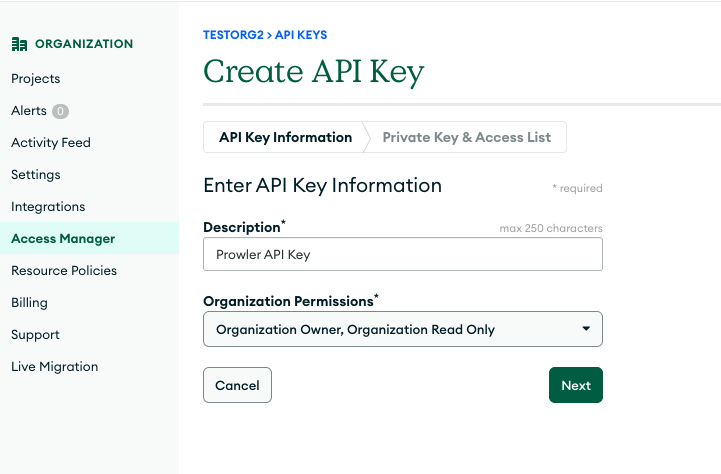
Create API Key: Click "Create API Key" and provide a description
-
Set Permissions: Project permissions are recommended for security, you can modify them after creating the key

-
Save Credentials: Note the public key and private key and store them securely

-
Add IP Access List: Add the IP where you are running Prowler to the IP Access List of the API Key. If you want to skip this step and use your API key in all type of IP addresses you need to uncheck the
Require IP Access List for the Atlas Administration APIbutton on the Organization Settings, but this is not recommended.


Basic Usage
Scan All Projects and Clusters
After storing your API keys, you can run Prowler with the following command:
prowler mongodbatlas --atlas-public-key <key> --atlas-private-key <secret>
Also, you can set your API keys as environment variables:
export ATLAS_PUBLIC_KEY=<key>
export ATLAS_PRIVATE_KEY=<secret>
And then just run Prowler with the following command:
prowler mongodbatlas
Scanning a Specific Project
If you want to scan a specific project, you can use the following argument added to the command above:
prowler mongodbatlas --atlas-project-id <project-id>
Needed Permissions
MongoDB Atlas API keys require appropriate permissions to perform security checks:
- Organization Read Only: Provides read-only access to everything in the organization, including all projects in the organization.
- If you want to be able to audit the Auditing configuration for the project, Organization Owner is needed.
Also, it's important to note that the IP where you are running Prowler must be added to the IP Access List of the MongoDB Atlas organization API key. If you want to skip this step and use your API key in all type of IP addresses you need to uncheck the Require IP Access List for the Atlas Administration API button on the Organization Settings, that setting is enabled by default.
???+ warning
If you want the check organizations_api_access_list_required to pass you will need to enable the API access list for the organization, so to make sure that your API Key is working you need to add your IP to the IP Access List of the organization. If you are running the check from Prowler Cloud, you will need to add our IP to the IP Access List.
