mirror of
https://github.com/prowler-cloud/prowler.git
synced 2026-05-16 09:12:47 +00:00
Compare commits
53 Commits
| Author | SHA1 | Date | |
|---|---|---|---|
 Kay Agahd Kay Agahd
|
6dee12450e | ||
|
Kay Agahd
|
eecb1dd8c3 | ||
|
Nacho Rivera
|
74add0c151 | ||
|
Pepe Fagoaga
|
1cf86350bc | ||
|
Sergio Garcia
|
e9b09790da | ||
|
Acknosyn
|
c74b4adf27 | ||
|
Kay Agahd
|
a769bb86d3 | ||
|
Nacho Rivera
|
f8a2527429 | ||
|
laura franzese
|
ae645718ad | ||
|
Nacho Rivera
|
a0625dff2f | ||
|
Fennerr
|
37e9cbbabd | ||
|
Pepe Fagoaga
|
8818f47333 | ||
|
Pepe Fagoaga
|
3cffe72273 | ||
|
Nacho Rivera
|
135aaca851 | ||
|
Nacho Rivera
|
cf8df051de | ||
|
Pepe Fagoaga
|
bef42f3f2d | ||
|
Nacho Rivera
|
3d86bf1705 | ||
|
Olivier Gendron
|
5a43ec951a | ||
|
Nacho Rivera
|
b0e6ab6e31 | ||
|
Nacho Rivera
|
b7fb38cc9e | ||
|
Nacho Rivera
|
f29f7fc239 | ||
|
Nacho Rivera
|
2997ff0f1c | ||
|
Nacho Rivera
|
11dc0aa5b2 | ||
|
Sergio Garcia
|
8bddb9b265 | ||
|
Sergio Garcia
|
689e292585 | ||
|
Sergio Garcia
|
bff2aabda6 | ||
|
Kay Agahd
|
4b29293362 | ||
|
Sergio Garcia
|
4e24103dc6 | ||
|
Sergio Garcia
|
3b90347849 | ||
|
Pepe Fagoaga
|
6a7a037cec | ||
|
Gábor Lipták
|
927c13b9c6 | ||
|
Nacho Rivera
|
11cc8e998b | ||
|
Nacho Rivera
|
4a71739c56 | ||
|
Pepe Fagoaga
|
aedc5cd0ad | ||
|
Pepe Fagoaga
|
3d81307e56 | ||
|
Andrew Walker
|
918661bd7a | ||
|
Nacho Rivera
|
99f9abe3f6 | ||
|
Sergio Garcia
|
f2950764f0 | ||
|
Pepe Fagoaga
|
d9777a68c7 | ||
|
Richard Carpenter
|
2a4cc9a5f8 | ||
|
Ignacio Dominguez
|
1f0c210926 | ||
|
JArmandoG
|
dd64c7d226 | ||
|
JArmandoG
|
865f79f5b3 | ||
|
Pepe Fagoaga
|
1f8a4c1022 | ||
|
Pepe Fagoaga
|
1e422f20aa | ||
|
Pepe Fagoaga
|
29eda28bf3 | ||
|
Pepe Fagoaga
|
f67f0cc66d | ||
|
Pepe Fagoaga
|
721cafa0cd | ||
|
Kay Agahd
|
c1d60054e9 | ||
|
Pepe Fagoaga
|
b95b3f68d3 | ||
|
Jonathan Jenkyn
|
81b6e27eb8 | ||
|
William
|
d69678424b | ||
|
Pepe Fagoaga
|
a43c1aceec |
@@ -0,0 +1,5 @@
|
||||
blank_issues_enabled: false
|
||||
contact_links:
|
||||
- name: Questions & Help
|
||||
url: https://github.com/prowler-cloud/prowler/discussions/categories/q-a
|
||||
about: Please ask and answer questions here.
|
||||
@@ -7,15 +7,17 @@ on:
|
||||
paths-ignore:
|
||||
- '.github/**'
|
||||
- 'README.md'
|
||||
|
||||
|
||||
release:
|
||||
types: [published, edited]
|
||||
|
||||
env:
|
||||
AWS_REGION_STG: eu-west-1
|
||||
AWS_REGION_PLATFORM: eu-west-1
|
||||
AWS_REGION_PRO: us-east-1
|
||||
IMAGE_NAME: prowler
|
||||
LATEST_TAG: latest
|
||||
STABLE_TAG: stable
|
||||
TEMPORARY_TAG: temporary
|
||||
DOCKERFILE_PATH: ./Dockerfile
|
||||
|
||||
@@ -145,25 +147,25 @@ jobs:
|
||||
with:
|
||||
registry: ${{ secrets.STG_ECR }}
|
||||
-
|
||||
name: Configure AWS Credentials -- PRO
|
||||
name: Configure AWS Credentials -- PLATFORM
|
||||
if: github.event_name == 'release'
|
||||
uses: aws-actions/configure-aws-credentials@v1
|
||||
with:
|
||||
aws-region: ${{ env.AWS_REGION_PRO }}
|
||||
role-to-assume: ${{ secrets.PRO_IAM_ROLE_ARN }}
|
||||
aws-region: ${{ env.AWS_REGION_PLATFORM }}
|
||||
role-to-assume: ${{ secrets.STG_IAM_ROLE_ARN }}
|
||||
role-session-name: build-lint-containers-pro
|
||||
-
|
||||
name: Login to ECR -- PRO
|
||||
name: Login to ECR -- PLATFORM
|
||||
if: github.event_name == 'release'
|
||||
uses: docker/login-action@v2
|
||||
with:
|
||||
registry: ${{ secrets.PRO_ECR }}
|
||||
registry: ${{ secrets.PLATFORM_ECR }}
|
||||
-
|
||||
# Push to master branch - push "latest" tag
|
||||
name: Tag (latest)
|
||||
if: github.event_name == 'push'
|
||||
run: |
|
||||
docker tag ${{ env.IMAGE_NAME }}:${{ env.TEMPORARY_TAG }} ${{ secrets.STG_ECR }}/${{ secrets.STG_ECR_REPOSITORY }}:${{ env.LATEST_TAG }}
|
||||
docker tag ${{ env.IMAGE_NAME }}:${{ env.TEMPORARY_TAG }} ${{ secrets.PLATFORM_ECR }}/${{ secrets.PLATFORM_ECR_REPOSITORY }}:${{ env.LATEST_TAG }}
|
||||
docker tag ${{ env.IMAGE_NAME }}:${{ env.TEMPORARY_TAG }} ${{ secrets.DOCKER_HUB_REPOSITORY }}/${{ env.IMAGE_NAME }}:${{ env.LATEST_TAG }}
|
||||
docker tag ${{ env.IMAGE_NAME }}:${{ env.TEMPORARY_TAG }} ${{ secrets.PUBLIC_ECR_REPOSITORY }}/${{ env.IMAGE_NAME }}:${{ env.LATEST_TAG }}
|
||||
-
|
||||
@@ -171,25 +173,34 @@ jobs:
|
||||
name: Push (latest)
|
||||
if: github.event_name == 'push'
|
||||
run: |
|
||||
docker push ${{ secrets.STG_ECR }}/${{ secrets.STG_ECR_REPOSITORY }}:${{ env.LATEST_TAG }}
|
||||
docker push ${{ secrets.PLATFORM_ECR }}/${{ secrets.PLATFORM_ECR_REPOSITORY }}:${{ env.LATEST_TAG }}
|
||||
docker push ${{ secrets.DOCKER_HUB_REPOSITORY }}/${{ env.IMAGE_NAME }}:${{ env.LATEST_TAG }}
|
||||
docker push ${{ secrets.PUBLIC_ECR_REPOSITORY }}/${{ env.IMAGE_NAME }}:${{ env.LATEST_TAG }}
|
||||
-
|
||||
# Push the new release
|
||||
# Tag the new release (stable and release tag)
|
||||
name: Tag (release)
|
||||
if: github.event_name == 'release'
|
||||
run: |
|
||||
docker tag ${{ env.IMAGE_NAME }}:${{ env.TEMPORARY_TAG }} ${{ secrets.PRO_ECR }}/${{ secrets.PRO_ECR_REPOSITORY }}:${{ github.event.release.tag_name }}
|
||||
docker tag ${{ env.IMAGE_NAME }}:${{ env.TEMPORARY_TAG }} ${{ secrets.PLATFORM_ECR }}/${{ secrets.PLATFORM_ECR_REPOSITORY }}:${{ github.event.release.tag_name }}
|
||||
docker tag ${{ env.IMAGE_NAME }}:${{ env.TEMPORARY_TAG }} ${{ secrets.DOCKER_HUB_REPOSITORY }}/${{ env.IMAGE_NAME }}:${{ github.event.release.tag_name }}
|
||||
docker tag ${{ env.IMAGE_NAME }}:${{ env.TEMPORARY_TAG }} ${{ secrets.PUBLIC_ECR_REPOSITORY }}/${{ env.IMAGE_NAME }}:${{ github.event.release.tag_name }}
|
||||
|
||||
docker tag ${{ env.IMAGE_NAME }}:${{ env.TEMPORARY_TAG }} ${{ secrets.PLATFORM_ECR }}/${{ secrets.PLATFORM_ECR_REPOSITORY }}:${{ env.STABLE_TAG }}
|
||||
docker tag ${{ env.IMAGE_NAME }}:${{ env.TEMPORARY_TAG }} ${{ secrets.DOCKER_HUB_REPOSITORY }}/${{ env.IMAGE_NAME }}:${{ env.STABLE_TAG }}
|
||||
docker tag ${{ env.IMAGE_NAME }}:${{ env.TEMPORARY_TAG }} ${{ secrets.PUBLIC_ECR_REPOSITORY }}/${{ env.IMAGE_NAME }}:${{ env.STABLE_TAG }}
|
||||
|
||||
-
|
||||
# Push the new release
|
||||
# Push the new release (stable and release tag)
|
||||
name: Push (release)
|
||||
if: github.event_name == 'release'
|
||||
run: |
|
||||
docker push ${{ secrets.PRO_ECR }}/${{ secrets.PRO_ECR_REPOSITORY }}:${{ github.event.release.tag_name }}
|
||||
docker push ${{ secrets.PLATFORM_ECR }}/${{ secrets.PLATFORM_ECR_REPOSITORY }}:${{ github.event.release.tag_name }}
|
||||
docker push ${{ secrets.DOCKER_HUB_REPOSITORY }}/${{ env.IMAGE_NAME }}:${{ github.event.release.tag_name }}
|
||||
docker push ${{ secrets.PUBLIC_ECR_REPOSITORY }}/${{ env.IMAGE_NAME }}:${{ github.event.release.tag_name }}
|
||||
|
||||
docker push ${{ secrets.PLATFORM_ECR }}/${{ secrets.PLATFORM_ECR_REPOSITORY }}:${{ env.STABLE_TAG }}
|
||||
docker push ${{ secrets.DOCKER_HUB_REPOSITORY }}/${{ env.IMAGE_NAME }}:${{ env.STABLE_TAG }}
|
||||
docker push ${{ secrets.PUBLIC_ECR_REPOSITORY }}/${{ env.IMAGE_NAME }}:${{ env.STABLE_TAG }}
|
||||
-
|
||||
name: Delete artifacts
|
||||
if: always()
|
||||
|
||||
@@ -11,7 +11,7 @@ jobs:
|
||||
with:
|
||||
fetch-depth: 0
|
||||
- name: TruffleHog OSS
|
||||
uses: trufflesecurity/trufflehog@v3.4.4
|
||||
uses: trufflesecurity/trufflehog@v3.13.0
|
||||
with:
|
||||
path: ./
|
||||
base: ${{ github.event.repository.default_branch }}
|
||||
|
||||
@@ -0,0 +1,41 @@
|
||||
name: Lint & Test
|
||||
|
||||
on:
|
||||
push:
|
||||
branches:
|
||||
- 'prowler-3.0-dev'
|
||||
pull_request:
|
||||
branches:
|
||||
- 'prowler-3.0-dev'
|
||||
|
||||
jobs:
|
||||
build:
|
||||
|
||||
runs-on: ubuntu-latest
|
||||
strategy:
|
||||
matrix:
|
||||
python-version: ["3.9"]
|
||||
|
||||
steps:
|
||||
- uses: actions/checkout@v3
|
||||
- name: Set up Python ${{ matrix.python-version }}
|
||||
uses: actions/setup-python@v4
|
||||
with:
|
||||
python-version: ${{ matrix.python-version }}
|
||||
- name: Install dependencies
|
||||
run: |
|
||||
python -m pip install --upgrade pip
|
||||
pip install pipenv
|
||||
pipenv install
|
||||
- name: Bandit
|
||||
run: |
|
||||
pipenv run bandit -q -lll -x '*_test.py,./contrib/' -r .
|
||||
- name: Safety
|
||||
run: |
|
||||
pipenv run safety check
|
||||
- name: Vulture
|
||||
run: |
|
||||
pipenv run vulture --exclude "contrib" --min-confidence 100 .
|
||||
- name: Test with pytest
|
||||
run: |
|
||||
pipenv run pytest -n auto
|
||||
+1
-1
@@ -1,5 +1,5 @@
|
||||
# Build command
|
||||
# docker build --platform=linux/amd64 --no-cache -t prowler:latest -f util/Dockerfile .
|
||||
# docker build --platform=linux/amd64 --no-cache -t prowler:latest -f ./Dockerfile .
|
||||
|
||||
# hadolint ignore=DL3007
|
||||
FROM public.ecr.aws/amazonlinux/amazonlinux:latest
|
||||
|
||||
@@ -3,14 +3,14 @@
|
||||
<img align="center" src="docs/images/prowler-pro-light.png#gh-light-mode-only" width="15%" height="15%">
|
||||
</p>
|
||||
<p align="center">
|
||||
<b><i>   Explore the Pro version of Prowler at <a href="https://prowler.pro">prowler.pro</a></i></b>
|
||||
<b><i>    See all the things you and your team can do with ProwlerPro at <a href="https://prowler.pro">prowler.pro</a></i></b>
|
||||
</p>
|
||||
<hr>
|
||||
<p align="center">
|
||||
<img src="https://user-images.githubusercontent.com/3985464/113734260-7ba06900-96fb-11eb-82bc-d4f68a1e2710.png" />
|
||||
</p>
|
||||
<p align="center">
|
||||
<a href="https://discord.gg/UjSMCVnxSB"><img alt="Discord Shield" src="https://img.shields.io/discord/807208614288818196"></a>
|
||||
<a href="https://join.slack.com/t/prowler-workspace/shared_invite/zt-1hix76xsl-2uq222JIXrC7Q8It~9ZNog"><img alt="Slack Shield" src="https://img.shields.io/badge/slack-prowler-brightgreen.svg?logo=slack"></a>
|
||||
<a href="https://hub.docker.com/r/toniblyx/prowler"><img alt="Docker Pulls" src="https://img.shields.io/docker/pulls/toniblyx/prowler"></a>
|
||||
<a href="https://hub.docker.com/r/toniblyx/prowler"><img alt="Docker" src="https://img.shields.io/docker/cloud/build/toniblyx/prowler"></a>
|
||||
<a href="https://hub.docker.com/r/toniblyx/prowler"><img alt="Docker" src="https://img.shields.io/docker/image-size/toniblyx/prowler"></a>
|
||||
@@ -32,6 +32,7 @@
|
||||
## Table of Contents
|
||||
|
||||
- [Description](#description)
|
||||
- [Prowler Container Versions](#prowler-container-versions)
|
||||
- [Features](#features)
|
||||
- [High level architecture](#high-level-architecture)
|
||||
- [Requirements and Installation](#requirements-and-installation)
|
||||
@@ -63,17 +64,28 @@ It follows guidelines of the CIS Amazon Web Services Foundations Benchmark (49 c
|
||||
|
||||
Read more about [CIS Amazon Web Services Foundations Benchmark v1.2.0 - 05-23-2018](https://d0.awsstatic.com/whitepapers/compliance/AWS_CIS_Foundations_Benchmark.pdf)
|
||||
|
||||
## Prowler container versions
|
||||
|
||||
The available versions of Prowler are the following:
|
||||
- latest: in sync with master branch (bear in mind that it is not a stable version)
|
||||
- <x.y.z> (release): you can find the releases [here](https://github.com/prowler-cloud/prowler/releases), those are stable releases.
|
||||
- stable: this tag always point to the latest release.
|
||||
|
||||
The container images are available here:
|
||||
- [DockerHub](https://hub.docker.com/r/toniblyx/prowler/tags)
|
||||
- [AWS Public ECR](https://gallery.ecr.aws/o4g1s5r6/prowler)
|
||||
|
||||
## Features
|
||||
|
||||
+240 checks covering security best practices across all AWS regions and most of AWS services and related to the next groups:
|
||||
|
||||
- Identity and Access Management [group1]
|
||||
- Logging [group2]
|
||||
- Logging [group2]
|
||||
- Monitoring [group3]
|
||||
- Networking [group4]
|
||||
- CIS Level 1 [cislevel1]
|
||||
- CIS Level 2 [cislevel2]
|
||||
- Extras *see Extras section* [extras]
|
||||
- Extras _see Extras section_ [extras]
|
||||
- Forensics related group of checks [forensics-ready]
|
||||
- GDPR [gdpr] Read more [here](#gdpr-checks)
|
||||
- HIPAA [hipaa] Read more [here](#hipaa-checks)
|
||||
@@ -88,7 +100,7 @@ With Prowler you can:
|
||||
|
||||
- Get a direct colorful or monochrome report
|
||||
- A HTML, CSV, JUNIT, JSON or JSON ASFF (Security Hub) format report
|
||||
- Send findings directly to Security Hub
|
||||
- Send findings directly to the Security Hub
|
||||
- Run specific checks and groups or create your own
|
||||
- Check multiple AWS accounts in parallel or sequentially
|
||||
- Get an inventory of your AWS resources
|
||||
@@ -99,6 +111,7 @@ With Prowler you can:
|
||||
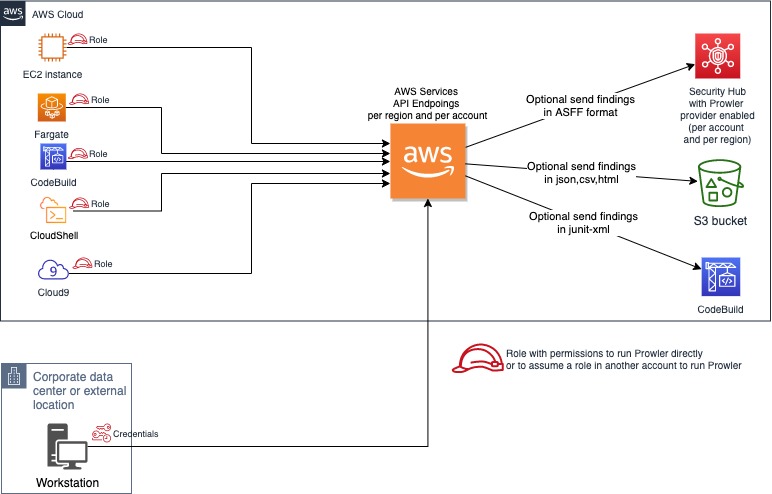
You can run Prowler from your workstation, an EC2 instance, Fargate or any other container, Codebuild, CloudShell and Cloud9.
|
||||
|
||||
|
||||
|
||||
## Requirements and Installation
|
||||
|
||||
Prowler has been written in bash using AWS-CLI underneath and it works in Linux, Mac OS or Windows with cygwin or virtualization. Also requires `jq` and `detect-secrets` to work properly.
|
||||
@@ -106,134 +119,137 @@ Prowler has been written in bash using AWS-CLI underneath and it works in Linux,
|
||||
- Make sure the latest version of AWS-CLI is installed. It works with either v1 or v2, however _latest v2 is recommended if using new regions since they require STS v2 token_, and other components needed, with Python pip already installed.
|
||||
|
||||
- For Amazon Linux (`yum` based Linux distributions and AWS CLI v2):
|
||||
```
|
||||
sudo yum update -y
|
||||
sudo yum remove -y awscli
|
||||
curl "https://awscli.amazonaws.com/awscli-exe-linux-x86_64.zip" -o "awscliv2.zip"
|
||||
unzip awscliv2.zip
|
||||
sudo ./aws/install
|
||||
sudo yum install -y python3 jq git
|
||||
sudo pip3 install detect-secrets==1.0.3
|
||||
git clone https://github.com/prowler-cloud/prowler
|
||||
```
|
||||
```
|
||||
sudo yum update -y
|
||||
sudo yum remove -y awscli
|
||||
curl "https://awscli.amazonaws.com/awscli-exe-linux-x86_64.zip" -o "awscliv2.zip"
|
||||
unzip awscliv2.zip
|
||||
sudo ./aws/install
|
||||
sudo yum install -y python3 jq git
|
||||
sudo pip3 install detect-secrets==1.0.3
|
||||
git clone https://github.com/prowler-cloud/prowler
|
||||
```
|
||||
- For Ubuntu Linux (`apt` based Linux distributions and AWS CLI v2):
|
||||
```
|
||||
sudo apt update
|
||||
sudo apt install python3 python3-pip jq git zip
|
||||
pip install detect-secrets==1.0.3
|
||||
curl "https://awscli.amazonaws.com/awscli-exe-linux-x86_64.zip" -o "awscliv2.zip"
|
||||
unzip awscliv2.zip
|
||||
sudo ./aws/install
|
||||
git clone https://github.com/prowler-cloud/prowler
|
||||
```
|
||||
|
||||
> NOTE: detect-secrets Yelp version is no longer supported, the one from IBM is mantained now. Use the one mentioned below or the specific Yelp version 1.0.3 to make sure it works as expected (`pip install detect-secrets==1.0.3`):
|
||||
```sh
|
||||
pip install "git+https://github.com/ibm/detect-secrets.git@master#egg=detect-secrets"
|
||||
```
|
||||
```
|
||||
sudo apt update
|
||||
sudo apt install python3 python3-pip jq git zip
|
||||
pip install detect-secrets==1.0.3
|
||||
curl "https://awscli.amazonaws.com/awscli-exe-linux-x86_64.zip" -o "awscliv2.zip"
|
||||
unzip awscliv2.zip
|
||||
sudo ./aws/install
|
||||
git clone https://github.com/prowler-cloud/prowler
|
||||
```
|
||||
|
||||
AWS-CLI can be also installed it using other methods, refer to official documentation for more details: <https://aws.amazon.com/cli/>, but `detect-secrets` has to be installed using `pip` or `pip3`.
|
||||
> NOTE: detect-secrets Yelp version is no longer supported, the one from IBM is mantained now. Use the one mentioned below or the specific Yelp version 1.0.3 to make sure it works as expected (`pip install detect-secrets==1.0.3`):
|
||||
|
||||
```sh
|
||||
pip install "git+https://github.com/ibm/detect-secrets.git@master#egg=detect-secrets"
|
||||
```
|
||||
|
||||
AWS-CLI can be also installed it using other methods, refer to official documentation for more details: <https://aws.amazon.com/cli/>, but `detect-secrets` has to be installed using `pip` or `pip3`.
|
||||
|
||||
- Once Prowler repository is cloned, get into the folder and you can run it:
|
||||
|
||||
```sh
|
||||
cd prowler
|
||||
./prowler
|
||||
```
|
||||
```sh
|
||||
cd prowler
|
||||
./prowler
|
||||
```
|
||||
|
||||
- Since Prowler users AWS CLI under the hood, you can follow any authentication method as described [here](https://docs.aws.amazon.com/cli/latest/userguide/cli-configure-quickstart.html#cli-configure-quickstart-precedence). Make sure you have properly configured your AWS-CLI with a valid Access Key and Region or declare AWS variables properly (or instance profile/role):
|
||||
|
||||
```sh
|
||||
aws configure
|
||||
```
|
||||
```sh
|
||||
aws configure
|
||||
```
|
||||
|
||||
or
|
||||
or
|
||||
|
||||
```sh
|
||||
export AWS_ACCESS_KEY_ID="ASXXXXXXX"
|
||||
export AWS_SECRET_ACCESS_KEY="XXXXXXXXX"
|
||||
export AWS_SESSION_TOKEN="XXXXXXXXX"
|
||||
```
|
||||
```sh
|
||||
export AWS_ACCESS_KEY_ID="ASXXXXXXX"
|
||||
export AWS_SECRET_ACCESS_KEY="XXXXXXXXX"
|
||||
export AWS_SESSION_TOKEN="XXXXXXXXX"
|
||||
```
|
||||
|
||||
- Those credentials must be associated to a user or role with proper permissions to do all checks. To make sure, add the AWS managed policies, SecurityAudit and ViewOnlyAccess, to the user or role being used. Policy ARNs are:
|
||||
- Those credentials must be associated to a user or role with proper permissions to do all checks. To make sure, add the AWS managed policies, SecurityAudit and ViewOnlyAccess, to the user or role being used. Policy ARNs are:
|
||||
|
||||
```sh
|
||||
arn:aws:iam::aws:policy/SecurityAudit
|
||||
arn:aws:iam::aws:policy/job-function/ViewOnlyAccess
|
||||
```
|
||||
```sh
|
||||
arn:aws:iam::aws:policy/SecurityAudit
|
||||
arn:aws:iam::aws:policy/job-function/ViewOnlyAccess
|
||||
```
|
||||
|
||||
> Additional permissions needed: to make sure Prowler can scan all services included in the group *Extras*, make sure you attach also the custom policy [prowler-additions-policy.json](https://github.com/prowler-cloud/prowler/blob/master/iam/prowler-additions-policy.json) to the role you are using. If you want Prowler to send findings to [AWS Security Hub](https://aws.amazon.com/security-hub), make sure you also attach the custom policy [prowler-security-hub.json](https://github.com/prowler-cloud/prowler/blob/master/iam/prowler-security-hub.json).
|
||||
> Additional permissions needed: to make sure Prowler can scan all services included in the group _Extras_, make sure you attach also the custom policy [prowler-additions-policy.json](https://github.com/prowler-cloud/prowler/blob/master/iam/prowler-additions-policy.json) to the role you are using. If you want Prowler to send findings to [AWS Security Hub](https://aws.amazon.com/security-hub), make sure you also attach the custom policy [prowler-security-hub.json](https://github.com/prowler-cloud/prowler/blob/master/iam/prowler-security-hub.json).
|
||||
|
||||
## Usage
|
||||
|
||||
1. Run the `prowler` command without options (it will use your environment variable credentials if they exist or will default to using the `~/.aws/credentials` file and run checks over all regions when needed. The default region is us-east-1):
|
||||
|
||||
```sh
|
||||
./prowler
|
||||
```
|
||||
```sh
|
||||
./prowler
|
||||
```
|
||||
|
||||
Use `-l` to list all available checks and the groups (sections) that reference them. To list all groups use `-L` and to list content of a group use `-l -g <groupname>`.
|
||||
Use `-l` to list all available checks and the groups (sections) that reference them. To list all groups use `-L` and to list content of a group use `-l -g <groupname>`.
|
||||
|
||||
If you want to avoid installing dependencies run it using Docker:
|
||||
If you want to avoid installing dependencies run it using Docker:
|
||||
|
||||
```sh
|
||||
docker run -ti --rm --name prowler --env AWS_ACCESS_KEY_ID --env AWS_SECRET_ACCESS_KEY --env AWS_SESSION_TOKEN toniblyx/prowler:latest
|
||||
```
|
||||
```sh
|
||||
docker run -ti --rm --name prowler --env AWS_ACCESS_KEY_ID --env AWS_SECRET_ACCESS_KEY --env AWS_SESSION_TOKEN toniblyx/prowler:latest
|
||||
```
|
||||
|
||||
In case you want to get reports created by Prowler use docker volume option like in the example below:
|
||||
```sh
|
||||
docker run -ti --rm -v /your/local/output:/prowler/output --name prowler --env AWS_ACCESS_KEY_ID --env AWS_SECRET_ACCESS_KEY --env AWS_SESSION_TOKEN toniblyx/prowler:latest -g hipaa -M csv,json,html
|
||||
```
|
||||
In case you want to get reports created by Prowler use docker volume option like in the example below:
|
||||
|
||||
```sh
|
||||
docker run -ti --rm -v /your/local/output:/prowler/output --name prowler --env AWS_ACCESS_KEY_ID --env AWS_SECRET_ACCESS_KEY --env AWS_SESSION_TOKEN toniblyx/prowler:latest -g hipaa -M csv,json,html
|
||||
```
|
||||
|
||||
1. For custom AWS-CLI profile and region, use the following: (it will use your custom profile and run checks over all regions when needed):
|
||||
|
||||
```sh
|
||||
./prowler -p custom-profile -r us-east-1
|
||||
```
|
||||
```sh
|
||||
./prowler -p custom-profile -r us-east-1
|
||||
```
|
||||
|
||||
1. For a single check use option `-c`:
|
||||
|
||||
```sh
|
||||
./prowler -c check310
|
||||
```
|
||||
```sh
|
||||
./prowler -c check310
|
||||
```
|
||||
|
||||
With Docker:
|
||||
With Docker:
|
||||
|
||||
```sh
|
||||
docker run -ti --rm --name prowler --env AWS_ACCESS_KEY_ID --env AWS_SECRET_ACCESS_KEY --env AWS_SESSION_TOKEN toniblyx/prowler:latest "-c check310"
|
||||
```
|
||||
```sh
|
||||
docker run -ti --rm --name prowler --env AWS_ACCESS_KEY_ID --env AWS_SECRET_ACCESS_KEY --env AWS_SESSION_TOKEN toniblyx/prowler:latest "-c check310"
|
||||
```
|
||||
|
||||
or multiple checks separated by comma:
|
||||
or multiple checks separated by comma:
|
||||
|
||||
```sh
|
||||
./prowler -c check310,check722
|
||||
```
|
||||
```sh
|
||||
./prowler -c check310,check722
|
||||
```
|
||||
|
||||
or all checks but some of them:
|
||||
or all checks but some of them:
|
||||
|
||||
```sh
|
||||
./prowler -E check42,check43
|
||||
```
|
||||
```sh
|
||||
./prowler -E check42,check43
|
||||
```
|
||||
|
||||
or for custom profile and region:
|
||||
or for custom profile and region:
|
||||
|
||||
```sh
|
||||
./prowler -p custom-profile -r us-east-1 -c check11
|
||||
```
|
||||
```sh
|
||||
./prowler -p custom-profile -r us-east-1 -c check11
|
||||
```
|
||||
|
||||
or for a group of checks use group name:
|
||||
or for a group of checks use group name:
|
||||
|
||||
```sh
|
||||
./prowler -g group1 # for iam related checks
|
||||
```
|
||||
```sh
|
||||
./prowler -g group1 # for iam related checks
|
||||
```
|
||||
|
||||
or exclude some checks in the group:
|
||||
or exclude some checks in the group:
|
||||
|
||||
```sh
|
||||
./prowler -g group4 -E check42,check43
|
||||
```
|
||||
```sh
|
||||
./prowler -g group4 -E check42,check43
|
||||
```
|
||||
|
||||
Valid check numbers are based on the AWS CIS Benchmark guide, so 1.1 is check11 and 3.10 is check310
|
||||
Valid check numbers are based on the AWS CIS Benchmark guide, so 1.1 is check11 and 3.10 is check310
|
||||
|
||||
### Regions
|
||||
|
||||
@@ -263,135 +279,254 @@ Prowler has two parameters related to regions: `-r` that is used query AWS servi
|
||||
|
||||
1. If you want to save your report for later analysis thare are different ways, natively (supported text, mono, csv, json, json-asff, junit-xml and html, see note below for more info):
|
||||
|
||||
```sh
|
||||
./prowler -M csv
|
||||
```
|
||||
```sh
|
||||
./prowler -M csv
|
||||
```
|
||||
|
||||
or with multiple formats at the same time:
|
||||
or with multiple formats at the same time:
|
||||
|
||||
```sh
|
||||
./prowler -M csv,json,json-asff,html
|
||||
```
|
||||
```sh
|
||||
./prowler -M csv,json,json-asff,html
|
||||
```
|
||||
|
||||
or just a group of checks in multiple formats:
|
||||
or just a group of checks in multiple formats:
|
||||
|
||||
```sh
|
||||
./prowler -g gdpr -M csv,json,json-asff
|
||||
```
|
||||
```sh
|
||||
./prowler -g gdpr -M csv,json,json-asff
|
||||
```
|
||||
|
||||
or if you want a sorted and dynamic HTML report do:
|
||||
or if you want a sorted and dynamic HTML report do:
|
||||
|
||||
```sh
|
||||
./prowler -M html
|
||||
```
|
||||
```sh
|
||||
./prowler -M html
|
||||
```
|
||||
|
||||
Now `-M` creates a file inside the prowler `output` directory named `prowler-output-AWSACCOUNTID-YYYYMMDDHHMMSS.format`. You don't have to specify anything else, no pipes, no redirects.
|
||||
Now `-M` creates a file inside the prowler `output` directory named `prowler-output-AWSACCOUNTID-YYYYMMDDHHMMSS.format`. You don't have to specify anything else, no pipes, no redirects.
|
||||
|
||||
or just saving the output to a file like below:
|
||||
or just saving the output to a file like below:
|
||||
|
||||
```sh
|
||||
./prowler -M mono > prowler-report.txt
|
||||
```
|
||||
```sh
|
||||
./prowler -M mono > prowler-report.txt
|
||||
```
|
||||
|
||||
To generate JUnit report files, include the junit-xml format. This can be combined with any other format. Files are written inside a prowler root directory named `junit-reports`:
|
||||
To generate JUnit report files, include the junit-xml format. This can be combined with any other format. Files are written inside a prowler root directory named `junit-reports`:
|
||||
|
||||
```sh
|
||||
./prowler -M text,junit-xml
|
||||
```
|
||||
```sh
|
||||
./prowler -M text,junit-xml
|
||||
```
|
||||
|
||||
>Note about output formats to use with `-M`: "text" is the default one with colors, "mono" is like default one but monochrome, "csv" is comma separated values, "json" plain basic json (without comma between lines) and "json-asff" is also json with Amazon Security Finding Format that you can ship to Security Hub using `-S`.
|
||||
> Note about output formats to use with `-M`: "text" is the default one with colors, "mono" is like default one but monochrome, "csv" is comma separated values, "json" plain basic json (without comma between lines) and "json-asff" is also json with Amazon Security Finding Format that you can ship to Security Hub using `-S`.
|
||||
|
||||
To save your report in an S3 bucket, use `-B` to define a custom output bucket along with `-M` to define the output format that is going to be uploaded to S3:
|
||||
To save your report in an S3 bucket, use `-B` to define a custom output bucket along with `-M` to define the output format that is going to be uploaded to S3:
|
||||
|
||||
```sh
|
||||
./prowler -M csv -B my-bucket/folder/
|
||||
```
|
||||
>In the case you do not want to use the assumed role credentials but the initial credentials to put the reports into the S3 bucket, use `-D` instead of `-B`. Make sure that the used credentials have s3:PutObject permissions in the S3 path where the reports are going to be uploaded.
|
||||
```sh
|
||||
./prowler -M csv -B my-bucket/folder/
|
||||
```
|
||||
|
||||
When generating multiple formats and running using Docker, to retrieve the reports, bind a local directory to the container, e.g.:
|
||||
> In the case you do not want to use the assumed role credentials but the initial credentials to put the reports into the S3 bucket, use `-D` instead of `-B`. Make sure that the used credentials have s3:PutObject permissions in the S3 path where the reports are going to be uploaded.
|
||||
|
||||
```sh
|
||||
docker run -ti --rm --name prowler --volume "$(pwd)":/prowler/output --env AWS_ACCESS_KEY_ID --env AWS_SECRET_ACCESS_KEY --env AWS_SESSION_TOKEN toniblyx/prowler:latest -M csv,json
|
||||
```
|
||||
When generating multiple formats and running using Docker, to retrieve the reports, bind a local directory to the container, e.g.:
|
||||
|
||||
```sh
|
||||
docker run -ti --rm --name prowler --volume "$(pwd)":/prowler/output --env AWS_ACCESS_KEY_ID --env AWS_SECRET_ACCESS_KEY --env AWS_SESSION_TOKEN toniblyx/prowler:latest -M csv,json
|
||||
```
|
||||
|
||||
1. To perform an assessment based on CIS Profile Definitions you can use cislevel1 or cislevel2 with `-g` flag, more information about this [here, page 8](https://d0.awsstatic.com/whitepapers/compliance/AWS_CIS_Foundations_Benchmark.pdf):
|
||||
|
||||
```sh
|
||||
./prowler -g cislevel1
|
||||
```
|
||||
```sh
|
||||
./prowler -g cislevel1
|
||||
```
|
||||
|
||||
1. If you want to run Prowler to check multiple AWS accounts in parallel (runs up to 4 simultaneously `-P 4`) but you may want to read below in Advanced Usage section to do so assuming a role:
|
||||
|
||||
```sh
|
||||
grep -E '^\[([0-9A-Aa-z_-]+)\]' ~/.aws/credentials | tr -d '][' | shuf | \
|
||||
xargs -n 1 -L 1 -I @ -r -P 4 ./prowler -p @ -M csv 2> /dev/null >> all-accounts.csv
|
||||
```
|
||||
```sh
|
||||
grep -E '^\[([0-9A-Aa-z_-]+)\]' ~/.aws/credentials | tr -d '][' | shuf | \
|
||||
xargs -n 1 -L 1 -I @ -r -P 4 ./prowler -p @ -M csv 2> /dev/null >> all-accounts.csv
|
||||
```
|
||||
|
||||
1. For help about usage run:
|
||||
|
||||
```
|
||||
./prowler -h
|
||||
```
|
||||
```
|
||||
./prowler -h
|
||||
```
|
||||
|
||||
## Database providers connector
|
||||
|
||||
You can send the Prowler's output to different databases (right now only PostgreSQL is supported).
|
||||
|
||||
Jump into the section for the database provider you want to use and follow the required steps to configure it.
|
||||
|
||||
### PostgreSQL
|
||||
|
||||
Install psql
|
||||
|
||||
- Mac -> `brew install libpq`
|
||||
- Ubuntu -> `sudo apt-get install postgresql-client `
|
||||
- RHEL/Centos -> `sudo yum install postgresql10`
|
||||
|
||||
#### Audit ID Field
|
||||
|
||||
To use Prowler postgres connector it is needed to set the -u flag to include `audit_id` field into the query. This field helps to identify each audit that has been made in the database. This field needs to be an UUID V4 to match the table schema.
|
||||
For example:
|
||||
```
|
||||
./prowler -M csv -d postgresql -u e5a0f214-8bf9-4600-a0c3-ff659b30e6c0
|
||||
```
|
||||
|
||||
#### Credentials
|
||||
|
||||
There are two options to pass the PostgreSQL credentials to Prowler:
|
||||
|
||||
##### Using a .pgpass file
|
||||
|
||||
Configure a `~/.pgpass` file into the root folder of the user that is going to launch Prowler ([pgpass file doc](https://www.postgresql.org/docs/current/libpq-pgpass.html)), including an extra field at the end of the line, separated by `:`, to name the table, using the following format:
|
||||
`hostname:port:database:username:password:table`
|
||||
`hostname:port:database:username:password:table`
|
||||
|
||||
##### Using environment variables
|
||||
|
||||
- Configure the following environment variables:
|
||||
- `POSTGRES_HOST`
|
||||
- `POSTGRES_PORT`
|
||||
- `POSTGRES_USER`
|
||||
- `POSTGRES_PASSWORD`
|
||||
- `POSTGRES_DB`
|
||||
- `POSTGRES_TABLE`
|
||||
> *Note*: If you are using a schema different than postgres please include it at the beginning of the `POSTGRES_TABLE` variable, like: `export POSTGRES_TABLE=prowler.findings`
|
||||
- `POSTGRES_HOST`
|
||||
- `POSTGRES_PORT`
|
||||
- `POSTGRES_USER`
|
||||
- `POSTGRES_PASSWORD`
|
||||
- `POSTGRES_DB`
|
||||
- `POSTGRES_TABLE`
|
||||
> _Note_: If you are using a schema different than postgres please include it at the beginning of the `POSTGRES_TABLE` variable, like: `export POSTGRES_TABLE=prowler.findings`
|
||||
|
||||
Also you need to have enabled the `uuid` postgresql extension, to enable it:
|
||||
|
||||
`CREATE EXTENSION IF NOT EXISTS "uuid-ossp";`
|
||||
|
||||
Create a table in your PostgreSQL database to store the Prowler's data. You can use the following SQL statement to create the table:
|
||||
|
||||
```
|
||||
CREATE TABLE IF NOT EXISTS prowler_findings (
|
||||
profile TEXT,
|
||||
account_number TEXT,
|
||||
region TEXT,
|
||||
check_id TEXT,
|
||||
result TEXT,
|
||||
item_scored TEXT,
|
||||
item_level TEXT,
|
||||
check_title TEXT,
|
||||
result_extended TEXT,
|
||||
check_asff_compliance_type TEXT,
|
||||
severity TEXT,
|
||||
service_name TEXT,
|
||||
check_asff_resource_type TEXT,
|
||||
check_asff_type TEXT,
|
||||
risk TEXT,
|
||||
remediation TEXT,
|
||||
documentation TEXT,
|
||||
check_caf_epic TEXT,
|
||||
resource_id TEXT,
|
||||
prowler_start_time TEXT,
|
||||
account_details_email TEXT,
|
||||
account_details_name TEXT,
|
||||
account_details_arn TEXT,
|
||||
account_details_org TEXT,
|
||||
account_details_tags TEXT
|
||||
id uuid,
|
||||
audit_id uuid ,
|
||||
profile text,
|
||||
account_number text,
|
||||
region text,
|
||||
check_id text,
|
||||
result text,
|
||||
item_scored text,
|
||||
item_level text,
|
||||
check_title text,
|
||||
result_extended text,
|
||||
check_asff_compliance_type text,
|
||||
severity text,
|
||||
service_name text,
|
||||
check_asff_resource_type text,
|
||||
check_asff_type text,
|
||||
risk text,
|
||||
remediation text,
|
||||
documentation text,
|
||||
check_caf_epic text,
|
||||
resource_id text,
|
||||
account_details_email text,
|
||||
account_details_name text,
|
||||
account_details_arn text,
|
||||
account_details_org text,
|
||||
account_details_tags text,
|
||||
prowler_start_time text
|
||||
);
|
||||
```
|
||||
|
||||
- Execute Prowler with `-d` flag, for example:
|
||||
`./prowler -M csv -d postgresql`
|
||||
> *Note*: This command creates a `csv` output file and stores the Prowler output in the configured PostgreSQL DB. It's an example, `-d` flag **does not** require `-M` to run.
|
||||
`./prowler -M csv -d postgresql -u e5a0f214-8bf9-4600-a0c3-ff659b30e6c0`
|
||||
> _Note_: This command creates a `csv` output file and stores the Prowler output in the configured PostgreSQL DB. It's an example, `-d` flag **does not** require `-M` to run.
|
||||
|
||||
## Output Formats
|
||||
|
||||
Prowler supports natively the following output formats:
|
||||
|
||||
- CSV
|
||||
- JSON
|
||||
- JSON-ASFF
|
||||
- HTML
|
||||
- JUNIT-XML
|
||||
|
||||
Hereunder is the structure for each of them
|
||||
|
||||
### CSV
|
||||
|
||||
| PROFILE | ACCOUNT_NUM | REGION | TITLE_ID | CHECK_RESULT | ITEM_SCORED | ITEM_LEVEL | TITLE_TEXT | CHECK_RESULT_EXTENDED | CHECK_ASFF_COMPLIANCE_TYPE | CHECK_SEVERITY | CHECK_SERVICENAME | CHECK_ASFF_RESOURCE_TYPE | CHECK_ASFF_TYPE | CHECK_RISK | CHECK_REMEDIATION | CHECK_DOC | CHECK_CAF_EPIC | CHECK_RESOURCE_ID | PROWLER_START_TIME | ACCOUNT_DETAILS_EMAIL | ACCOUNT_DETAILS_NAME | ACCOUNT_DETAILS_ARN | ACCOUNT_DETAILS_ORG | ACCOUNT_DETAILS_TAGS |
|
||||
| ------- | ----------- | ------ | -------- | ------------ | ----------- | ---------- | ---------- | --------------------- | -------------------------- | -------------- | ----------------- | ------------------------ | --------------- | ---------- | ----------------- | --------- | -------------- | ----------------- | ------------------ | --------------------- | -------------------- | ------------------- | ------------------- | -------------------- |
|
||||
|
||||
### JSON
|
||||
|
||||
```
|
||||
{
|
||||
"Profile": "ENV",
|
||||
"Account Number": "1111111111111",
|
||||
"Control": "[check14] Ensure access keys are rotated every 90 days or less",
|
||||
"Message": "us-west-2: user has not rotated access key 2 in over 90 days",
|
||||
"Severity": "Medium",
|
||||
"Status": "FAIL",
|
||||
"Scored": "",
|
||||
"Level": "CIS Level 1",
|
||||
"Control ID": "1.4",
|
||||
"Region": "us-west-2",
|
||||
"Timestamp": "2022-05-18T10:33:48Z",
|
||||
"Compliance": "ens-op.acc.1.aws.iam.4 ens-op.acc.5.aws.iam.3",
|
||||
"Service": "iam",
|
||||
"CAF Epic": "IAM",
|
||||
"Risk": "Access keys consist of an access key ID and secret access key which are used to sign programmatic requests that you make to AWS. AWS users need their own access keys to make programmatic calls to AWS from the AWS Command Line Interface (AWS CLI)- Tools for Windows PowerShell- the AWS SDKs- or direct HTTP calls using the APIs for individual AWS services. It is recommended that all access keys be regularly rotated.",
|
||||
"Remediation": "Use the credential report to ensure access_key_X_last_rotated is less than 90 days ago.",
|
||||
"Doc link": "https://docs.aws.amazon.com/IAM/latest/UserGuide/id_credentials_getting-report.html",
|
||||
"Resource ID": "terraform-user",
|
||||
"Account Email": "",
|
||||
"Account Name": "",
|
||||
"Account ARN": "",
|
||||
"Account Organization": "",
|
||||
"Account tags": ""
|
||||
}
|
||||
```
|
||||
|
||||
> NOTE: Each finding is a `json` object.
|
||||
|
||||
### JSON-ASFF
|
||||
|
||||
```
|
||||
{
|
||||
"SchemaVersion": "2018-10-08",
|
||||
"Id": "prowler-1.4-1111111111111-us-west-2-us-west-2_user_has_not_rotated_access_key_2_in_over_90_days",
|
||||
"ProductArn": "arn:aws:securityhub:us-west-2::product/prowler/prowler",
|
||||
"RecordState": "ACTIVE",
|
||||
"ProductFields": {
|
||||
"ProviderName": "Prowler",
|
||||
"ProviderVersion": "2.9.0-13April2022",
|
||||
"ProwlerResourceName": "user"
|
||||
},
|
||||
"GeneratorId": "prowler-check14",
|
||||
"AwsAccountId": "1111111111111",
|
||||
"Types": [
|
||||
"ens-op.acc.1.aws.iam.4 ens-op.acc.5.aws.iam.3"
|
||||
],
|
||||
"FirstObservedAt": "2022-05-18T10:33:48Z",
|
||||
"UpdatedAt": "2022-05-18T10:33:48Z",
|
||||
"CreatedAt": "2022-05-18T10:33:48Z",
|
||||
"Severity": {
|
||||
"Label": "MEDIUM"
|
||||
},
|
||||
"Title": "iam.[check14] Ensure access keys are rotated every 90 days or less",
|
||||
"Description": "us-west-2: user has not rotated access key 2 in over 90 days",
|
||||
"Resources": [
|
||||
{
|
||||
"Type": "AwsIamUser",
|
||||
"Id": "user",
|
||||
"Partition": "aws",
|
||||
"Region": "us-west-2"
|
||||
}
|
||||
],
|
||||
"Compliance": {
|
||||
"Status": "FAILED",
|
||||
"RelatedRequirements": [
|
||||
"ens-op.acc.1.aws.iam.4 ens-op.acc.5.aws.iam.3"
|
||||
]
|
||||
}
|
||||
}
|
||||
```
|
||||
|
||||
> NOTE: Each finding is a `json` object.
|
||||
|
||||
## Advanced Usage
|
||||
|
||||
@@ -407,16 +542,18 @@ Prowler uses the AWS CLI underneath so it uses the same authentication methods.
|
||||
./prowler -A 123456789012 -R ProwlerRole -I 123456
|
||||
```
|
||||
|
||||
> *NOTE 1 about Session Duration*: By default it gets credentials valid for 1 hour (3600 seconds). Depending on the mount of checks you run and the size of your infrastructure, Prowler may require more than 1 hour to finish. Use option `-T <seconds>` to allow up to 12h (43200 seconds). To allow more than 1h you need to modify *"Maximum CLI/API session duration"* for that particular role, read more [here](https://docs.aws.amazon.com/IAM/latest/UserGuide/id_roles_use.html#id_roles_use_view-role-max-session).
|
||||
> _NOTE 1 about Session Duration_: By default it gets credentials valid for 1 hour (3600 seconds). Depending on the mount of checks you run and the size of your infrastructure, Prowler may require more than 1 hour to finish. Use option `-T <seconds>` to allow up to 12h (43200 seconds). To allow more than 1h you need to modify _"Maximum CLI/API session duration"_ for that particular role, read more [here](https://docs.aws.amazon.com/IAM/latest/UserGuide/id_roles_use.html#id_roles_use_view-role-max-session).
|
||||
|
||||
> *NOTE 2 about Session Duration*: Bear in mind that if you are using roles assumed by role chaining there is a hard limit of 1 hour so consider not using role chaining if possible, read more about that, in foot note 1 below the table [here](https://docs.aws.amazon.com/IAM/latest/UserGuide/id_roles_use.html).
|
||||
> _NOTE 2 about Session Duration_: Bear in mind that if you are using roles assumed by role chaining there is a hard limit of 1 hour so consider not using role chaining if possible, read more about that, in foot note 1 below the table [here](https://docs.aws.amazon.com/IAM/latest/UserGuide/id_roles_use.html).
|
||||
|
||||
For example, if you want to get only the fails in CSV format from all checks regarding RDS without banner from the AWS Account 123456789012 assuming the role RemoteRoleToAssume and set a fixed session duration of 1h:
|
||||
|
||||
```sh
|
||||
./prowler -A 123456789012 -R RemoteRoleToAssume -T 3600 -b -M cvs -q -g rds
|
||||
```
|
||||
|
||||
or with a given External ID:
|
||||
|
||||
```sh
|
||||
./prowler -A 123456789012 -R RemoteRoleToAssume -T 3600 -I 123456 -b -M cvs -q -g rds
|
||||
```
|
||||
@@ -426,22 +563,28 @@ or with a given External ID:
|
||||
If you want to run Prowler or just a check or a group across all accounts of AWS Organizations you can do this:
|
||||
|
||||
First get a list of accounts that are not suspended:
|
||||
|
||||
```
|
||||
ACCOUNTS_IN_ORGS=$(aws organizations list-accounts --query Accounts[?Status==`ACTIVE`].Id --output text)
|
||||
```
|
||||
|
||||
Then run Prowler to assume a role (same in all members) per each account, in this example it is just running one particular check:
|
||||
|
||||
```
|
||||
for accountId in $ACCOUNTS_IN_ORGS; do ./prowler -A $accountId -R RemoteRoleToAssume -c extra79; done
|
||||
```
|
||||
|
||||
Using the same for loop it can be scanned a list of accounts with a variable like `ACCOUNTS_LIST='11111111111 2222222222 333333333'`
|
||||
|
||||
### Get AWS Account details from your AWS Organization:
|
||||
|
||||
From Prowler v2.8, you can get additional information of the scanned account in CSV and JSON outputs. When scanning a single account you get the Account ID as part of the output. Now, if you have AWS Organizations and are scanning multiple accounts using the assume role functionality, Prowler can get your account details like Account Name, Email, ARN, Organization ID and Tags and you will have them next to every finding in the CSV and JSON outputs.
|
||||
In order to do that you can use the new option `-O <management account id>`, requires `-R <role to assume>` and also needs permissions `organizations:ListAccounts*` and `organizations:ListTagsForResource`. See the following sample command:
|
||||
|
||||
```
|
||||
./prowler -R ProwlerScanRole -A 111111111111 -O 222222222222 -M json,csv
|
||||
```
|
||||
|
||||
In that command Prowler will scan the account `111111111111` assuming the role `ProwlerScanRole` and getting the account details from the AWS Organizatiosn management account `222222222222` assuming the same role `ProwlerScanRole` for that and creating two reports with those details in JSON and CSV.
|
||||
|
||||
In the JSON output below (redacted) you can see tags coded in base64 to prevent breaking CSV or JSON due to its format:
|
||||
@@ -453,6 +596,7 @@ In the JSON output below (redacted) you can see tags coded in base64 to prevent
|
||||
"Account Organization": "o-abcde1234",
|
||||
"Account tags": "\"eyJUYWdzIjpasf0=\""
|
||||
```
|
||||
|
||||
The additional fields in CSV header output are as follow:
|
||||
|
||||
```csv
|
||||
@@ -462,9 +606,11 @@ ACCOUNT_DETAILS_EMAIL,ACCOUNT_DETAILS_NAME,ACCOUNT_DETAILS_ARN,ACCOUNT_DETAILS_O
|
||||
### GovCloud
|
||||
|
||||
Prowler runs in GovCloud regions as well. To make sure it points to the right API endpoint use `-r` to either `us-gov-west-1` or `us-gov-east-1`. If not filter region is used it will look for resources in both GovCloud regions by default:
|
||||
|
||||
```sh
|
||||
./prowler -r us-gov-west-1
|
||||
```
|
||||
|
||||
> For Security Hub integration see below in Security Hub section.
|
||||
|
||||
### Custom folder for custom checks
|
||||
@@ -472,7 +618,8 @@ Prowler runs in GovCloud regions as well. To make sure it points to the right AP
|
||||
Flag `-x /my/own/checks` will include any check in that particular directory (files must start by check). To see how to write checks see [Add Custom Checks](#add-custom-checks) section.
|
||||
|
||||
S3 URIs are also supported as custom folders for custom checks, e.g. `s3://bucket/prefix/checks`. Prowler will download the folder locally and run the checks as they are called with default execution,`-c` or `-g`.
|
||||
>Make sure that the used credentials have s3:GetObject permissions in the S3 path where the custom checks are located.
|
||||
|
||||
> Make sure that the used credentials have s3:GetObject permissions in the S3 path where the custom checks are located.
|
||||
|
||||
### Show or log only FAILs
|
||||
|
||||
@@ -494,6 +641,7 @@ Sets the entropy limit for high entropy hex strings from environment variable `H
|
||||
export BASE64_LIMIT=4.5
|
||||
export HEX_LIMIT=3.0
|
||||
```
|
||||
|
||||
### Run Prowler using AWS CloudShell
|
||||
|
||||
An easy way to run Prowler to scan your account is using AWS CloudShell. Read more and learn how to do it [here](util/cloudshell/README.md).
|
||||
@@ -503,24 +651,28 @@ An easy way to run Prowler to scan your account is using AWS CloudShell. Read mo
|
||||
Since October 30th 2020 (version v2.3RC5), Prowler supports natively and as **official integration** sending findings to [AWS Security Hub](https://aws.amazon.com/security-hub). This integration allows Prowler to import its findings to AWS Security Hub. With Security Hub, you now have a single place that aggregates, organizes, and prioritizes your security alerts, or findings, from multiple AWS services, such as Amazon GuardDuty, Amazon Inspector, Amazon Macie, AWS Identity and Access Management (IAM) Access Analyzer, and AWS Firewall Manager, as well as from AWS Partner solutions and from Prowler for free.
|
||||
|
||||
Before sending findings to Prowler, you need to perform next steps:
|
||||
|
||||
1. Since Security Hub is a region based service, enable it in the region or regions you require. Use the AWS Management Console or using the AWS CLI with this command if you have enough permissions:
|
||||
- `aws securityhub enable-security-hub --region <region>`.
|
||||
- `aws securityhub enable-security-hub --region <region>`.
|
||||
2. Enable Prowler as partner integration integration. Use the AWS Management Console or using the AWS CLI with this command if you have enough permissions:
|
||||
- `aws securityhub enable-import-findings-for-product --region <region> --product-arn arn:aws:securityhub:<region>::product/prowler/prowler` (change region also inside the ARN).
|
||||
- Using the AWS Management Console:
|
||||

|
||||
- `aws securityhub enable-import-findings-for-product --region <region> --product-arn arn:aws:securityhub:<region>::product/prowler/prowler` (change region also inside the ARN).
|
||||
- Using the AWS Management Console:
|
||||

|
||||
3. As mentioned in section "Custom IAM Policy", to allow Prowler to import its findings to AWS Security Hub you need to add the policy below to the role or user running Prowler:
|
||||
- [iam/prowler-security-hub.json](iam/prowler-security-hub.json)
|
||||
- [iam/prowler-security-hub.json](iam/prowler-security-hub.json)
|
||||
|
||||
Once it is enabled, it is as simple as running the command below (for all regions):
|
||||
|
||||
```sh
|
||||
./prowler -M json-asff -S
|
||||
```
|
||||
|
||||
or for only one filtered region like eu-west-1:
|
||||
|
||||
```sh
|
||||
./prowler -M json-asff -q -S -f eu-west-1
|
||||
```
|
||||
|
||||
> Note 1: It is recommended to send only fails to Security Hub and that is possible adding `-q` to the command.
|
||||
|
||||
> Note 2: Since Prowler perform checks to all regions by defaults you may need to filter by region when runing Security Hub integration, as shown in the example above. Remember to enable Security Hub in the region or regions you need by calling `aws securityhub enable-security-hub --region <region>` and run Prowler with the option `-f <region>` (if no region is used it will try to push findings in all regions hubs).
|
||||
@@ -534,6 +686,7 @@ Once you run findings for first time you will be able to see Prowler findings in
|
||||
### Security Hub in GovCloud regions
|
||||
|
||||
To use Prowler and Security Hub integration in GovCloud there is an additional requirement, usage of `-r` is needed to point the API queries to the right API endpoint. Here is a sample command that sends only failed findings to Security Hub in region `us-gov-west-1`:
|
||||
|
||||
```
|
||||
./prowler -r us-gov-west-1 -f us-gov-west-1 -S -M csv,json-asff -q
|
||||
```
|
||||
@@ -541,6 +694,7 @@ To use Prowler and Security Hub integration in GovCloud there is an additional r
|
||||
### Security Hub in China regions
|
||||
|
||||
To use Prowler and Security Hub integration in China regions there is an additional requirement, usage of `-r` is needed to point the API queries to the right API endpoint. Here is a sample command that sends only failed findings to Security Hub in region `cn-north-1`:
|
||||
|
||||
```
|
||||
./prowler -r cn-north-1 -f cn-north-1 -q -S -M csv,json-asff
|
||||
```
|
||||
@@ -552,6 +706,7 @@ Either to run Prowler once or based on a schedule this template makes it pretty
|
||||
The Cloud Formation template that helps you to do that is [here](https://github.com/prowler-cloud/prowler/blob/master/util/codebuild/codebuild-prowler-audit-account-cfn.yaml).
|
||||
|
||||
> This is a simple solution to monitor one account. For multiples accounts see [Multi Account and Continuous Monitoring](util/org-multi-account/README.md).
|
||||
|
||||
## Allowlist or remove a fail from resources
|
||||
|
||||
Sometimes you may find resources that are intentionally configured in a certain way that may be a bad practice but it is all right with it, for example an S3 bucket open to the internet hosting a web site, or a security group with an open port needed in your use case. Now you can use `-w allowlist_sample.txt` and add your resources as `checkID:resourcename` as in this command:
|
||||
@@ -561,23 +716,27 @@ Sometimes you may find resources that are intentionally configured in a certain
|
||||
```
|
||||
|
||||
S3 URIs are also supported as allowlist file, e.g. `s3://bucket/prefix/allowlist_sample.txt`
|
||||
>Make sure that the used credentials have s3:GetObject permissions in the S3 path where the allowlist file is located.
|
||||
|
||||
> Make sure that the used credentials have s3:GetObject permissions in the S3 path where the allowlist file is located.
|
||||
|
||||
DynamoDB table ARNs are also supported as allowlist file, e.g. `arn:aws:dynamodb:us-east-1:111111222222:table/allowlist`
|
||||
>Make sure that the table has `account_id` as partition key and `rule` as sort key, and that the used credentials have `dynamodb:PartiQLSelect` permissions in the table.
|
||||
><p align="left"><img src="https://user-images.githubusercontent.com/38561120/165769502-296f9075-7cc8-445e-8158-4b21804bfe7e.png" alt="image" width="397" height="252" /></p>
|
||||
|
||||
>The field `account_id` can contain either an account ID or an `*` (which applies to all the accounts that use this table as a whitelist). As in the traditional allowlist file, the `rule` field must contain `checkID:resourcename` pattern.
|
||||
><p><img src="https://user-images.githubusercontent.com/38561120/165770610-ed5c2764-7538-44c2-9195-bcfdecc4ef9b.png" alt="image" width="394" /></p>
|
||||
|
||||
> Make sure that the table has `account_id` as partition key and `rule` as sort key, and that the used credentials have `dynamodb:PartiQLSelect` permissions in the table.
|
||||
>
|
||||
> <p align="left"><img src="https://user-images.githubusercontent.com/38561120/165769502-296f9075-7cc8-445e-8158-4b21804bfe7e.png" alt="image" width="397" height="252" /></p>
|
||||
|
||||
> The field `account_id` can contain either an account ID or an `*` (which applies to all the accounts that use this table as a whitelist). As in the traditional allowlist file, the `rule` field must contain `checkID:resourcename` pattern.
|
||||
>
|
||||
> <p><img src="https://user-images.githubusercontent.com/38561120/165770610-ed5c2764-7538-44c2-9195-bcfdecc4ef9b.png" alt="image" width="394" /></p>
|
||||
|
||||
Allowlist option works along with other options and adds a `WARNING` instead of `INFO`, `PASS` or `FAIL` to any output format except for `json-asff`.
|
||||
|
||||
## Inventory
|
||||
|
||||
With Prowler you can get an inventory of your AWS resources. To do so, run `./prowler -i` to see what AWS resources you have deployed in your AWS account. This feature lists almost all resources in all regions based on [this](https://docs.aws.amazon.com/resourcegroupstagging/latest/APIReference/API_GetResources.html) API call. Note that it does not cover 100% of resource types.
|
||||
|
||||
The inventory will be stored in an output `csv` file by default, under common Prowler `output` folder, with the following format: `prowler-inventory-${ACCOUNT_NUM}-${OUTPUT_DATE}.csv`
|
||||
|
||||
## How to fix every FAIL
|
||||
|
||||
Check your report and fix the issues following all specific guidelines per check in <https://d0.awsstatic.com/whitepapers/compliance/AWS_CIS_Foundations_Benchmark.pdf>
|
||||
@@ -618,10 +777,12 @@ There are some helpfull tools to save time in this process like [aws-mfa-script]
|
||||
### AWS Managed IAM Policies
|
||||
|
||||
[ViewOnlyAccess](https://docs.aws.amazon.com/IAM/latest/UserGuide/access_policies_job-functions.html#jf_view-only-user)
|
||||
|
||||
- Use case: This user can view a list of AWS resources and basic metadata in the account across all services. The user cannot read resource content or metadata that goes beyond the quota and list information for resources.
|
||||
- Policy description: This policy grants List*, Describe*, Get*, View*, and Lookup* access to resources for most AWS services. To see what actions this policy includes for each service, see [ViewOnlyAccess Permissions](https://console.aws.amazon.com/iam/home#policies/arn:aws:iam::aws:policy/job-function/ViewOnlyAccess)
|
||||
- Policy description: This policy grants List*, Describe*, Get*, View*, and Lookup\* access to resources for most AWS services. To see what actions this policy includes for each service, see [ViewOnlyAccess Permissions](https://console.aws.amazon.com/iam/home#policies/arn:aws:iam::aws:policy/job-function/ViewOnlyAccess)
|
||||
|
||||
[SecurityAudit](https://docs.aws.amazon.com/IAM/latest/UserGuide/access_policies_job-functions.html#jf_security-auditor)
|
||||
|
||||
- Use case: This user monitors accounts for compliance with security requirements. This user can access logs and events to investigate potential security breaches or potential malicious activity.
|
||||
- Policy description: This policy grants permissions to view configuration data for many AWS services and to review their logs. To see what actions this policy includes for each service, see [SecurityAudit Permissions](https://console.aws.amazon.com/iam/home#policies/arn:aws:iam::aws:policy/SecurityAudit)
|
||||
|
||||
@@ -657,7 +818,7 @@ aws iam create-access-key --user-name prowler
|
||||
unset ACCOUNT_ID AWS_DEFAULT_PROFILE
|
||||
```
|
||||
|
||||
The `aws iam create-access-key` command will output the secret access key and the key id; keep these somewhere safe, and add them to `~/.aws/credentials` with an appropriate profile name to use them with Prowler. This is the only time the secret key will be shown. If you lose it, you will need to generate a replacement.
|
||||
The `aws iam create-access-key` command will output the secret access key and the key id; keep these somewhere safe, and add them to `~/.aws/credentials` with an appropriate profile name to use them with Prowler. This is the only time the secret key will be shown. If you lose it, you will need to generate a replacement.
|
||||
|
||||
> [This CloudFormation template](iam/create_role_to_assume_cfn.yaml) may also help you on that task.
|
||||
|
||||
@@ -673,7 +834,7 @@ To list all existing checks in the extras group run the command below:
|
||||
./prowler -l -g extras
|
||||
```
|
||||
|
||||
>There are some checks not included in that list, they are experimental or checks that take long to run like `extra759` and `extra760` (search for secrets in Lambda function variables and code).
|
||||
> There are some checks not included in that list, they are experimental or checks that take long to run like `extra759` and `extra760` (search for secrets in Lambda function variables and code).
|
||||
|
||||
To check all extras in one command:
|
||||
|
||||
@@ -693,7 +854,6 @@ or to run multiple extras in one go:
|
||||
./prowler -c extraNumber,extraNumber
|
||||
```
|
||||
|
||||
|
||||
## Forensics Ready Checks
|
||||
|
||||
With this group of checks, Prowler looks if each service with logging or audit capabilities has them enabled to ensure all needed evidences are recorded and collected for an eventual digital forensic investigation in case of incident. List of checks part of this group (you can also see all groups with `./prowler -L`). The list of checks can be seen in the group file at:
|
||||
@@ -765,6 +925,7 @@ AWS is made to be flexible for service links within and between different AWS ac
|
||||
This group of checks helps to analyse a particular AWS account (subject) on existing links to other AWS accounts across various AWS services, in order to identify untrusted links.
|
||||
|
||||
### Run
|
||||
|
||||
To give it a quick shot just call:
|
||||
|
||||
```sh
|
||||
@@ -781,10 +942,10 @@ Currently, this check group supports two different scenarios:
|
||||
### Coverage
|
||||
|
||||
Current coverage of Amazon Web Service (AWS) taken from [here](https://docs.aws.amazon.com/whitepapers/latest/aws-overview/introduction.html):
|
||||
| Topic | Service | Trust Boundary |
|
||||
| Topic | Service | Trust Boundary |
|
||||
|---------------------------------|------------|---------------------------------------------------------------------------|
|
||||
| Networking and Content Delivery | Amazon VPC | VPC endpoints connections ([extra786](checks/check_extra786)) |
|
||||
| | | VPC endpoints allowlisted principals ([extra787](checks/check_extra787)) |
|
||||
| Networking and Content Delivery | Amazon VPC | VPC endpoints connections ([extra786](checks/check_extra786)) |
|
||||
| | | VPC endpoints allowlisted principals ([extra787](checks/check_extra787)) |
|
||||
|
||||
All ideas or recommendations to extend this group are very welcome [here](https://github.com/prowler-cloud/prowler/issues/new/choose).
|
||||
|
||||
@@ -802,10 +963,12 @@ Multi Account environments assumes a minimum of two trusted or known accounts. F
|
||||

|
||||
|
||||
## Custom Checks
|
||||
Using `./prowler -c extra9999 -a` you can build your own on-the-fly custom check by specifying the AWS CLI command to execute.
|
||||
|
||||
Using `./prowler -c extra9999 -a` you can build your own on-the-fly custom check by specifying the AWS CLI command to execute.
|
||||
|
||||
> Omit the "aws" command and only use its parameters within quotes and do not nest quotes in the aws parameter, --output text is already included in the check.
|
||||
>
|
||||
Here is an example of a check to find SGs with inbound port 80:
|
||||
> Here is an example of a check to find SGs with inbound port 80:
|
||||
|
||||
```sh
|
||||
./prowler -c extra9999 -a 'ec2 describe-security-groups --filters Name=ip-permission.to-port,Values=80 --query SecurityGroups[*].GroupId[]]'
|
||||
|
||||
+20
-15
@@ -29,21 +29,26 @@ CHECK_CAF_EPIC_check116='IAM'
|
||||
check116(){
|
||||
# "Ensure IAM policies are attached only to groups or roles (Scored)"
|
||||
LIST_USERS=$($AWSCLI iam list-users --query 'Users[*].UserName' --output text $PROFILE_OPT --region $REGION)
|
||||
for user in $LIST_USERS;do
|
||||
USER_ATTACHED_POLICY=$($AWSCLI iam list-attached-user-policies --output text $PROFILE_OPT --region $REGION --user-name $user)
|
||||
USER_INLINE_POLICY=$($AWSCLI iam list-user-policies --output text $PROFILE_OPT --region $REGION --user-name $user)
|
||||
if [[ $USER_ATTACHED_POLICY ]] || [[ $USER_INLINE_POLICY ]]
|
||||
then
|
||||
if [[ $USER_ATTACHED_POLICY ]]
|
||||
if [[ "${LIST_USERS}" ]]
|
||||
then
|
||||
for user in $LIST_USERS;do
|
||||
USER_ATTACHED_POLICY=$($AWSCLI iam list-attached-user-policies --output text $PROFILE_OPT --region $REGION --user-name $user)
|
||||
USER_INLINE_POLICY=$($AWSCLI iam list-user-policies --output text $PROFILE_OPT --region $REGION --user-name $user)
|
||||
if [[ $USER_ATTACHED_POLICY ]] || [[ $USER_INLINE_POLICY ]]
|
||||
then
|
||||
textFail "$REGION: $user has managed policy directly attached" "$REGION" "$user"
|
||||
if [[ $USER_ATTACHED_POLICY ]]
|
||||
then
|
||||
textFail "$REGION: $user has managed policy directly attached" "$REGION" "$user"
|
||||
fi
|
||||
if [[ $USER_INLINE_POLICY ]]
|
||||
then
|
||||
textFail "$REGION: $user has inline policy directly attached" "$REGION" "$user"
|
||||
fi
|
||||
else
|
||||
textPass "$REGION: No policies attached to user $user" "$REGION" "$user"
|
||||
fi
|
||||
if [[ $USER_INLINE_POLICY ]]
|
||||
then
|
||||
textFail "$REGION: $user has inline policy directly attached" "$REGION" "$user"
|
||||
fi
|
||||
else
|
||||
textPass "$REGION: No policies attached to user $user" "$REGION" "$user"
|
||||
fi
|
||||
done
|
||||
done
|
||||
else
|
||||
textPass "$REGION: No users found" "$REGION" "No users found"
|
||||
fi
|
||||
}
|
||||
|
||||
+12
-4
@@ -13,7 +13,7 @@
|
||||
|
||||
CHECK_ID_check117="1.17"
|
||||
CHECK_TITLE_check117="[check117] Maintain current contact details"
|
||||
CHECK_SCORED_check117="NOT_SCORED"
|
||||
CHECK_SCORED_check117="SCORED"
|
||||
CHECK_CIS_LEVEL_check117="LEVEL1"
|
||||
CHECK_SEVERITY_check117="Medium"
|
||||
CHECK_ASFF_TYPE_check117="Software and Configuration Checks/Industry and Regulatory Standards/CIS AWS Foundations Benchmark"
|
||||
@@ -26,10 +26,18 @@ CHECK_CAF_EPIC_check117='IAM'
|
||||
|
||||
check117(){
|
||||
if [[ "${REGION}" == "us-gov-west-1" || "${REGION}" == "us-gov-east-1" ]]; then
|
||||
textInfo "${REGION}: This is an AWS GovCloud account and there is no root account to perform checks." "$REGION" "root"
|
||||
textInfo "${REGION}: This is an AWS GovCloud account and there is no root account to perform checks." "${REGION}" "root"
|
||||
else
|
||||
# "Maintain current contact details (Scored)"
|
||||
# No command available
|
||||
textInfo "No command available for check 1.17. See section 1.17 on the CIS Benchmark guide for details." "$REGION" "root"
|
||||
GET_CONTACT_DETAILS=$($AWSCLI account get-contact-information --output text $PROFILE_OPT --region "${REGION}" 2>&1)
|
||||
if grep -E -q 'AccessDenied|UnauthorizedOperation|AuthorizationError' <<< "${GET_CONTACT_DETAILS}"; then
|
||||
textInfo "${REGION}: Access Denied trying to get account contact information" "${REGION}"
|
||||
else
|
||||
if [[ ${GET_CONTACT_DETAILS} ]];then
|
||||
textPass "${REGION}: Account has contact information. Perhaps check for freshness of these details." "${REGION}" "root"
|
||||
else
|
||||
textFail "${REGION}: Unable to get account contact details. See section 1.17 on the CIS Benchmark guide for details." "${REGION}" "root"
|
||||
fi
|
||||
fi
|
||||
fi
|
||||
}
|
||||
|
||||
+12
-4
@@ -13,7 +13,7 @@
|
||||
|
||||
CHECK_ID_check118="1.18"
|
||||
CHECK_TITLE_check118="[check118] Ensure security contact information is registered"
|
||||
CHECK_SCORED_check118="NOT_SCORED"
|
||||
CHECK_SCORED_check118="SCORED"
|
||||
CHECK_CIS_LEVEL_check118="LEVEL1"
|
||||
CHECK_SEVERITY_check118="Medium"
|
||||
CHECK_ASFF_TYPE_check118="Software and Configuration Checks/Industry and Regulatory Standards/CIS AWS Foundations Benchmark"
|
||||
@@ -26,10 +26,18 @@ CHECK_CAF_EPIC_check118='IAM'
|
||||
|
||||
check118(){
|
||||
if [[ "${REGION}" == "us-gov-west-1" || "${REGION}" == "us-gov-east-1" ]]; then
|
||||
textInfo "${REGION}: This is an AWS GovCloud account and there is no root account to perform checks." "$REGION" "root"
|
||||
textInfo "${REGION}: This is an AWS GovCloud account and there is no root account to perform checks." "${REGION}" "root"
|
||||
else
|
||||
# "Ensure security contact information is registered (Scored)"
|
||||
# No command available
|
||||
textInfo "No command available for check 1.18. See section 1.18 on the CIS Benchmark guide for details." "$REGION" "root"
|
||||
GET_SECURITY_CONTACT_DETAILS=$("${AWSCLI}" account get-alternate-contact --alternate-contact-type SECURITY --output text ${PROFILE_OPT} --region "${REGION}" 2>&1)
|
||||
if grep -E -q 'AccessDenied|UnauthorizedOperation|AuthorizationError' <<< "${GET_SECURITY_CONTACT_DETAILS}"; then
|
||||
textInfo "${REGION}: Access Denied trying to get account contact information" "${REGION}"
|
||||
else
|
||||
if grep "SECURITY" <<< "${GET_SECURITY_CONTACT_DETAILS}"; then
|
||||
textPass "${REGION}: Account has security contact information. Perhaps check for freshness of these details." "${REGION}" "root"
|
||||
else
|
||||
textFail "${REGION}: Account has not security contact information, or it was unable to capture. See section 1.18 on the CIS Benchmark guide for details." "${REGION}" "root"
|
||||
fi
|
||||
fi
|
||||
fi
|
||||
}
|
||||
|
||||
+1
-1
@@ -22,7 +22,7 @@ CHECK_ALTERNATE_check102="check12"
|
||||
CHECK_ASFF_COMPLIANCE_TYPE_check12="ens-op.acc.5.aws.iam.1"
|
||||
CHECK_SERVICENAME_check12="iam"
|
||||
CHECK_RISK_check12='Unauthorized access to this critical account if password is not secure or it is disclosed in any way.'
|
||||
CHECK_REMEDIATION_check12='Enable MFA for root account. MFA is a simple best practice that adds an extra layer of protection on top of your user name and password. Recommended to use hardware keys over virtual MFA.'
|
||||
CHECK_REMEDIATION_check12='Enable MFA for all IAM users that have a console password. MFA is a simple best practice that adds an extra layer of protection on top of your user name and password. Recommended to use hardware keys over virtual MFA.'
|
||||
CHECK_DOC_check12='https://docs.aws.amazon.com/IAM/latest/UserGuide/id_credentials_mfa_enable_virtual.html'
|
||||
CHECK_CAF_EPIC_check12='IAM'
|
||||
|
||||
|
||||
+1
-1
@@ -23,7 +23,7 @@ CHECK_ASFF_COMPLIANCE_TYPE_check120="ens-op.acc.1.aws.iam.4"
|
||||
CHECK_SERVICENAME_check120="iam"
|
||||
CHECK_RISK_check120='AWS provides a support center that can be used for incident notification and response; as well as technical support and customer services. Create an IAM Role to allow authorized users to manage incidents with AWS Support.'
|
||||
CHECK_REMEDIATION_check120='Create an IAM role for managing incidents with AWS.'
|
||||
CHECK_DOC_check120='https://docs.aws.amazon.com/awssupport/latest/user/using-service-linked-roles-sup.html'
|
||||
CHECK_DOC_check120='https://docs.aws.amazon.com/awssupport/latest/user/accessing-support.html'
|
||||
CHECK_CAF_EPIC_check120='IAM'
|
||||
|
||||
check120(){
|
||||
|
||||
+1
-1
@@ -32,7 +32,7 @@ check122(){
|
||||
for policy in $LIST_CUSTOM_POLICIES; do
|
||||
POLICY_ARN=$(awk 'BEGIN{FS=OFS=","}{NF--; print}' <<< "${policy}")
|
||||
POLICY_VERSION=$(awk -F ',' '{print $(NF)}' <<< "${policy}")
|
||||
POLICY_WITH_FULL=$($AWSCLI iam get-policy-version --output text --policy-arn $POLICY_ARN --version-id $POLICY_VERSION --query "[PolicyVersion.Document.Statement] | [] | [?Action!=null] | [?Effect == 'Allow' && Resource == '*' && Action == '*']" $PROFILE_OPT --region $REGION)
|
||||
POLICY_WITH_FULL=$($AWSCLI iam get-policy-version --output text --policy-arn $POLICY_ARN --version-id $POLICY_VERSION --query "[PolicyVersion.Document.Statement] | [] | [?Action!=null] | [?Effect == 'Allow' && Resource == '*' && contains(Action, '*')]" $PROFILE_OPT --region $REGION)
|
||||
if [[ $POLICY_WITH_FULL ]]; then
|
||||
POLICIES_ALLOW_LIST="$POLICIES_ALLOW_LIST $POLICY_ARN"
|
||||
else
|
||||
|
||||
+31
-33
@@ -27,42 +27,40 @@ CHECK_DOC_check21='https://docs.aws.amazon.com/awscloudtrail/latest/userguide/cl
|
||||
CHECK_CAF_EPIC_check21='Logging and Monitoring'
|
||||
|
||||
check21(){
|
||||
trail_count=0
|
||||
# "Ensure CloudTrail is enabled in all regions (Scored)"
|
||||
for regx in $REGIONS; do
|
||||
TRAILS_AND_REGIONS=$($AWSCLI cloudtrail describe-trails $PROFILE_OPT --region $regx --query 'trailList[*].{Name:TrailARN, HomeRegion:HomeRegion}' --output text 2>&1 | tr " " ',')
|
||||
if [[ $(echo "$TRAILS_AND_REGIONS" | grep AccessDenied) ]]; then
|
||||
textInfo "$regx: Access Denied trying to describe trails" "$regx" "$trail"
|
||||
TRAILS_DETAILS=$($AWSCLI cloudtrail describe-trails $PROFILE_OPT --region $regx --query 'trailList[*].{Name:Name, HomeRegion:HomeRegion, Multiregion:IsMultiRegionTrail, ARN:TrailARN}' --output text 2>&1)
|
||||
if [[ $(echo "$TRAILS_DETAILS" | grep AccessDenied) ]]; then
|
||||
textInfo "$regx: Access Denied trying to describe trails" "$regx"
|
||||
continue
|
||||
fi
|
||||
if [[ $TRAILS_AND_REGIONS ]]; then
|
||||
for reg_trail in $TRAILS_AND_REGIONS; do
|
||||
TRAIL_REGION=$(echo $reg_trail | cut -d',' -f1)
|
||||
if [ $TRAIL_REGION != $regx ]; then # Only report trails once in home region
|
||||
continue
|
||||
fi
|
||||
trail=$(echo $reg_trail | cut -d',' -f2)
|
||||
trail_count=$((trail_count + 1))
|
||||
|
||||
MULTIREGION_TRAIL_STATUS=$($AWSCLI cloudtrail describe-trails $PROFILE_OPT --region $TRAIL_REGION --query 'trailList[*].IsMultiRegionTrail' --output text --trail-name-list $trail)
|
||||
if [[ "$MULTIREGION_TRAIL_STATUS" == 'False' ]];then
|
||||
textFail "$regx: Trail $trail is not enabled for all regions" "$regx" "$trail"
|
||||
else
|
||||
TRAIL_ON_OFF_STATUS=$($AWSCLI cloudtrail get-trail-status $PROFILE_OPT --region $TRAIL_REGION --name $trail --query IsLogging --output text)
|
||||
if [[ "$TRAIL_ON_OFF_STATUS" == 'False' ]];then
|
||||
textFail "$regx: Trail $trail is configured for all regions but it is OFF" "$regx" "$trail"
|
||||
else
|
||||
textPass "$regx: Trail $trail is enabled for all regions" "$regx" "$trail"
|
||||
fi
|
||||
fi
|
||||
if [[ $TRAILS_DETAILS ]]
|
||||
then
|
||||
for REGION_TRAIL in "${TRAILS_DETAILS}"
|
||||
do
|
||||
while read -r TRAIL_ARN TRAIL_HOME_REGION IS_MULTIREGION TRAIL_NAME
|
||||
do
|
||||
TRAIL_ON_OFF_STATUS=$(${AWSCLI} cloudtrail get-trail-status ${PROFILE_OPT} --region ${regx} --name ${TRAIL_ARN} --query IsLogging --output text)
|
||||
if [[ "$TRAIL_ON_OFF_STATUS" == "False" ]]
|
||||
then
|
||||
if [[ "${IS_MULTIREGION}" == "True" ]]
|
||||
then
|
||||
textFail "$regx: Trail ${TRAIL_NAME} is multiregion configured from region "${TRAIL_HOME_REGION}" but it is not logging" "${regx}" "${TRAIL_NAME}"
|
||||
else
|
||||
textFail "$regx: Trail ${TRAIL_NAME} is not a multiregion trail and it is not logging" "${regx}" "${TRAIL_NAME}"
|
||||
fi
|
||||
elif [[ "$TRAIL_ON_OFF_STATUS" == "True" ]]
|
||||
then
|
||||
if [[ "${IS_MULTIREGION}" == "True" ]]
|
||||
then
|
||||
textPass "$regx: Trail ${TRAIL_NAME} is multiregion configured from region "${TRAIL_HOME_REGION}" and it is logging" "${regx}" "${TRAIL_NAME}"
|
||||
else
|
||||
textFail "$regx: Trail ${TRAIL_NAME} is not a multiregion trail and it is logging" "${regx}" "${TRAIL_NAME}"
|
||||
fi
|
||||
fi
|
||||
done <<< "${REGION_TRAIL}"
|
||||
done
|
||||
else
|
||||
textFail "$regx: No CloudTrail trails were found for the region" "${regx}" "No trails found"
|
||||
fi
|
||||
done
|
||||
if [[ $trail_count == 0 ]]; then
|
||||
if [[ $FILTERREGION ]]; then
|
||||
textFail "$regx: No CloudTrail trails were found in the filtered region" "$regx" "$trail"
|
||||
else
|
||||
textFail "$regx: No CloudTrail trails were found in the account" "$regx" "$trail"
|
||||
fi
|
||||
fi
|
||||
}
|
||||
}
|
||||
|
||||
+31
-25
@@ -27,34 +27,40 @@ CHECK_DOC_check22='http://docs.aws.amazon.com/awscloudtrail/latest/userguide/clo
|
||||
CHECK_CAF_EPIC_check22='Logging and Monitoring'
|
||||
|
||||
check22(){
|
||||
trail_count=0
|
||||
# "Ensure CloudTrail log file validation is enabled (Scored)"
|
||||
for regx in $REGIONS; do
|
||||
TRAILS_AND_REGIONS=$($AWSCLI cloudtrail describe-trails $PROFILE_OPT --region $regx --query 'trailList[*].{Name:TrailARN, HomeRegion:HomeRegion}' --output text 2>&1 | tr " " ',')
|
||||
if [[ $(echo "$TRAILS_AND_REGIONS" | grep AccessDenied) ]]; then
|
||||
textInfo "$regx: Access Denied trying to describe trails" "$regx" "$trail"
|
||||
continue
|
||||
for regx in $REGIONS
|
||||
do
|
||||
TRAILS_DETAILS=$($AWSCLI cloudtrail describe-trails $PROFILE_OPT --region $regx --query 'trailList[*].{Name:Name, HomeRegion:HomeRegion, Multiregion:IsMultiRegionTrail, LogFileValidation:LogFileValidationEnabled}' --output text 2>&1)
|
||||
if [[ $(echo "$TRAILS_DETAILS" | grep AccessDenied) ]]; then
|
||||
textInfo "$regx: Access Denied trying to describe trails" "$regx"
|
||||
continue
|
||||
fi
|
||||
if [[ $TRAILS_AND_REGIONS ]]; then
|
||||
for reg_trail in $TRAILS_AND_REGIONS; do
|
||||
TRAIL_REGION=$(echo $reg_trail | cut -d',' -f1)
|
||||
if [ $TRAIL_REGION != $regx ]; then # Only report trails once in home region
|
||||
continue
|
||||
fi
|
||||
trail=$(echo $reg_trail | cut -d',' -f2)
|
||||
trail_count=$((trail_count + 1))
|
||||
|
||||
LOGFILEVALIDATION_TRAIL_STATUS=$($AWSCLI cloudtrail describe-trails $PROFILE_OPT --region $TRAIL_REGION --query 'trailList[*].LogFileValidationEnabled' --output text --trail-name-list $trail)
|
||||
if [[ "$LOGFILEVALIDATION_TRAIL_STATUS" == 'False' ]];then
|
||||
textFail "$regx: Trail $trail log file validation disabled" "$regx" "$trail"
|
||||
else
|
||||
textPass "$regx: Trail $trail log file validation enabled" "$regx" "$trail"
|
||||
fi
|
||||
|
||||
if [[ $TRAILS_DETAILS ]]
|
||||
then
|
||||
for REGION_TRAIL in "${TRAILS_DETAILS}"
|
||||
do
|
||||
while read -r TRAIL_HOME_REGION LOG_FILE_VALIDATION IS_MULTIREGION TRAIL_NAME
|
||||
do
|
||||
if [[ "${LOG_FILE_VALIDATION}" == "True" ]]
|
||||
then
|
||||
if [[ "${IS_MULTIREGION}" == "True" ]]
|
||||
then
|
||||
textPass "$regx: Multiregion trail ${TRAIL_NAME} configured from region ${TRAIL_HOME_REGION} log file validation enabled" "$regx" "$TRAIL_NAME"
|
||||
else
|
||||
textPass "$regx: Single region trail ${TRAIL_NAME} log file validation enabled" "$regx" "$TRAIL_NAME"
|
||||
fi
|
||||
else
|
||||
if [[ "${IS_MULTIREGION}" == "True" ]]
|
||||
then
|
||||
textFail "$regx: Multiregion trail ${TRAIL_NAME} configured from region ${TRAIL_HOME_REGION} log file validation disabled" "$regx" "$TRAIL_NAME"
|
||||
else
|
||||
textFail "$regx: Single region trail ${TRAIL_NAME} log file validation disabled" "$regx" "$TRAIL_NAME"
|
||||
fi
|
||||
fi
|
||||
done <<< "${REGION_TRAIL}"
|
||||
done
|
||||
else
|
||||
textPass "$regx: No trails found in the region" "$regx"
|
||||
fi
|
||||
done
|
||||
if [[ $trail_count == 0 ]]; then
|
||||
textFail "$REGION: No CloudTrail trails were found in the account" "$REGION" "$trail"
|
||||
fi
|
||||
}
|
||||
|
||||
+53
-55
@@ -27,68 +27,66 @@ CHECK_DOC_check23='https://docs.aws.amazon.com/IAM/latest/UserGuide/reference_po
|
||||
CHECK_CAF_EPIC_check23='Logging and Monitoring'
|
||||
|
||||
check23(){
|
||||
trail_count=0
|
||||
# "Ensure the S3 bucket CloudTrail logs to is not publicly accessible (Scored)"
|
||||
for regx in $REGIONS; do
|
||||
TRAILS_AND_REGIONS=$($AWSCLI cloudtrail describe-trails $PROFILE_OPT --region $regx --query 'trailList[*].{Name:TrailARN, HomeRegion:HomeRegion}' --output text 2>&1 | tr " " ',')
|
||||
if [[ $(echo "$TRAILS_AND_REGIONS" | grep AccessDenied) ]]; then
|
||||
textInfo "$regx: Access Denied trying to describe trails" "$regx" "$trail"
|
||||
for regx in $REGIONS
|
||||
do
|
||||
TRAILS_DETAILS=$($AWSCLI cloudtrail describe-trails $PROFILE_OPT --region $regx --query 'trailList[*].{Name:Name, HomeRegion:HomeRegion, Multiregion:IsMultiRegionTrail, BucketName:S3BucketName}' --output text 2>&1)
|
||||
if [[ $(echo "$TRAILS_DETAILS" | grep AccessDenied) ]]; then
|
||||
textInfo "$regx: Access Denied trying to describe trails" "$regx"
|
||||
continue
|
||||
fi
|
||||
if [[ $TRAILS_AND_REGIONS ]]; then
|
||||
for reg_trail in $TRAILS_AND_REGIONS; do
|
||||
TRAIL_REGION=$(echo $reg_trail | cut -d',' -f1)
|
||||
if [ $TRAIL_REGION != $regx ]; then # Only report trails once in home region
|
||||
continue
|
||||
fi
|
||||
trail=$(echo $reg_trail | cut -d',' -f2)
|
||||
trail_count=$((trail_count + 1))
|
||||
if [[ $TRAILS_DETAILS ]]
|
||||
then
|
||||
for REGION_TRAIL in "${TRAILS_DETAILS}"
|
||||
do
|
||||
while read -r TRAIL_BUCKET TRAIL_HOME_REGION IS_MULTIREGION TRAIL_NAME
|
||||
do
|
||||
if [[ ! "${TRAIL_BUCKET}" ]]
|
||||
then
|
||||
if [[ "${IS_MULTIREGION}" == "True" ]]
|
||||
then
|
||||
textFail "$regx: Multiregion trail ${TRAIL_NAME} configured from region ${TRAIL_HOME_REGION} does not publish to S3" "$regx" "$TRAIL_NAME"
|
||||
else
|
||||
textFail "$regx: Single region trail ${TRAIL_NAME} does not publish to S3" "$regx" "$TRAIL_NAME"
|
||||
fi
|
||||
continue
|
||||
fi
|
||||
|
||||
CLOUDTRAILBUCKET=$($AWSCLI cloudtrail describe-trails $PROFILE_OPT --region $TRAIL_REGION --query 'trailList[*].[S3BucketName]' --output text --trail-name-list $trail)
|
||||
if [[ -z $CLOUDTRAILBUCKET ]]; then
|
||||
textFail "Trail $trail in $TRAIL_REGION does not publish to S3" "$regx" "$trail"
|
||||
continue
|
||||
fi
|
||||
BUCKET_LOCATION=$($AWSCLI s3api get-bucket-location $PROFILE_OPT --region $regx --bucket $TRAIL_BUCKET --output text 2>&1)
|
||||
if [[ $(echo "$BUCKET_LOCATION" | grep AccessDenied) ]]
|
||||
then
|
||||
textInfo "$regx: Trail ${TRAIL_NAME} with home region ${TRAIL_HOME_REGION} Access Denied getting bucket location for bucket $TRAIL_BUCKET" "$regx" "$TRAIL_NAME"
|
||||
continue
|
||||
fi
|
||||
if [[ $(echo "$BUCKET_LOCATION" | grep NoSuchBucket) ]]
|
||||
then
|
||||
textInfo "$regx: Trail ${TRAIL_NAME} with home region ${TRAIL_HOME_REGION} S3 logging bucket $TRAIL_BUCKET does not exist" "$regx" "$TRAIL_NAME"
|
||||
continue
|
||||
fi
|
||||
if [[ $BUCKET_LOCATION == "None" ]]; then
|
||||
BUCKET_LOCATION="us-east-1"
|
||||
fi
|
||||
if [[ $BUCKET_LOCATION == "EU" ]]; then
|
||||
BUCKET_LOCATION="eu-west-1"
|
||||
fi
|
||||
|
||||
CLOUDTRAIL_ACCOUNT_ID=$(echo $trail | awk -F: '{ print $5 }')
|
||||
if [ "$CLOUDTRAIL_ACCOUNT_ID" != "$ACCOUNT_NUM" ]; then
|
||||
textInfo "Trail $trail in $TRAIL_REGION S3 logging bucket $CLOUDTRAILBUCKET is not in current account" "$regx" "$trail"
|
||||
continue
|
||||
fi
|
||||
CLOUDTRAILBUCKET_HASALLPERMISIONS=$($AWSCLI s3api get-bucket-acl --bucket $TRAIL_BUCKET $PROFILE_OPT --region $BUCKET_LOCATION --query 'Grants[?Grantee.URI==`http://acs.amazonaws.com/groups/global/AllUsers`]' --output text 2>&1)
|
||||
if [[ $(echo "$CLOUDTRAILBUCKET_HASALLPERMISIONS" | grep AccessDenied) ]]; then
|
||||
textInfo "$regx: Trail ${TRAIL_NAME} with home region ${TRAIL_HOME_REGION} Access Denied getting bucket acl for bucket $TRAIL_BUCKET" "$regx" "$TRAIL_NAME"
|
||||
continue
|
||||
fi
|
||||
|
||||
#
|
||||
# LOCATION - requests referencing buckets created after March 20, 2019
|
||||
# must be made to S3 endpoints in the same region as the bucket was
|
||||
# created.
|
||||
#
|
||||
BUCKET_LOCATION=$($AWSCLI s3api get-bucket-location $PROFILE_OPT --region $regx --bucket $CLOUDTRAILBUCKET --output text 2>&1)
|
||||
if [[ $(echo "$BUCKET_LOCATION" | grep AccessDenied) ]]; then
|
||||
textInfo "Trail $trail in $TRAIL_REGION Access Denied getting bucket location for $CLOUDTRAILBUCKET" "$regx" "$trail"
|
||||
continue
|
||||
fi
|
||||
if [[ $BUCKET_LOCATION == "None" ]]; then
|
||||
BUCKET_LOCATION="us-east-1"
|
||||
fi
|
||||
if [[ $BUCKET_LOCATION == "EU" ]]; then
|
||||
BUCKET_LOCATION="eu-west-1"
|
||||
fi
|
||||
|
||||
CLOUDTRAILBUCKET_HASALLPERMISIONS=$($AWSCLI s3api get-bucket-acl --bucket $CLOUDTRAILBUCKET $PROFILE_OPT --region $BUCKET_LOCATION --query 'Grants[?Grantee.URI==`http://acs.amazonaws.com/groups/global/AllUsers`]' --output text 2>&1)
|
||||
if [[ $(echo "$CLOUDTRAILBUCKET_HASALLPERMISIONS" | grep AccessDenied) ]]; then
|
||||
textInfo "Trail $trail in $TRAIL_REGION Access Denied getting bucket acl for $CLOUDTRAILBUCKET" "$regx" "$trail"
|
||||
continue
|
||||
fi
|
||||
|
||||
if [[ -z $CLOUDTRAILBUCKET_HASALLPERMISIONS ]]; then
|
||||
textPass "Trail $trail in $TRAIL_REGION S3 logging bucket $CLOUDTRAILBUCKET is not publicly accessible" "$regx" "$trail"
|
||||
else
|
||||
textFail "Trail $trail in $TRAIL_REGION S3 logging bucket $CLOUDTRAILBUCKET is publicly accessible" "$regx" "$trail"
|
||||
fi
|
||||
if [[ ! $CLOUDTRAILBUCKET_HASALLPERMISIONS ]]; then
|
||||
textPass "$regx: Trail ${TRAIL_NAME} with home region ${TRAIL_HOME_REGION} S3 logging bucket $TRAIL_BUCKET is not publicly accessible" "$regx" "$TRAIL_NAME"
|
||||
else
|
||||
textFail "$regx: Trail ${TRAIL_NAME} with home region ${TRAIL_HOME_REGION} S3 logging bucket $TRAIL_BUCKET is publicly accessible" "$regx" "$TRAIL_NAME"
|
||||
fi
|
||||
|
||||
done <<< "${REGION_TRAIL}"
|
||||
done
|
||||
else
|
||||
textPass "$regx: No trails found in the region" "$regx"
|
||||
fi
|
||||
|
||||
done
|
||||
if [[ $trail_count == 0 ]]; then
|
||||
textFail "$REGION: No CloudTrail trails were found in the account" "$REGION" "$trail"
|
||||
fi
|
||||
|
||||
}
|
||||
|
||||
+22
-28
@@ -27,40 +27,34 @@ CHECK_DOC_check24='https://docs.aws.amazon.com/awscloudtrail/latest/userguide/se
|
||||
CHECK_CAF_EPIC_check24='Logging and Monitoring'
|
||||
|
||||
check24(){
|
||||
trail_count=0
|
||||
# "Ensure CloudTrail trails are integrated with CloudWatch Logs (Scored)"
|
||||
for regx in $REGIONS; do
|
||||
TRAILS_AND_REGIONS=$($AWSCLI cloudtrail describe-trails $PROFILE_OPT --region $regx --query 'trailList[*].{Name:TrailARN, HomeRegion:HomeRegion}' --output text 2>&1 | tr " " ',')
|
||||
if [[ $(echo "$TRAILS_AND_REGIONS" | grep AccessDenied) ]]; then
|
||||
textInfo "$regx: Access Denied trying to describe trails" "$regx" "$trail"
|
||||
TRAILS_DETAILS=$($AWSCLI cloudtrail describe-trails $PROFILE_OPT --region $regx --query 'trailList[*].{Name:Name, HomeRegion:HomeRegion, ARN:TrailARN}' --output text 2>&1)
|
||||
if [[ $(echo "$TRAILS_DETAILS" | grep AccessDenied) ]]; then
|
||||
textInfo "$regx: Access Denied trying to describe trails" "$regx"
|
||||
continue
|
||||
fi
|
||||
if [[ $TRAILS_AND_REGIONS ]]; then
|
||||
for reg_trail in $TRAILS_AND_REGIONS; do
|
||||
TRAIL_REGION=$(echo $reg_trail | cut -d',' -f1)
|
||||
if [ $TRAIL_REGION != $regx ]; then # Only report trails once in home region
|
||||
continue
|
||||
fi
|
||||
trail=$(echo $reg_trail | cut -d',' -f2)
|
||||
trail_count=$((trail_count + 1))
|
||||
|
||||
LATESTDELIVERY_TIMESTAMP=$($AWSCLI cloudtrail get-trail-status --name $trail $PROFILE_OPT --region $TRAIL_REGION --query 'LatestCloudWatchLogsDeliveryTime' --output text|grep -v None)
|
||||
if [[ ! $LATESTDELIVERY_TIMESTAMP ]];then
|
||||
textFail "$TRAIL_REGION: $trail trail is not logging in the last 24h or not configured (it is in $TRAIL_REGION)" "$TRAIL_REGION" "$trail"
|
||||
else
|
||||
LATESTDELIVERY_DATE=$(timestamp_to_date $LATESTDELIVERY_TIMESTAMP)
|
||||
HOWOLDER=$(how_older_from_today $LATESTDELIVERY_DATE)
|
||||
if [ $HOWOLDER -gt "1" ];then
|
||||
textFail "$TRAIL_REGION: $trail trail is not logging in the last 24h or not configured" "$TRAIL_REGION" "$trail"
|
||||
if [[ $TRAILS_DETAILS ]]
|
||||
then
|
||||
for REGION_TRAIL in "${TRAILS_DETAILS}"
|
||||
do
|
||||
while read -r TRAIL_ARN TRAIL_HOME_REGION TRAIL_NAME
|
||||
do
|
||||
LATESTDELIVERY_TIMESTAMP=$(${AWSCLI} cloudtrail get-trail-status ${PROFILE_OPT} --region ${regx} --name ${TRAIL_ARN} --query LatestCloudWatchLogsDeliveryTime --output text|grep -v None)
|
||||
if [[ ! $LATESTDELIVERY_TIMESTAMP ]];then
|
||||
textFail "$regx: $TRAIL_NAME trail is not logging in the last 24h or not configured (its home region is $TRAIL_HOME_REGION)" "$regx" "$trail"
|
||||
else
|
||||
textPass "$TRAIL_REGION: $trail trail has been logging during the last 24h" "$TRAIL_REGION" "$trail"
|
||||
LATESTDELIVERY_DATE=$(timestamp_to_date $LATESTDELIVERY_TIMESTAMP)
|
||||
HOWOLDER=$(how_older_from_today $LATESTDELIVERY_DATE)
|
||||
if [ $HOWOLDER -gt "1" ];then
|
||||
textFail "$regx: $TRAIL_NAME trail is not logging in the last 24h or not configured" "$regx" "$TRAIL_NAME"
|
||||
else
|
||||
textPass "$regx: $TRAIL_NAME trail has been logging during the last 24h" "$regx" "$TRAIL_NAME"
|
||||
fi
|
||||
fi
|
||||
fi
|
||||
|
||||
done <<< "${REGION_TRAIL}"
|
||||
done
|
||||
else
|
||||
textFail "$regx: No CloudTrail trails were found for the region" "${regx}" "No trails found"
|
||||
fi
|
||||
done
|
||||
if [[ $trail_count == 0 ]]; then
|
||||
textFail "$REGION: No CloudTrail trails were found in the account" "$REGION" "$trail"
|
||||
fi
|
||||
}
|
||||
|
||||
+48
-54
@@ -26,68 +26,62 @@ CHECK_DOC_check26='https://docs.aws.amazon.com/AmazonS3/latest/dev/security-best
|
||||
CHECK_CAF_EPIC_check26='Logging and Monitoring'
|
||||
|
||||
check26(){
|
||||
trail_count=0
|
||||
# "Ensure S3 bucket access logging is enabled on the CloudTrail S3 bucket (Scored)"
|
||||
for regx in $REGIONS; do
|
||||
TRAILS_AND_REGIONS=$($AWSCLI cloudtrail describe-trails $PROFILE_OPT --region $regx --query 'trailList[*].{Name:TrailARN, HomeRegion:HomeRegion}' --output text 2>&1 | tr " " ',')
|
||||
if [[ $(echo "$TRAILS_AND_REGIONS" | grep AccessDenied) ]]; then
|
||||
textInfo "$regx: Access Denied trying to describe trails" "$regx" "$trail"
|
||||
|
||||
for regx in $REGIONS
|
||||
do
|
||||
TRAILS_DETAILS=$($AWSCLI cloudtrail describe-trails $PROFILE_OPT --region $regx --query 'trailList[*].{Name:Name, HomeRegion:HomeRegion, Multiregion:IsMultiRegionTrail, BucketName:S3BucketName}' --output text 2>&1)
|
||||
if [[ $(echo "$TRAILS_DETAILS" | grep AccessDenied) ]]; then
|
||||
textInfo "$regx: Access Denied trying to describe trails" "$regx"
|
||||
continue
|
||||
fi
|
||||
if [[ $TRAILS_AND_REGIONS ]]; then
|
||||
for reg_trail in $TRAILS_AND_REGIONS; do
|
||||
TRAIL_REGION=$(echo $reg_trail | cut -d',' -f1)
|
||||
if [ $TRAIL_REGION != $regx ]; then # Only report trails once in home region
|
||||
continue
|
||||
fi
|
||||
trail=$(echo $reg_trail | cut -d',' -f2)
|
||||
trail_count=$((trail_count + 1))
|
||||
if [[ $TRAILS_DETAILS ]]
|
||||
then
|
||||
for REGION_TRAIL in "${TRAILS_DETAILS}"
|
||||
do
|
||||
while read -r TRAIL_BUCKET TRAIL_HOME_REGION IS_MULTIREGION TRAIL_NAME
|
||||
do
|
||||
if [[ ! "${TRAIL_BUCKET}" ]]
|
||||
then
|
||||
if [[ "${IS_MULTIREGION}" == "True" ]]
|
||||
then
|
||||
textFail "$regx: Multiregion trail ${TRAIL_NAME} configured from region ${TRAIL_HOME_REGION} does not publish to S3" "$regx" "$TRAIL_NAME"
|
||||
else
|
||||
textFail "$regx: Single region trail ${TRAIL_NAME} does not publish to S3" "$regx" "$TRAIL_NAME"
|
||||
fi
|
||||
continue
|
||||
fi
|
||||
|
||||
CLOUDTRAILBUCKET=$($AWSCLI cloudtrail describe-trails $PROFILE_OPT --region $TRAIL_REGION --query 'trailList[*].[S3BucketName]' --output text --trail-name-list $trail)
|
||||
if [[ -z $CLOUDTRAILBUCKET ]]; then
|
||||
textFail "$regx: Trail $trail does not publish to S3" "$TRAIL_REGION" "$trail"
|
||||
continue
|
||||
fi
|
||||
BUCKET_LOCATION=$($AWSCLI s3api get-bucket-location $PROFILE_OPT --region $regx --bucket $TRAIL_BUCKET --output text 2>&1)
|
||||
if [[ $(echo "$BUCKET_LOCATION" | grep AccessDenied) ]]
|
||||
then
|
||||
textInfo "$regx: Trail ${TRAIL_NAME} with home region ${TRAIL_HOME_REGION} Access Denied getting bucket location for bucket $TRAIL_BUCKET" "$regx" "$TRAIL_NAME"
|
||||
continue
|
||||
fi
|
||||
if [[ $BUCKET_LOCATION == "None" ]]; then
|
||||
BUCKET_LOCATION="us-east-1"
|
||||
fi
|
||||
if [[ $BUCKET_LOCATION == "EU" ]]; then
|
||||
BUCKET_LOCATION="eu-west-1"
|
||||
fi
|
||||
|
||||
CLOUDTRAIL_ACCOUNT_ID=$(echo $trail | awk -F: '{ print $5 }')
|
||||
if [ "$CLOUDTRAIL_ACCOUNT_ID" != "$ACCOUNT_NUM" ]; then
|
||||
textInfo "$regx: Trail $trail S3 logging bucket $CLOUDTRAILBUCKET is not in current account" "$TRAIL_REGION" "$trail"
|
||||
continue
|
||||
fi
|
||||
CLOUDTRAILBUCKET_LOGENABLED=$($AWSCLI s3api get-bucket-logging --bucket $TRAIL_BUCKET $PROFILE_OPT --region $BUCKET_LOCATION --query 'LoggingEnabled.TargetBucket' --output text 2>&1)
|
||||
if [[ $(echo "$CLOUDTRAILBUCKET_LOGENABLED" | grep AccessDenied) ]]; then
|
||||
textInfo "$regx: Trail $TRAIL_NAME Access Denied getting bucket logging for $TRAIL_BUCKET" "$regx" "$TRAIL_NAME"
|
||||
continue
|
||||
fi
|
||||
|
||||
#
|
||||
# LOCATION - requests referencing buckets created after March 20, 2019
|
||||
# must be made to S3 endpoints in the same region as the bucket was
|
||||
# created.
|
||||
#
|
||||
BUCKET_LOCATION=$($AWSCLI s3api get-bucket-location $PROFILE_OPT --region $regx --bucket $CLOUDTRAILBUCKET --output text 2>&1)
|
||||
if [[ $(echo "$BUCKET_LOCATION" | grep AccessDenied) ]]; then
|
||||
textInfo "$regx: Trail $trail Access Denied getting bucket location for $CLOUDTRAILBUCKET" "$TRAIL_REGION" "$trail"
|
||||
continue
|
||||
fi
|
||||
if [[ $BUCKET_LOCATION == "None" ]]; then
|
||||
BUCKET_LOCATION="us-east-1"
|
||||
fi
|
||||
if [[ $BUCKET_LOCATION == "EU" ]]; then
|
||||
BUCKET_LOCATION="eu-west-1"
|
||||
fi
|
||||
if [[ $CLOUDTRAILBUCKET_LOGENABLED != "None" ]]; then
|
||||
textPass "$regx: Trail $TRAIL_NAME S3 bucket access logging is enabled for $TRAIL_BUCKET" "$regx" "$TRAIL_NAME"
|
||||
else
|
||||
textFail "$regx: Trail $TRAIL_NAME S3 bucket access logging is not enabled for $TRAIL_BUCKET" "$regx" "$TRAIL_NAME"
|
||||
fi
|
||||
|
||||
CLOUDTRAILBUCKET_LOGENABLED=$($AWSCLI s3api get-bucket-logging --bucket $CLOUDTRAILBUCKET $PROFILE_OPT --region $BUCKET_LOCATION --query 'LoggingEnabled.TargetBucket' --output text 2>&1)
|
||||
if [[ $(echo "$CLOUDTRAILBUCKET_LOGENABLED" | grep AccessDenied) ]]; then
|
||||
textInfo "$regx: Trail $trail Access Denied getting bucket logging for $CLOUDTRAILBUCKET" "$TRAIL_REGION" "$trail"
|
||||
continue
|
||||
fi
|
||||
|
||||
if [[ $CLOUDTRAILBUCKET_LOGENABLED != "None" ]]; then
|
||||
textPass "$regx: Trail $trail S3 bucket access logging is enabled for $CLOUDTRAILBUCKET" "$TRAIL_REGION" "$trail"
|
||||
else
|
||||
textFail "$regx: Trail $trail S3 bucket access logging is not enabled for $CLOUDTRAILBUCKET" "$TRAIL_REGION" "$trail"
|
||||
fi
|
||||
|
||||
done <<< "${REGION_TRAIL}"
|
||||
done
|
||||
else
|
||||
textPass "$regx: No trails found in the region" "$regx"
|
||||
fi
|
||||
|
||||
done
|
||||
if [[ $trail_count == 0 ]]; then
|
||||
textFail "$REGION: No CloudTrail trails were found in the account" "$REGION" "$trail"
|
||||
fi
|
||||
}
|
||||
|
||||
+18
-23
@@ -27,33 +27,28 @@ CHECK_DOC_check27='https://docs.aws.amazon.com/awscloudtrail/latest/userguide/en
|
||||
CHECK_CAF_EPIC_check27='Logging and Monitoring'
|
||||
|
||||
check27(){
|
||||
trail_count=0
|
||||
# "Ensure CloudTrail logs are encrypted at rest using KMS CMKs (Scored)"
|
||||
for regx in $REGIONS; do
|
||||
TRAILS_AND_REGIONS=$($AWSCLI cloudtrail describe-trails $PROFILE_OPT --region $regx --query 'trailList[*].{Name:TrailARN, HomeRegion:HomeRegion}' --output text 2>&1 | tr " " ',')
|
||||
if [[ $(echo "$TRAILS_AND_REGIONS" | grep AccessDenied) ]]; then
|
||||
textInfo "$regx: Access Denied trying to describe trails" "$regx" "$trail"
|
||||
TRAILS_DETAILS=$($AWSCLI cloudtrail describe-trails $PROFILE_OPT --region $regx --query 'trailList[*].{Name:Name, KeyID:KmsKeyId}' --output text 2>&1)
|
||||
if [[ $(echo "$TRAILS_DETAILS" | grep AccessDenied) ]]; then
|
||||
textInfo "$regx: Access Denied trying to describe trails" "$regx"
|
||||
continue
|
||||
fi
|
||||
if [[ $TRAILS_AND_REGIONS ]]; then
|
||||
for reg_trail in $TRAILS_AND_REGIONS; do
|
||||
TRAIL_REGION=$(echo $reg_trail | cut -d',' -f1)
|
||||
if [ $TRAIL_REGION != $regx ]; then # Only report trails once in home region
|
||||
continue
|
||||
fi
|
||||
trail=$(echo $reg_trail | cut -d',' -f2)
|
||||
trail_count=$((trail_count + 1))
|
||||
|
||||
KMSKEYID=$($AWSCLI cloudtrail describe-trails $PROFILE_OPT --region $TRAIL_REGION --query 'trailList[*].KmsKeyId' --output text --trail-name-list $trail)
|
||||
if [[ "$KMSKEYID" ]];then
|
||||
textPass "$regx: Trail $trail has encryption enabled" "$regx" "$trail"
|
||||
else
|
||||
textFail "$regx: Trail $trail has encryption disabled" "$regx" "$trail"
|
||||
fi
|
||||
if [[ $TRAILS_DETAILS ]]
|
||||
then
|
||||
for REGION_TRAIL in "${TRAILS_DETAILS}"
|
||||
do
|
||||
while read -r TRAIL_KEY_ID TRAIL_NAME
|
||||
do
|
||||
if [[ "${TRAIL_KEY_ID}" != "None" ]]
|
||||
then
|
||||
textPass "$regx: Trail $TRAIL_NAME has encryption enabled" "$regx" "$TRAIL_NAME"
|
||||
else
|
||||
textFail "$regx: Trail $TRAIL_NAME has encryption disabled" "$regx" "$TRAIL_NAME"
|
||||
fi
|
||||
done <<< "${REGION_TRAIL}"
|
||||
done
|
||||
else
|
||||
textPass "$regx: No CloudTrail trails were found for the region" "${regx}" "No trails found"
|
||||
fi
|
||||
done
|
||||
if [[ $trail_count == 0 ]]; then
|
||||
textFail "$REGION: No CloudTrail trails were found in the account" "$REGION" "$trail"
|
||||
fi
|
||||
}
|
||||
|
||||
+30
-25
@@ -21,8 +21,8 @@ CHECK_ALTERNATE_check71="extra71"
|
||||
CHECK_ALTERNATE_check701="extra71"
|
||||
CHECK_ASFF_COMPLIANCE_TYPE_extra71="ens-op.exp.10.aws.trail.2"
|
||||
CHECK_SERVICENAME_extra71="iam"
|
||||
CHECK_RISK_extra71='Policy "may" allow Anonymous users to perform actions.'
|
||||
CHECK_REMEDIATION_extra71='Ensure this repository and its contents should be publicly accessible.'
|
||||
CHECK_RISK_extra71='Any user with AdministratorAccess is allowed to perform any action on an AWS account, so it needs to have a multi factor authentication enabled to avoid impersonation through a potential credentials leak'
|
||||
CHECK_REMEDIATION_extra71='Enable MFA for users belonging to groups with AdministratorAccess policies'
|
||||
CHECK_DOC_extra71='https://docs.aws.amazon.com/IAM/latest/UserGuide/id_credentials_mfa_enable_virtual.html'
|
||||
CHECK_CAF_EPIC_extra71='Infrastructure Security'
|
||||
|
||||
@@ -30,27 +30,32 @@ extra71(){
|
||||
# "Ensure users of groups with AdministratorAccess policy have MFA tokens enabled "
|
||||
ADMIN_GROUPS=''
|
||||
AWS_GROUPS=$($AWSCLI $PROFILE_OPT iam list-groups --output text --region $REGION --query 'Groups[].GroupName')
|
||||
for grp in $AWS_GROUPS; do
|
||||
# aws --profile onlinetraining iam list-attached-group-policies --group-name Administrators --query 'AttachedPolicies[].PolicyArn' | grep 'arn:aws:iam::aws:policy/AdministratorAccess'
|
||||
# list-attached-group-policies
|
||||
CHECK_ADMIN_GROUP=$($AWSCLI $PROFILE_OPT --region $REGION iam list-attached-group-policies --group-name $grp --output json --query 'AttachedPolicies[].PolicyArn' | grep "arn:${AWS_PARTITION}:iam::aws:policy/AdministratorAccess")
|
||||
if [[ $CHECK_ADMIN_GROUP ]]; then
|
||||
ADMIN_GROUPS="$ADMIN_GROUPS $grp"
|
||||
textInfo "$REGION: $grp group provides administrative access" "$REGION" "$grp"
|
||||
ADMIN_USERS=$($AWSCLI $PROFILE_OPT iam get-group --region $REGION --group-name $grp --output json --query 'Users[].UserName' | grep '"' | cut -d'"' -f2 )
|
||||
for auser in $ADMIN_USERS; do
|
||||
# users in group are Administrators
|
||||
# users
|
||||
# check for user MFA device in credential report
|
||||
USER_MFA_ENABLED=$( cat $TEMP_REPORT_FILE | grep "^$auser," | cut -d',' -f8)
|
||||
if [[ "true" == $USER_MFA_ENABLED ]]; then
|
||||
textPass "$REGION: $auser / MFA Enabled / admin via group $grp" "$REGION" "$grp"
|
||||
else
|
||||
textFail "$REGION: $auser / MFA DISABLED / admin via group $grp" "$REGION" "$grp"
|
||||
fi
|
||||
done
|
||||
else
|
||||
textInfo "$REGION: $grp group provides non-administrative access" "$REGION" "$grp"
|
||||
fi
|
||||
done
|
||||
if [[ ${AWS_GROUPS} ]]
|
||||
then
|
||||
for grp in $AWS_GROUPS; do
|
||||
# aws --profile onlinetraining iam list-attached-group-policies --group-name Administrators --query 'AttachedPolicies[].PolicyArn' | grep 'arn:aws:iam::aws:policy/AdministratorAccess'
|
||||
# list-attached-group-policies
|
||||
CHECK_ADMIN_GROUP=$($AWSCLI $PROFILE_OPT --region $REGION iam list-attached-group-policies --group-name $grp --output json --query 'AttachedPolicies[].PolicyArn' | grep "arn:${AWS_PARTITION}:iam::aws:policy/AdministratorAccess")
|
||||
if [[ $CHECK_ADMIN_GROUP ]]; then
|
||||
ADMIN_GROUPS="$ADMIN_GROUPS $grp"
|
||||
textInfo "$REGION: $grp group provides administrative access" "$REGION" "$grp"
|
||||
ADMIN_USERS=$($AWSCLI $PROFILE_OPT iam get-group --region $REGION --group-name $grp --output json --query 'Users[].UserName' | grep '"' | cut -d'"' -f2 )
|
||||
for auser in $ADMIN_USERS; do
|
||||
# users in group are Administrators
|
||||
# users
|
||||
# check for user MFA device in credential report
|
||||
USER_MFA_ENABLED=$( cat $TEMP_REPORT_FILE | grep "^$auser," | cut -d',' -f8)
|
||||
if [[ "true" == $USER_MFA_ENABLED ]]; then
|
||||
textPass "$REGION: $auser / MFA Enabled / admin via group $grp" "$REGION" "$grp"
|
||||
else
|
||||
textFail "$REGION: $auser / MFA DISABLED / admin via group $grp" "$REGION" "$grp"
|
||||
fi
|
||||
done
|
||||
else
|
||||
textInfo "$REGION: $grp group provides non-administrative access" "$REGION" "$grp"
|
||||
fi
|
||||
done
|
||||
else
|
||||
textPass "$REGION: There is no IAM groups" "$REGION"
|
||||
fi
|
||||
}
|
||||
|
||||
+23
-23
@@ -32,31 +32,31 @@ CHECK_CAF_EPIC_extra7102='Infrastructure Security'
|
||||
# Each finding will be saved in prowler/output folder for further review.
|
||||
|
||||
extra7102(){
|
||||
if [[ ! $SHODAN_API_KEY ]]; then
|
||||
textInfo "[extra7102] Requires a Shodan API key to work. Use -N <shodan_api_key>" "$REGION"
|
||||
else
|
||||
for regx in $REGIONS; do
|
||||
LIST_OF_EIP=$($AWSCLI $PROFILE_OPT --region $regx ec2 describe-network-interfaces --query 'NetworkInterfaces[*].Association.PublicIp' --output text 2>&1)
|
||||
if [[ $(echo "$LIST_OF_EIP" | grep -E 'AccessDenied|UnauthorizedOperation|AuthorizationError') ]]; then
|
||||
textInfo "$regx: Access Denied trying to describe network interfaces" "$regx"
|
||||
continue
|
||||
fi
|
||||
if [[ $LIST_OF_EIP ]]; then
|
||||
for ip in $LIST_OF_EIP;do
|
||||
SHODAN_QUERY=$(curl -ks https://api.shodan.io/shodan/host/$ip?key=$SHODAN_API_KEY)
|
||||
# Shodan has a request rate limit of 1 request/second.
|
||||
sleep 1
|
||||
if [[ $SHODAN_QUERY == *"No information available for that IP"* ]]; then
|
||||
textPass "$regx: IP $ip is not listed in Shodan" "$regx"
|
||||
else
|
||||
echo $SHODAN_QUERY > $OUTPUT_DIR/shodan-output-$ip.json
|
||||
IP_SHODAN_INFO=$(cat $OUTPUT_DIR/shodan-output-$ip.json | jq -r '. | { ports: .ports, org: .org, country: .country_name }| @text' | tr -d \"\{\}\}\]\[ | tr , '\ ' )
|
||||
textFail "$regx: IP $ip is listed in Shodan with data $IP_SHODAN_INFO. More info https://www.shodan.io/host/$ip and $OUTPUT_DIR/shodan-output-$ip.json" "$regx" "$ip"
|
||||
fi
|
||||
done
|
||||
if [[ ! $SHODAN_API_KEY ]]; then
|
||||
textInfo "$regx: Requires a Shodan API key to work. Use -N <shodan_api_key>" "$regx"
|
||||
else
|
||||
textInfo "$regx: No Public or Elastic IPs found" "$regx"
|
||||
LIST_OF_EIP=$($AWSCLI $PROFILE_OPT --region $regx ec2 describe-network-interfaces --query 'NetworkInterfaces[*].Association.PublicIp' --output text 2>&1)
|
||||
if [[ $(echo "$LIST_OF_EIP" | grep -E 'AccessDenied|UnauthorizedOperation|AuthorizationError') ]]; then
|
||||
textInfo "$regx: Access Denied trying to describe network interfaces" "$regx"
|
||||
continue
|
||||
fi
|
||||
if [[ $LIST_OF_EIP ]]; then
|
||||
for ip in $LIST_OF_EIP;do
|
||||
SHODAN_QUERY=$(curl -ks https://api.shodan.io/shodan/host/$ip?key=$SHODAN_API_KEY)
|
||||
# Shodan has a request rate limit of 1 request/second.
|
||||
sleep 1
|
||||
if [[ $SHODAN_QUERY == *"No information available for that IP"* ]]; then
|
||||
textPass "$regx: IP $ip is not listed in Shodan" "$regx"
|
||||
else
|
||||
echo $SHODAN_QUERY > $OUTPUT_DIR/shodan-output-$ip.json
|
||||
IP_SHODAN_INFO=$(cat $OUTPUT_DIR/shodan-output-$ip.json | jq -r '. | { ports: .ports, org: .org, country: .country_name }| @text' | tr -d \"\{\}\}\]\[ | tr , '\ ' )
|
||||
textFail "$regx: IP $ip is listed in Shodan with data $IP_SHODAN_INFO. More info https://www.shodan.io/host/$ip and $OUTPUT_DIR/shodan-output-$ip.json" "$regx" "$ip"
|
||||
fi
|
||||
done
|
||||
else
|
||||
textInfo "$regx: No Public or Elastic IPs found" "$regx"
|
||||
fi
|
||||
fi
|
||||
done
|
||||
fi
|
||||
}
|
||||
|
||||
+11
-7
@@ -1,5 +1,5 @@
|
||||
#!/usr/bin/env bash
|
||||
|
||||
|
||||
# Prowler - the handy cloud security tool (copyright 2020) by Toni de la Fuente
|
||||
#
|
||||
# Licensed under the Apache License, Version 2.0 (the "License"); you may not
|
||||
@@ -31,17 +31,21 @@ extra7111(){
|
||||
textInfo "$regx: Access Denied trying to list notebook instances" "$regx"
|
||||
continue
|
||||
fi
|
||||
if [[ $LIST_SM_NB_INSTANCES ]];then
|
||||
if [[ $LIST_SM_NB_INSTANCES ]];then
|
||||
for nb_instance in $LIST_SM_NB_INSTANCES; do
|
||||
SM_NB_DIRECTINET=$($AWSCLI $PROFILE_OPT --region $regx sagemaker describe-notebook-instance --notebook-instance-name $nb_instance --query 'DirectInternetAccess' --output text)
|
||||
SM_NB_DIRECTINET=$($AWSCLI $PROFILE_OPT --region $regx sagemaker describe-notebook-instance --notebook-instance-name $nb_instance --query 'DirectInternetAccess' --output text 2>&1)
|
||||
if [[ $(echo "$SM_NB_DIRECTINET" | grep -E 'AccessDenied|UnauthorizedOperation|AuthorizationError') ]]; then
|
||||
textInfo "$regx: Access Denied trying to describe notebook instances" "$regx"
|
||||
continue
|
||||
fi
|
||||
if [[ "${SM_NB_DIRECTINET}" == "Enabled" ]]; then
|
||||
textFail "${regx}: Sagemaker Notebook instance $nb_instance has direct internet access enabled" "${regx}" "$nb_instance"
|
||||
else
|
||||
textPass "${regx}: Sagemaker Notebook instance $nb_instance has direct internet access disabled" "${regx}" "$nb_instance"
|
||||
fi
|
||||
fi
|
||||
done
|
||||
else
|
||||
else
|
||||
textInfo "${regx}: No Sagemaker Notebook instances found" "${regx}"
|
||||
fi
|
||||
fi
|
||||
done
|
||||
}
|
||||
}
|
||||
|
||||
+19
-10
@@ -23,13 +23,22 @@ CHECK_REMEDIATION_extra712='Enable Amazon Macie and create appropriate jobs to d
|
||||
CHECK_DOC_extra712='https://docs.aws.amazon.com/macie/latest/user/getting-started.html'
|
||||
CHECK_CAF_EPIC_extra712='Data Protection'
|
||||
|
||||
extra712(){
|
||||
# "No API commands available to check if Macie is enabled,"
|
||||
# "just looking if IAM Macie related permissions exist. "
|
||||
MACIE_IAM_ROLES_CREATED=$($AWSCLI iam list-roles $PROFILE_OPT --query 'Roles[*].Arn'|grep AWSMacieServiceCustomer|wc -l)
|
||||
if [[ $MACIE_IAM_ROLES_CREATED -eq 2 ]];then
|
||||
textPass "$REGION: Macie related IAM roles exist so it might be enabled. Check it out manually" "$REGION"
|
||||
else
|
||||
textFail "$REGION: No Macie related IAM roles found. It is most likely not to be enabled" "$REGION"
|
||||
fi
|
||||
}
|
||||
extra712(){
|
||||
# Macie supports get-macie-session which tells the current status, if not Disabled.
|
||||
# Capturing the STDOUT can help determine when Disabled.
|
||||
for region in $REGIONS; do
|
||||
MACIE_STATUS=$($AWSCLI macie2 get-macie-session ${PROFILE_OPT} --region "$region" --query status --output text 2>&1)
|
||||
if [[ "$MACIE_STATUS" == "ENABLED" ]]; then
|
||||
textPass "$region: Macie is enabled." "$region"
|
||||
|
||||
elif [[ "$MACIE_STATUS" == "PAUSED" ]]; then
|
||||
textFail "$region: Macie is currently in a SUSPENDED state." "$region"
|
||||
|
||||
elif grep -q -E 'Macie is not enabled' <<< "${MACIE_STATUS}"; then
|
||||
textFail "$region: Macie is not enabled." "$region"
|
||||
|
||||
elif grep -q -E 'AccessDenied|UnauthorizedOperation|AuthorizationError' <<< "${MACIE_STATUS}"; then
|
||||
textInfo "$region: Access Denied trying to get AWS Macie information." "$region"
|
||||
fi
|
||||
done
|
||||
}
|
||||
|
||||
@@ -18,15 +18,15 @@ CHECK_SEVERITY_extra7131="Low"
|
||||
CHECK_ASFF_RESOURCE_TYPE_extra7131="AwsRdsDbInstance"
|
||||
CHECK_ALTERNATE_check7131="extra7131"
|
||||
CHECK_SERVICENAME_extra7131="rds"
|
||||
CHECK_RISK_extra7131='Auto Minor Version Upgrade is a feature that you can enable to have your database automatically upgraded when a new minor database engine version is available. Minor version upgrades often patch security vulnerabilities and fix bugs; and therefor should be applied.'
|
||||
CHECK_REMEDIATION_extra7131='Enable auto minor version upgrade for all databases and environments.'
|
||||
CHECK_RISK_extra7131='Auto Minor Version Upgrade is a feature that you can enable to have your relational database automatically upgraded when a new minor database engine version is available. Minor version upgrades often patch security vulnerabilities and fix bugs; and therefor should be applied.'
|
||||
CHECK_REMEDIATION_extra7131='Enable auto minor version upgrade for all relational databases and environments.'
|
||||
CHECK_DOC_extra7131='https://aws.amazon.com/blogs/database/best-practices-for-upgrading-amazon-rds-to-major-and-minor-versions-of-postgresql/'
|
||||
CHECK_CAF_EPIC_extra7131='Infrastructure Security'
|
||||
|
||||
extra7131(){
|
||||
for regx in $REGIONS; do
|
||||
# LIST_OF_RDS_PUBLIC_INSTANCES=$($AWSCLI rds describe-db-instances $PROFILE_OPT --region $regx --query 'DBInstances[?PubliclyAccessible==`true` && DBInstanceStatus==`"available"`].[DBInstanceIdentifier,Endpoint.Address]' --output text)
|
||||
LIST_OF_RDS_INSTANCES=$($AWSCLI rds describe-db-instances $PROFILE_OPT --region $regx --query 'DBInstances[*].[DBInstanceIdentifier,AutoMinorVersionUpgrade]' --output text 2>&1)
|
||||
LIST_OF_RDS_INSTANCES=$($AWSCLI rds describe-db-instances $PROFILE_OPT --region $regx --query "DBInstances[?Engine != 'docdb'].[DBInstanceIdentifier,AutoMinorVersionUpgrade]" --output text 2>&1)
|
||||
if [[ $(echo "$LIST_OF_RDS_INSTANCES" | grep -E 'AccessDenied|UnauthorizedOperation|AuthorizationError') ]]; then
|
||||
textInfo "$regx: Access Denied trying to describe DB instances" "$regx"
|
||||
continue
|
||||
|
||||
@@ -25,7 +25,7 @@ CHECK_CAF_EPIC_extra7134='Infrastructure Security'
|
||||
|
||||
extra7134(){
|
||||
for regx in $REGIONS; do
|
||||
SG_LIST=$($AWSCLI ec2 describe-security-groups --query 'SecurityGroups[?length(IpPermissions[?((FromPort==null && ToPort==null) || (FromPort==`20` && ToPort==`21`)) && (contains(IpRanges[].CidrIp, `0.0.0.0/0`) || contains(Ipv6Ranges[].CidrIpv6, `::/0`))]) > `0`].{GroupId:GroupId}' $PROFILE_OPT --region $regx --output text 2>&1)
|
||||
SG_LIST=$($AWSCLI ec2 describe-security-groups --query 'SecurityGroups[?length(IpPermissions[?((FromPort==null && ToPort==null) || (FromPort==`20` && ToPort==`21`)) && (contains(IpRanges[].CidrIp, `0.0.0.0/0`) || contains(Ipv6Ranges[].CidrIpv6, `::/0`)) && (IpProtocol==`tcp`)]) > `0`].{GroupId:GroupId}' $PROFILE_OPT --region $regx --output text 2>&1)
|
||||
if [[ $(echo "$SG_LIST" | grep -E 'AccessDenied|UnauthorizedOperation|AuthorizationError') ]]; then
|
||||
textInfo "$regx: Access Denied trying to describe security groups" "$regx"
|
||||
continue
|
||||
@@ -38,4 +38,4 @@ extra7134(){
|
||||
textPass "$regx: No Security Groups found with any port open to 0.0.0.0/0 for FTP ports" "$regx" "$SG"
|
||||
fi
|
||||
done
|
||||
}
|
||||
}
|
||||
|
||||
@@ -25,7 +25,7 @@ CHECK_CAF_EPIC_extra7135='Infrastructure Security'
|
||||
|
||||
extra7135(){
|
||||
for regx in $REGIONS; do
|
||||
SG_LIST=$($AWSCLI ec2 describe-security-groups --query 'SecurityGroups[?length(IpPermissions[?((FromPort==null && ToPort==null) || (FromPort==`9092` && ToPort==`9092`)) && (contains(IpRanges[].CidrIp, `0.0.0.0/0`) || contains(Ipv6Ranges[].CidrIpv6, `::/0`))]) > `0`].{GroupId:GroupId}' $PROFILE_OPT --region $regx --output text 2>&1)
|
||||
SG_LIST=$($AWSCLI ec2 describe-security-groups --query 'SecurityGroups[?length(IpPermissions[?((FromPort==null && ToPort==null) || (FromPort==`9092` && ToPort==`9092`)) && (contains(IpRanges[].CidrIp, `0.0.0.0/0`) || contains(Ipv6Ranges[].CidrIpv6, `::/0`)) && (IpProtocol==`tcp`)]) > `0`].{GroupId:GroupId}' $PROFILE_OPT --region $regx --output text 2>&1)
|
||||
if [[ $(echo "$SG_LIST" | grep -E 'AccessDenied|UnauthorizedOperation|AuthorizationError') ]]; then
|
||||
textInfo "$regx: Access Denied trying to describe security groups" "$regx"
|
||||
continue
|
||||
@@ -38,4 +38,4 @@ extra7135(){
|
||||
textPass "$regx: No Security Groups found with any port open to 0.0.0.0/0 for Kafka ports" "$regx"
|
||||
fi
|
||||
done
|
||||
}
|
||||
}
|
||||
|
||||
@@ -11,7 +11,7 @@
|
||||
# CONDITIONS OF ANY KIND, either express or implied. See the License for the
|
||||
# specific language governing permissions and limitations under the License.
|
||||
CHECK_ID_extra7136="7.136"
|
||||
CHECK_TITLE_extra7136="[extra7136] Ensure no security groups allow ingress from 0.0.0.0/0 or ::/0 to Telnet port 23 "
|
||||
CHECK_TITLE_extra7136="[extra7136] Ensure no security groups allow ingress from 0.0.0.0/0 or ::/0 to Telnet port 23"
|
||||
CHECK_SCORED_extra7136="NOT_SCORED"
|
||||
CHECK_CIS_LEVEL_extra7136="EXTRA"
|
||||
CHECK_SEVERITY_extra7136="High"
|
||||
@@ -25,7 +25,7 @@ CHECK_CAF_EPIC_extra7136='Infrastructure Security'
|
||||
|
||||
extra7136(){
|
||||
for regx in $REGIONS; do
|
||||
SG_LIST=$($AWSCLI ec2 describe-security-groups --query 'SecurityGroups[?length(IpPermissions[?((FromPort==null && ToPort==null) || (FromPort==`23` && ToPort==`23`)) && (contains(IpRanges[].CidrIp, `0.0.0.0/0`) || contains(Ipv6Ranges[].CidrIpv6, `::/0`))]) > `0`].{GroupId:GroupId}' $PROFILE_OPT --region $regx --output text 2>&1)
|
||||
SG_LIST=$($AWSCLI ec2 describe-security-groups --query 'SecurityGroups[?length(IpPermissions[?((FromPort==null && ToPort==null) || (FromPort==`23` && ToPort==`23`)) && (contains(IpRanges[].CidrIp, `0.0.0.0/0`) || contains(Ipv6Ranges[].CidrIpv6, `::/0`)) && (IpProtocol==`tcp`)]) > `0`].{GroupId:GroupId}' $PROFILE_OPT --region $regx --output text 2>&1)
|
||||
if [[ $(echo "$SG_LIST" | grep -E 'AccessDenied|UnauthorizedOperation|AuthorizationError') ]]; then
|
||||
textInfo "$regx: Access Denied trying to describe security groups" "$regx"
|
||||
continue
|
||||
@@ -38,4 +38,4 @@ extra7136(){
|
||||
textPass "$regx: No Security Groups found with any port open to 0.0.0.0/0 for Telnet ports" "$regx" "$SG"
|
||||
fi
|
||||
done
|
||||
}
|
||||
}
|
||||
|
||||
@@ -11,7 +11,7 @@
|
||||
# CONDITIONS OF ANY KIND, either express or implied. See the License for the
|
||||
# specific language governing permissions and limitations under the License.
|
||||
CHECK_ID_extra7137="7.137"
|
||||
CHECK_TITLE_extra7137="[extra7137] Ensure no security groups allow ingress from 0.0.0.0/0 or ::/0 to Windows SQL Server ports 1433 or 1434 "
|
||||
CHECK_TITLE_extra7137="[extra7137] Ensure no security groups allow ingress from 0.0.0.0/0 or ::/0 to Windows SQL Server ports 1433 or 1434"
|
||||
CHECK_SCORED_extra7137="NOT_SCORED"
|
||||
CHECK_CIS_LEVEL_extra7137="EXTRA"
|
||||
CHECK_SEVERITY_extra7137="High"
|
||||
@@ -38,4 +38,4 @@ extra7137(){
|
||||
textPass "$regx: No Security Groups found with any port open to 0.0.0.0/0 for Microsoft SQL Server ports" "$regx"
|
||||
fi
|
||||
done
|
||||
}
|
||||
}
|
||||
|
||||
+19
-18
@@ -33,29 +33,30 @@ CHECK_REMEDIATION_extra7164="Associate KMS Key with Cloudwatch log group."
|
||||
CHECK_DOC_extra7164="https://docs.aws.amazon.com/cli/latest/reference/logs/associate-kms-key.html"
|
||||
CHECK_CAF_EPIC_extra7164="Data Protection"
|
||||
|
||||
|
||||
extra7164(){
|
||||
# "Check if Cloudwatch log groups are associated with AWS KMS"
|
||||
|
||||
# "Check if Cloudwatch log groups are associated with AWS KMS"
|
||||
for regx in $REGIONS; do
|
||||
LIST_OF_LOGGROUPS=$($AWSCLI logs describe-log-groups $PROFILE_OPT --region $regx --output json 2>&1 )
|
||||
if [[ $(echo "$LIST_OF_LOGGROUPS" | grep -E 'AccessDenied|UnauthorizedOperation|AuthorizationError') ]]; then
|
||||
LIST_OF_LOGGROUPS=$($AWSCLI logs describe-log-groups $PROFILE_OPT --region $regx --query 'logGroups[]' 2>&1 )
|
||||
if grep -q -E 'AccessDenied|UnauthorizedOperation|AuthorizationError' <<< "${LIST_OF_LOGGROUPS}"
|
||||
then
|
||||
textInfo "$regx: Access Denied trying to describe log groups" "$regx"
|
||||
continue
|
||||
fi
|
||||
if [[ $LIST_OF_LOGGROUPS ]]; then
|
||||
LIST_OF_LOGGROUPS_WITHOUT_KMS=$(echo "${LIST_OF_LOGGROUPS}" | jq '.logGroups[]' | jq '. | select( has("kmsKeyId") == false )' | jq -r '.logGroupName')
|
||||
LIST_OF_LOGGROUPS_WITH_KMS=$(echo "${LIST_OF_LOGGROUPS}" | jq '.logGroups[]' | jq '. | select( has("kmsKeyId") == true )' | jq -r '.logGroupName')
|
||||
if [[ $LIST_OF_LOGGROUPS_WITHOUT_KMS ]]; then
|
||||
for loggroup in $LIST_OF_LOGGROUPS_WITHOUT_KMS; do
|
||||
textFail "$regx: ${loggroup} does not have AWS KMS keys associated." "$regx" "${loggroup}"
|
||||
done
|
||||
fi
|
||||
if [[ $LIST_OF_LOGGROUPS_WITH_KMS ]]; then
|
||||
for loggroup in $LIST_OF_LOGGROUPS_WITH_KMS; do
|
||||
textPass "$regx: ${loggroup} does have AWS KMS keys associated." "$regx" "${loggroup}"
|
||||
done
|
||||
fi
|
||||
else
|
||||
textPass "$regx: No Cloudwatch log groups found." "$regx"
|
||||
if [[ "${LIST_OF_LOGGROUPS}" != '[]' ]]
|
||||
then
|
||||
for LOGGROUP in $(jq -c '.[]' <<< "${LIST_OF_LOGGROUPS}"); do
|
||||
LOGGROUP_NAME=$(jq -r '.logGroupName' <<< "${LOGGROUP}")
|
||||
if [[ $(jq '. | select( has("kmsKeyId") == false )' <<< "${LOGGROUP}") ]]
|
||||
then
|
||||
textFail "$regx: ${LOGGROUP_NAME} does not have AWS KMS keys associated." "$regx" "${LOGGROUP_NAME}"
|
||||
else
|
||||
textPass "$regx: ${LOGGROUP_NAME} does have AWS KMS keys associated." "$regx" "${LOGGROUP_NAME}"
|
||||
fi
|
||||
done
|
||||
else
|
||||
textPass "$regx: No Cloudwatch log groups found." "$regx" "No log groups"
|
||||
fi
|
||||
done
|
||||
}
|
||||
|
||||
+10
-10
@@ -25,11 +25,11 @@ CHECK_DOC_extra7166='https://docs.aws.amazon.com/waf/latest/developerguide/confi
|
||||
CHECK_CAF_EPIC_extra7166='Infrastructure security'
|
||||
|
||||
extra7166() {
|
||||
if [[ "$($AWSCLI $PROFILE_OPT shield get-subscription-state --output text)" == "ACTIVE" ]]; then
|
||||
CALLER_IDENTITY=$($AWSCLI sts get-caller-identity $PROFILE_OPT --query Arn)
|
||||
PARTITION=$(echo $CALLER_IDENTITY | cut -d: -f2)
|
||||
ACCOUNT_ID=$(echo $CALLER_IDENTITY | cut -d: -f5)
|
||||
for regx in $REGIONS; do
|
||||
for regx in $REGIONS; do
|
||||
if [[ "$($AWSCLI $PROFILE_OPT shield get-subscription-state --output text)" == "ACTIVE" ]]; then
|
||||
CALLER_IDENTITY=$($AWSCLI sts get-caller-identity $PROFILE_OPT --query Arn)
|
||||
PARTITION=$(echo $CALLER_IDENTITY | cut -d: -f2)
|
||||
ACCOUNT_ID=$(echo $CALLER_IDENTITY | cut -d: -f5)
|
||||
LIST_OF_ELASTIC_IPS_WITH_ASSOCIATIONS=$($AWSCLI ec2 describe-addresses $PROFILE_OPT --region $regx --query 'Addresses[?AssociationId].AllocationId' --output text)
|
||||
if [[ $LIST_OF_ELASTIC_IPS_WITH_ASSOCIATIONS ]]; then
|
||||
for elastic_ip in $LIST_OF_ELASTIC_IPS_WITH_ASSOCIATIONS; do
|
||||
@@ -41,10 +41,10 @@ extra7166() {
|
||||
fi
|
||||
done
|
||||
else
|
||||
textInfo "$regx: no elastic IP addresses with assocations found" "$regx"
|
||||
textInfo "$regx: No elastic IP addresses with assocations found" "$regx"
|
||||
fi
|
||||
done
|
||||
else
|
||||
textInfo "$regx: no AWS Shield Advanced subscription found. Skipping check" "$regx"
|
||||
fi
|
||||
else
|
||||
textInfo "$regx: No AWS Shield Advanced subscription found. Skipping check" "$regx"
|
||||
fi
|
||||
done
|
||||
}
|
||||
|
||||
@@ -25,8 +25,8 @@ CHECK_DOC_extra7170='https://docs.aws.amazon.com/waf/latest/developerguide/confi
|
||||
CHECK_CAF_EPIC_extra7170='Infrastructure security'
|
||||
|
||||
extra7170() {
|
||||
if [[ "$($AWSCLI $PROFILE_OPT shield get-subscription-state --output text)" == "ACTIVE" ]]; then
|
||||
for regx in $REGIONS; do
|
||||
for regx in $REGIONS; do
|
||||
if [[ "$($AWSCLI $PROFILE_OPT shield get-subscription-state --output text)" == "ACTIVE" ]]; then
|
||||
LIST_OF_APPLICATION_LOAD_BALANCERS=$($AWSCLI elbv2 describe-load-balancers $PROFILE_OPT --region $regx --query 'LoadBalancers[?Type == `application` && Scheme == `internet-facing`].[LoadBalancerName,LoadBalancerArn]' --output text)
|
||||
if [[ $LIST_OF_APPLICATION_LOAD_BALANCERS ]]; then
|
||||
while read -r alb; do
|
||||
@@ -39,10 +39,10 @@ extra7170() {
|
||||
fi
|
||||
done <<<"$LIST_OF_APPLICATION_LOAD_BALANCERS"
|
||||
else
|
||||
textInfo "$regx: no application load balancers found" "$regx"
|
||||
textInfo "$regx: No application load balancers found" "$regx"
|
||||
fi
|
||||
done
|
||||
else
|
||||
textInfo "$REGION: no AWS Shield Advanced subscription found. Skipping check." "$REGION"
|
||||
fi
|
||||
else
|
||||
textInfo "$regx: No AWS Shield Advanced subscription found. Skipping check." "$regx"
|
||||
fi
|
||||
done
|
||||
}
|
||||
|
||||
+10
-10
@@ -25,11 +25,11 @@ CHECK_DOC_extra7171='https://docs.aws.amazon.com/waf/latest/developerguide/confi
|
||||
CHECK_CAF_EPIC_extra7171='Infrastructure security'
|
||||
|
||||
extra7171() {
|
||||
if [[ "$($AWSCLI $PROFILE_OPT shield get-subscription-state --output text)" == "ACTIVE" ]]; then
|
||||
CALLER_IDENTITY=$($AWSCLI sts get-caller-identity $PROFILE_OPT --query Arn)
|
||||
PARTITION=$(echo $CALLER_IDENTITY | cut -d: -f2)
|
||||
ACCOUNT_ID=$(echo $CALLER_IDENTITY | cut -d: -f5)
|
||||
for regx in $REGIONS; do
|
||||
for regx in $REGIONS; do
|
||||
if [[ "$($AWSCLI $PROFILE_OPT shield get-subscription-state --output text)" == "ACTIVE" ]]; then
|
||||
CALLER_IDENTITY=$($AWSCLI sts get-caller-identity $PROFILE_OPT --query Arn)
|
||||
PARTITION=$(echo $CALLER_IDENTITY | cut -d: -f2)
|
||||
ACCOUNT_ID=$(echo $CALLER_IDENTITY | cut -d: -f5)
|
||||
LIST_OF_CLASSIC_LOAD_BALANCERS=$($AWSCLI elb describe-load-balancers $PROFILE_OPT --region $regx --query 'LoadBalancerDescriptions[?Scheme == `internet-facing`].[LoadBalancerName]' --output text |grep -v '^None$')
|
||||
if [[ $LIST_OF_CLASSIC_LOAD_BALANCERS ]]; then
|
||||
for elb in $LIST_OF_CLASSIC_LOAD_BALANCERS; do
|
||||
@@ -41,10 +41,10 @@ extra7171() {
|
||||
fi
|
||||
done
|
||||
else
|
||||
textInfo "$regx: no classic load balancers found" "$regx"
|
||||
textInfo "$regx: No classic load balancers found" "$regx"
|
||||
fi
|
||||
done
|
||||
else
|
||||
textInfo "$REGION: no AWS Shield Advanced subscription found. Skipping check." "$REGION"
|
||||
fi
|
||||
else
|
||||
textInfo "$regx: No AWS Shield Advanced subscription found. Skipping check." "$regx"
|
||||
fi
|
||||
done
|
||||
}
|
||||
|
||||
@@ -41,10 +41,14 @@ extra7183(){
|
||||
textInfo "${regx}: Access Denied trying to list certificates" "${regx}"
|
||||
continue
|
||||
fi
|
||||
if grep -q -E 'UnsupportedOperationException' <<< "${CERT_DATA}"; then
|
||||
textInfo "${regx}: Error calling the ListCertificates operation: LDAPS operations are not supported for this Directory Type (directory id: ${DIRECTORY_ID})" "${regx}"
|
||||
continue
|
||||
fi
|
||||
if [[ ${CERT_DATA} ]]; then
|
||||
echo "${CERT_DATA}" | while read -r CERTIFICATE_ID NOTAFTER; do
|
||||
EXPIRES_DATE=$(timestamp_to_date "${NOTAFTER}")
|
||||
if [[ ${EXPIRES_DATE} == "" ]]
|
||||
if [[ ${EXPIRES_DATE} == "" ]]
|
||||
then
|
||||
textInfo "${regx}: LDAP Certificate ${CERTIFICATE_ID} has an incorrect timestamp format: ${NOTAFTER}" "${regx}" "${CERTIFICATE_ID}"
|
||||
else
|
||||
@@ -57,7 +61,7 @@ extra7183(){
|
||||
fi
|
||||
done
|
||||
else
|
||||
textFail "${regx}: Directory Service ${DIRECTORY_ID} does not have a LDAP Certificate configured" "${regx}" "${DIRECTORY_ID}"
|
||||
textFail "${regx}: Directory Service ${DIRECTORY_ID} does not have a LDAP Certificate configured" "${regx}" "${DIRECTORY_ID}"
|
||||
fi
|
||||
done
|
||||
else
|
||||
|
||||
@@ -42,11 +42,15 @@ extra7184(){
|
||||
textInfo "${regx}: Access Denied trying to get Directiory Service snapshot limits" "${regx}"
|
||||
continue
|
||||
fi
|
||||
if grep -q -E 'ClientException' <<< "${LIMIT_DATA}"; then
|
||||
textInfo "${regx}: Error calling the GetSnapshotLimits operation: Snapshot limits can be fetched only for VPC or Microsoft AD directories (directory id: ${DIRECTORY_ID})" "${regx}"
|
||||
continue
|
||||
fi
|
||||
echo "${LIMIT_DATA}" | while read -r CURRENT_SNAPSHOTS_COUNT SNAPSHOTS_LIMIT SNAPSHOTS_LIMIT_REACHED; do
|
||||
if [[ ${SNAPSHOTS_LIMIT_REACHED} == "true" ]]
|
||||
if [[ ${SNAPSHOTS_LIMIT_REACHED} == "true" ]]
|
||||
then
|
||||
textFail "${regx}: Directory Service ${DIRECTORY_ID} reached ${SNAPSHOTS_LIMIT} Snapshots Limit" "${regx}" "${DIRECTORY_ID}"
|
||||
else
|
||||
else
|
||||
LIMIT_REMAIN=$(("${SNAPSHOTS_LIMIT}" - "${CURRENT_SNAPSHOTS_COUNT}"))
|
||||
if [[ "${LIMIT_REMAIN}" -le "${THRESHOLD}" ]]; then
|
||||
textFail "${regx}: Directory Service ${DIRECTORY_ID} is about to reach ${SNAPSHOTS_LIMIT} snapshots which is the limit" "${regx}" "${DIRECTORY_ID}"
|
||||
|
||||
@@ -28,7 +28,7 @@ CHECK_CAF_EPIC_extra7190="Infrastructure Security"
|
||||
extra7190(){
|
||||
for regx in $REGIONS; do
|
||||
LIST_OF_FLEETS_WITH_MAX_SESSION_DURATION_ABOVE_RECOMMENDED=$("${AWSCLI}" appstream describe-fleets $PROFILE_OPT --region "${regx}" --query 'Fleets[?MaxUserDurationInSeconds>=`36000`].Arn' --output text 2>&1)
|
||||
if grep -q -E 'AccessDenied|UnauthorizedOperation|AuthorizationError|Could not connect to the endpoint URL' <<< "${LIST_OF_FLEETS_WITH_MAX_SESSION_DURATION_ABOVE_RECOMMENDED}"; then
|
||||
if grep -q -E 'AccessDenied|UnauthorizedOperation|AuthorizationError|Could not connect to the endpoint URL|Connect timeout on endpoint URL' <<< "${LIST_OF_FLEETS_WITH_MAX_SESSION_DURATION_ABOVE_RECOMMENDED}"; then
|
||||
textInfo "${regx}: Access Denied trying to describe appstream fleet(s)" "${regx}"
|
||||
continue
|
||||
fi
|
||||
|
||||
@@ -28,7 +28,7 @@ CHECK_CAF_EPIC_extra7191="Infrastructure Security"
|
||||
extra7191(){
|
||||
for regx in $REGIONS; do
|
||||
LIST_OF_FLEETS_WITH_SESSION_DISCONNECT_DURATION_ABOVE_RECOMMENDED=$("${AWSCLI}" appstream describe-fleets $PROFILE_OPT --region "${regx}" --query 'Fleets[?DisconnectTimeoutInSeconds>`300`].Arn' --output text 2>&1)
|
||||
if grep -q -E 'AccessDenied|UnauthorizedOperation|AuthorizationError|Could not connect to the endpoint URL' <<< "${LIST_OF_FLEETS_WITH_SESSION_DISCONNECT_DURATION_ABOVE_RECOMMENDED}"; then
|
||||
if grep -q -E 'AccessDenied|UnauthorizedOperation|AuthorizationError|Could not connect to the endpoint URL|Connect timeout on endpoint URL' <<< "${LIST_OF_FLEETS_WITH_SESSION_DISCONNECT_DURATION_ABOVE_RECOMMENDED}"; then
|
||||
textInfo "${regx}: Access Denied trying to describe appstream fleet(s)" "${regx}"
|
||||
continue
|
||||
fi
|
||||
|
||||
@@ -28,7 +28,7 @@ CHECK_CAF_EPIC_extra7192="Infrastructure Security"
|
||||
extra7192(){
|
||||
for regx in $REGIONS; do
|
||||
LIST_OF_FLEETS_WITH_SESSION_IDLE_DISCONNECT_DURATION_ABOVE_RECOMMENDED=$("${AWSCLI}" appstream describe-fleets $PROFILE_OPT --region "${regx}" --query 'Fleets[?IdleDisconnectTimeoutInSeconds>`600`].Arn' --output text 2>&1)
|
||||
if grep -q -E 'AccessDenied|UnauthorizedOperation|AuthorizationError|Could not connect to the endpoint URL' <<< "${LIST_OF_FLEETS_WITH_SESSION_IDLE_DISCONNECT_DURATION_ABOVE_RECOMMENDED}"; then
|
||||
if grep -q -E 'AccessDenied|UnauthorizedOperation|AuthorizationError|Could not connect to the endpoint URL|Connect timeout on endpoint URL' <<< "${LIST_OF_FLEETS_WITH_SESSION_IDLE_DISCONNECT_DURATION_ABOVE_RECOMMENDED}"; then
|
||||
textInfo "${regx}: Access Denied trying to describe appstream fleet(s)" "${regx}"
|
||||
continue
|
||||
fi
|
||||
|
||||
@@ -28,7 +28,7 @@ CHECK_CAF_EPIC_extra7193="Infrastructure Security"
|
||||
extra7193(){
|
||||
for regx in $REGIONS; do
|
||||
LIST_OF_FLEETS_WITH_DEFAULT_INTERNET_ACCESS_ENABLED=$("${AWSCLI}" appstream describe-fleets $PROFILE_OPT --region "${regx}" --query 'Fleets[?EnableDefaultInternetAccess==`true`].Arn' --output text 2>&1)
|
||||
if grep -q -E 'AccessDenied|UnauthorizedOperation|AuthorizationError|Could not connect to the endpoint URL' <<< "${LIST_OF_FLEETS_WITH_DEFAULT_INTERNET_ACCESS_ENABLED}"; then
|
||||
if grep -q -E 'AccessDenied|UnauthorizedOperation|AuthorizationError|Could not connect to the endpoint URL|Connect timeout on endpoint URL' <<< "${LIST_OF_FLEETS_WITH_DEFAULT_INTERNET_ACCESS_ENABLED}"; then
|
||||
textInfo "${regx}: Access Denied trying to describe appstream fleet(s)" "${regx}"
|
||||
continue
|
||||
fi
|
||||
|
||||
@@ -0,0 +1,105 @@
|
||||
#!/usr/bin/env bash
|
||||
|
||||
# Prowler - the handy cloud security tool (copyright 2019) by Toni de la Fuente
|
||||
#
|
||||
# Licensed under the Apache License, Version 2.0 (the "License"); you may not
|
||||
# use this file except in compliance with the License. You may obtain a copy
|
||||
# of the License at http://www.apache.org/licenses/LICENSE-2.0
|
||||
#
|
||||
# Unless required by applicable law or agreed to in writing, software distributed
|
||||
# under the License is distributed on an "AS IS" BASIS, WITHOUT WARRANTIES OR
|
||||
# CONDITIONS OF ANY KIND, either express or implied. See the License for the
|
||||
# specific language governing permissions and limitations under the License.
|
||||
|
||||
# Remediation:
|
||||
#
|
||||
# here URL to the relevand/official documentation
|
||||
# https://docs.aws.amazon.com/codeartifact/latest/ug/package-origin-controls.html
|
||||
# https://zego.engineering/dependency-confusion-in-aws-codeartifact-86b9ff68963d
|
||||
# https://aws.amazon.com/blogs/devops/tighten-your-package-security-with-codeartifact-package-origin-control-toolkit/
|
||||
#
|
||||
#
|
||||
# here commands or steps to fix it if avalable, like:
|
||||
# aws codeartifact put-package-origin-configuration \
|
||||
# --package "MyPackage" \
|
||||
# --namespace "MyNamespace" \ #You don't need namespace for npm or pypi
|
||||
# --domain "MyDomain" \
|
||||
# --repository "MyRepository" \
|
||||
# --domain-owner "MyOwnerAccount"
|
||||
# --format "MyFormat" \ # npm/pypi/maven
|
||||
# --restrictions 'publish=ALLOW,upstream=BLOCK'
|
||||
|
||||
|
||||
|
||||
CHECK_ID_extra7195="7.195"
|
||||
CHECK_TITLE_extra7195="[extra7195] Ensure CodeArtifact internal packages do not allow external public source publishing."
|
||||
CHECK_SCORED_extra7195="NOT_SCORED"
|
||||
CHECK_CIS_LEVEL_extra7195="EXTRA"
|
||||
CHECK_SEVERITY_extra7195="Critical"
|
||||
CHECK_ASFF_RESOURCE_TYPE_extra7195="Other"
|
||||
CHECK_ALTERNATE_check7195="extra7195"
|
||||
CHECK_SERVICENAME_extra7195="codeartifact"
|
||||
CHECK_RISK_extra7195="Allowing package versions of a package to be added both by direct publishing and ingesting from public repositories makes you vulnerable to a dependency substitution attack."
|
||||
CHECK_REMEDIATION_extra7195="Configure package origin controls on a package in a repository to limit how versions of that package can be added to the repository."
|
||||
CHECK_DOC_extra7195="https://docs.aws.amazon.com/codeartifact/latest/ug/package-origin-controls.html"
|
||||
CHECK_CAF_EPIC_extra7195=""
|
||||
|
||||
extra7195(){
|
||||
# Checks Code Artifact packages for Dependency Confusion
|
||||
# Looking for codeartifact repositories in all regions
|
||||
for regx in ${REGIONS}; do
|
||||
LIST_OF_REPOSITORIES=$("${AWSCLI}" codeartifact list-repositories ${PROFILE_OPT} --region "${regx}" --query 'repositories[*].[name,domainName,domainOwner]' --output text 2>&1)
|
||||
if [[ $(echo "${LIST_OF_REPOSITORIES}" | grep -E 'AccessDenied|UnauthorizedOperation|AuthorizationError|Could not connect to the endpoint URL|ExpiredToken') ]]; then
|
||||
textInfo "${regx}: Access Denied trying to list repositories" "${regx}"
|
||||
continue
|
||||
fi
|
||||
if [[ "${LIST_OF_REPOSITORIES}" != "" && "${LIST_OF_REPOSITORIES}" != "none" ]]; then
|
||||
while read -r REPOSITORY DOMAIN ACCOUNT; do
|
||||
# Iterate over repositories to get packages
|
||||
# Found repository scanning packages
|
||||
LIST_OF_PACKAGES=$(aws codeartifact list-packages --repository "$REPOSITORY" --domain "$DOMAIN" --domain-owner "$ACCOUNT" ${PROFILE_OPT} --region "${regx}" --query 'packages[*].[package, namespace, format, originConfiguration.restrictions.upstream]' --output text 2>&1)
|
||||
if [[ $(echo "${LIST_OF_PACKAGES}" | grep -E 'AccessDenied|UnauthorizedOperation|AuthorizationError|Could not connect to the endpoint URL|ExpiredToken') ]]; then
|
||||
textInfo "${regx}: Access Denied trying to list packages for repository: ${REPOSITORY}" "${regx}" "${REPOSITORY}"
|
||||
continue
|
||||
fi
|
||||
|
||||
if [[ "${LIST_OF_PACKAGES}" != "" && "${LIST_OF_PACKAGES}" != "none" ]]; then
|
||||
while read -r PACKAGE NAMESPACE FORMAT UPSTREAM; do
|
||||
# Get the latest version of the package we assume if the latest is internal the package is internal
|
||||
# textInfo "Found package: $(if [[ "$NAMESPACE" != "" && "$NAMESPACE" != "None" ]]; then echo "${NAMESPACE}:"; fi)${PACKAGE}"
|
||||
LATEST=$(aws codeartifact list-package-versions --package "$PACKAGE" $(if [[ "$NAMESPACE" != "" && "$NAMESPACE" != "None" ]]; then echo "--namespace $NAMESPACE"; fi) --domain "$DOMAIN" --repository "$REPOSITORY" --domain-owner "$ACCOUNT" --format "$FORMAT" ${PROFILE_OPT} --region "${regx}" --sort-by PUBLISHED_TIME --no-paginate --query 'versions[0].version' --output text 2>&1)
|
||||
if grep -q -E 'AccessDenied|UnauthorizedOperation|AuthorizationError|Could not connect to the endpoint URL|ExpiredToken' <<< "${LATEST}"; then
|
||||
textInfo "${regx}: Access Denied trying to get latest version for packages: $(if [[ "$NAMESPACE" != "" && "$NAMESPACE" != "None" ]]; then echo "${NAMESPACE}:"; fi)${PACKAGE}" "${regx}"
|
||||
continue
|
||||
fi
|
||||
if grep -q -E 'ResourceNotFoundException' <<< "${LATEST}"; then
|
||||
textInfo "${regx}: Package not found for package: $(if [[ "$NAMESPACE" != "" && "$NAMESPACE" != "None" ]]; then echo "${NAMESPACE}:"; fi)${PACKAGE}" "${regx}"
|
||||
continue
|
||||
fi
|
||||
LATEST=$(head -n 1 <<< $LATEST)
|
||||
# textInfo "Latest version: ${LATEST}"
|
||||
# Get the origin type for the latest version
|
||||
ORIGIN_TYPE=$(aws codeartifact describe-package-version --package "$PACKAGE" $(if [[ "$NAMESPACE" != "" && "$NAMESPACE" != "None" ]]; then echo "--namespace $NAMESPACE"; fi) --domain "$DOMAIN" --repository "$REPOSITORY" --domain-owner "$ACCOUNT" --format "$FORMAT" --package-version "$LATEST" ${PROFILE_OPT} --region "${regx}" --query 'packageVersion.origin.originType' --output text 2>&1)
|
||||
if grep -q -E 'AccessDenied|UnauthorizedOperation|AuthorizationError|Could not connect to the endpoint URL|ExpiredToken' <<< "${ORIGIN_TYPE}"; then
|
||||
textInfo "${regx}: Access Denied trying to get origin type of package $(if [[ "$NAMESPACE" != "" && "$NAMESPACE" != "None" ]]; then echo "${NAMESPACE}:"; fi)${PACKAGE}:${LATEST}" "${regx}" "${PACKAGE}"
|
||||
continue
|
||||
fi
|
||||
if grep -q -E 'INTERNAL|UNKNOWN' <<< "${ORIGIN_TYPE}"; then
|
||||
# The package is internal
|
||||
if [[ "$UPSTREAM" == "ALLOW" ]]; then
|
||||
# The package is not configured to block upstream fail check
|
||||
textFail "${regx}: Internal package $(if [[ "$NAMESPACE" != "" && "$NAMESPACE" != "None" ]]; then echo "${NAMESPACE}:"; fi)${PACKAGE} is vulnerable to dependency confusion in repository ${REPOSITORY}" "${regx}" "${PACKAGE}"
|
||||
else
|
||||
textPass "${regx}: Internal package $(if [[ "$NAMESPACE" != "" && "$NAMESPACE" != "None" ]]; then echo "${NAMESPACE}:"; fi)${PACKAGE} is NOT vulnerable to dependency confusion in repository ${REPOSITORY}" "${regx}" "${PACKAGE}"
|
||||
fi
|
||||
fi
|
||||
done <<< "${LIST_OF_PACKAGES}"
|
||||
else
|
||||
textInfo "${regx}: No packages found in ${REPOSITORY}" "${regx}" "${REPOSITORY}"
|
||||
fi
|
||||
done <<< "${LIST_OF_REPOSITORIES}"
|
||||
else
|
||||
textPass "${regx}: No repositories found" "${regx}"
|
||||
fi
|
||||
done
|
||||
}
|
||||
+13
-8
@@ -33,13 +33,18 @@ extra72(){
|
||||
textInfo "$regx: Access Denied trying to describe snapshot" "$regx"
|
||||
continue
|
||||
fi
|
||||
for snapshot in $LIST_OF_EBS_SNAPSHOTS; do
|
||||
SNAPSHOT_IS_PUBLIC=$($AWSCLI ec2 describe-snapshot-attribute $PROFILE_OPT --region $regx --output text --snapshot-id $snapshot --attribute createVolumePermission --query "CreateVolumePermissions[?Group=='all']")
|
||||
if [[ $SNAPSHOT_IS_PUBLIC ]];then
|
||||
textFail "$regx: $snapshot is currently Public!" "$regx" "$snapshot"
|
||||
else
|
||||
textPass "$regx: $snapshot is not Public" "$regx" "$snapshot"
|
||||
fi
|
||||
done
|
||||
if [[ ${LIST_OF_EBS_SNAPSHOTS} ]]
|
||||
then
|
||||
for snapshot in $LIST_OF_EBS_SNAPSHOTS; do
|
||||
SNAPSHOT_IS_PUBLIC=$($AWSCLI ec2 describe-snapshot-attribute $PROFILE_OPT --region $regx --output text --snapshot-id $snapshot --attribute createVolumePermission --query "CreateVolumePermissions[?Group=='all']")
|
||||
if [[ $SNAPSHOT_IS_PUBLIC ]];then
|
||||
textFail "$regx: $snapshot is currently Public!" "$regx" "$snapshot"
|
||||
else
|
||||
textPass "$regx: $snapshot is not Public" "$regx" "$snapshot"
|
||||
fi
|
||||
done
|
||||
else
|
||||
textPass "$regx: There is no EBS Snapshots" "$regx" "No EBS Snapshots"
|
||||
fi
|
||||
done
|
||||
}
|
||||
|
||||
@@ -18,8 +18,8 @@ CHECK_SEVERITY_extra723="Critical"
|
||||
CHECK_ASFF_RESOURCE_TYPE_extra723="AwsRdsDbSnapshot"
|
||||
CHECK_ALTERNATE_check723="extra723"
|
||||
CHECK_SERVICENAME_extra723="rds"
|
||||
CHECK_RISK_extra723='Publicly accessible services could expose sensitive data to bad actors. t is recommended that your RDS snapshots should not be public in order to prevent potential leak or misuse of sensitive data or any other kind of security threat. If your RDS snapshot is public; then the data which is backed up in that snapshot is accessible to all other AWS accounts.'
|
||||
CHECK_REMEDIATION_extra723='Use AWS Config to identify any sanpshot that is public.'
|
||||
CHECK_RISK_extra723='Publicly accessible services could expose sensitive data to bad actors. It is recommended that your RDS snapshots should not be public in order to prevent potential leak or misuse of sensitive data or any other kind of security threat. If your RDS snapshot is public then the data which is backed up in that snapshot is accessible to all other AWS accounts.'
|
||||
CHECK_REMEDIATION_extra723='Use AWS Config to identify any snapshot that is public.'
|
||||
CHECK_DOC_extra723='https://docs.aws.amazon.com/config/latest/developerguide/rds-snapshots-public-prohibited.html'
|
||||
CHECK_CAF_EPIC_extra723='Data Protection'
|
||||
|
||||
|
||||
+20
-16
@@ -28,21 +28,25 @@ CHECK_CAF_EPIC_extra729='Data Protection'
|
||||
extra729(){
|
||||
# "Ensure there are no EBS Volumes unencrypted "
|
||||
for regx in $REGIONS; do
|
||||
LIST_OF_EBS_NON_ENC_VOLUMES=$($AWSCLI ec2 describe-volumes $PROFILE_OPT --region $regx --query 'Volumes[?Encrypted==`false`].VolumeId' --output text 2>&1)
|
||||
if [[ $(echo "$LIST_OF_EBS_NON_ENC_VOLUMES" | grep -E 'AccessDenied|UnauthorizedOperation') ]]; then
|
||||
textInfo "$regx: Access Denied trying to describe volumes" "$regx"
|
||||
continue
|
||||
fi
|
||||
if [[ $LIST_OF_EBS_NON_ENC_VOLUMES ]];then
|
||||
for volume in $LIST_OF_EBS_NON_ENC_VOLUMES; do
|
||||
textFail "$regx: $volume is not encrypted!" "$regx" "$volume"
|
||||
done
|
||||
fi
|
||||
LIST_OF_EBS_ENC_VOLUMES=$($AWSCLI ec2 describe-volumes $PROFILE_OPT --region $regx --query 'Volumes[?Encrypted==`true`].VolumeId' --output text)
|
||||
if [[ $LIST_OF_EBS_ENC_VOLUMES ]];then
|
||||
for volume in $LIST_OF_EBS_ENC_VOLUMES; do
|
||||
textPass "$regx: $volume is encrypted" "$regx" "$volume"
|
||||
done
|
||||
fi
|
||||
LIST_OF_EBS_NON_ENC_VOLUMES=$($AWSCLI ec2 describe-volumes $PROFILE_OPT --region $regx --query 'Volumes[?Encrypted==`false`].VolumeId' --output text 2>&1)
|
||||
if [[ $(echo "$LIST_OF_EBS_NON_ENC_VOLUMES" | grep -E 'AccessDenied|UnauthorizedOperation') ]]; then
|
||||
textInfo "$regx: Access Denied trying to describe volumes" "$regx"
|
||||
continue
|
||||
fi
|
||||
if [[ $LIST_OF_EBS_NON_ENC_VOLUMES ]];then
|
||||
for volume in $LIST_OF_EBS_NON_ENC_VOLUMES; do
|
||||
textFail "$regx: $volume is not encrypted!" "$regx" "$volume"
|
||||
done
|
||||
fi
|
||||
LIST_OF_EBS_ENC_VOLUMES=$($AWSCLI ec2 describe-volumes $PROFILE_OPT --region $regx --query 'Volumes[?Encrypted==`true`].VolumeId' --output text)
|
||||
if [[ $LIST_OF_EBS_ENC_VOLUMES ]];then
|
||||
for volume in $LIST_OF_EBS_ENC_VOLUMES; do
|
||||
textPass "$regx: $volume is encrypted" "$regx" "$volume"
|
||||
done
|
||||
fi
|
||||
if [[ ! "${LIST_OF_EBS_NON_ENC_VOLUMES}" ]] && [[ ! "${LIST_OF_EBS_ENC_VOLUMES}" ]]
|
||||
then
|
||||
textPass "$regx: There are no ebs volumes" "$regx" "No ebs volumes"
|
||||
fi
|
||||
done
|
||||
}
|
||||
|
||||
+13
-8
@@ -34,13 +34,18 @@ extra74(){
|
||||
textInfo "$regx: Access Denied trying to describe security groups" "$regx"
|
||||
continue
|
||||
fi
|
||||
for SG_ID in $LIST_OF_SECURITYGROUPS; do
|
||||
SG_NO_INGRESS_FILTER=$($AWSCLI ec2 describe-network-interfaces $PROFILE_OPT --region $regx --filters "Name=group-id,Values=$SG_ID" --query "length(NetworkInterfaces)" --output text)
|
||||
if [[ $SG_NO_INGRESS_FILTER -ne 0 ]];then
|
||||
textFail "$regx: $SG_ID has no ingress filtering and it is being used!" "$regx" "$SG_ID"
|
||||
else
|
||||
textInfo "$regx: $SG_ID has no ingress filtering but it is not being used" "$regx" "$SG_ID"
|
||||
fi
|
||||
done
|
||||
if [[ ${LIST_OF_SECURITYGROUPS} ]]
|
||||
then
|
||||
for SG_ID in $LIST_OF_SECURITYGROUPS; do
|
||||
SG_NO_INGRESS_FILTER=$($AWSCLI ec2 describe-network-interfaces $PROFILE_OPT --region $regx --filters "Name=group-id,Values=$SG_ID" --query "length(NetworkInterfaces)" --output text)
|
||||
if [[ $SG_NO_INGRESS_FILTER -ne 0 ]];then
|
||||
textFail "$regx: $SG_ID has no ingress filtering and it is being used!" "$regx" "$SG_ID"
|
||||
else
|
||||
textInfo "$regx: $SG_ID has no ingress filtering but it is not being used" "$regx" "$SG_ID"
|
||||
fi
|
||||
done
|
||||
else
|
||||
textPass "$regx: There is no EC2 Security Groups" "$regx" "No EBS Snapshots"
|
||||
fi
|
||||
done
|
||||
}
|
||||
|
||||
+6
-38
@@ -31,7 +31,7 @@ extra740(){
|
||||
for regx in ${REGIONS}; do
|
||||
UNENCRYPTED_SNAPSHOTS=$(${AWSCLI} ec2 describe-snapshots ${PROFILE_OPT} \
|
||||
--region ${regx} --owner-ids ${ACCOUNT_NUM} --output text \
|
||||
--query 'Snapshots[?Encrypted==`false`]|[*].{Id:SnapshotId}' 2>&1 \
|
||||
--query 'Snapshots[?Encrypted==`false`]|[*].{Id:SnapshotId}' --max-items $MAXITEMS 2>&1 \
|
||||
| grep -v None )
|
||||
if [[ $(echo "$UNENCRYPTED_SNAPSHOTS" | grep -E 'AccessDenied|UnauthorizedOperation|AuthorizationError') ]]; then
|
||||
textInfo "$regx: Access Denied trying to describe snapshots" "$regx"
|
||||
@@ -40,57 +40,25 @@ extra740(){
|
||||
|
||||
ENCRYPTED_SNAPSHOTS=$(${AWSCLI} ec2 describe-snapshots ${PROFILE_OPT} \
|
||||
--region ${regx} --owner-ids ${ACCOUNT_NUM} --output text \
|
||||
--query 'Snapshots[?Encrypted==`true`]|[*].{Id:SnapshotId}' 2>&1 \
|
||||
--query 'Snapshots[?Encrypted==`true`]|[*].{Id:SnapshotId}' --max-items $MAXITEMS 2>&1 \
|
||||
| grep -v None )
|
||||
if [[ $(echo "$ENCRYPTED_SNAPSHOTS" | grep -E 'AccessDenied|UnauthorizedOperation|AuthorizationError') ]]; then
|
||||
textInfo "$regx: Access Denied trying to describe snapshots" "$regx"
|
||||
continue
|
||||
fi
|
||||
typeset -i unencrypted
|
||||
typeset -i encrypted
|
||||
unencrypted=0
|
||||
encrypted=0
|
||||
|
||||
if [[ ${UNENCRYPTED_SNAPSHOTS} ]]; then
|
||||
for snapshot in ${UNENCRYPTED_SNAPSHOTS}; do
|
||||
unencrypted=${unencrypted}+1
|
||||
if [ "${unencrypted}" -le "${MAXITEMS}" ]; then
|
||||
textFail "${regx}: ${snapshot} is not encrypted!" "${regx}" "${snapshot}"
|
||||
fi
|
||||
textFail "${regx}: ${snapshot} is not encrypted!" "${regx}" "${snapshot}"
|
||||
done
|
||||
fi
|
||||
if [[ ${ENCRYPTED_SNAPSHOTS} ]]; then
|
||||
for snapshot in ${ENCRYPTED_SNAPSHOTS}; do
|
||||
encrypted=${encrypted}+1
|
||||
if [ "${encrypted}" -le "${MAXITEMS}" ]; then
|
||||
textPass "${regx}: ${snapshot} is encrypted." "${regx}" "${snapshot}"
|
||||
fi
|
||||
textPass "${regx}: ${snapshot} is encrypted." "${regx}" "${snapshot}"
|
||||
done
|
||||
fi
|
||||
if [[ "${encrypted}" = "0" ]] && [[ "${unencrypted}" = "0" ]] ; then
|
||||
textInfo "${regx}: No EBS volume snapshots" "${regx}"
|
||||
else
|
||||
typeset -i total
|
||||
total=${encrypted}+${unencrypted}
|
||||
if [[ "${unencrypted}" -ge "${MAXITEMS}" ]]; then
|
||||
textFail "${unencrypted} unencrypted snapshots out of ${total} snapshots found. Only the first ${MAXITEMS} unencrypted snapshots are reported!" "${regx}"
|
||||
fi
|
||||
if [[ "${encrypted}" -ge "${MAXITEMS}" ]]; then
|
||||
textPass "${encrypted} encrypted snapshots out of ${total} snapshots found. Only the first ${MAXITEMS} encrypted snapshots are reported." "${regx}"
|
||||
fi
|
||||
# Bit of 'bc' magic to print something like 10.42% or 0.85% or similar. 'bc' has a
|
||||
# bug where it will never print leading zeros. So 0.5 is output as ".5". This has a
|
||||
# little extra clause to print a 0 if 0 < x < 1.
|
||||
ratio=$(echo "scale=2; p=(100*${encrypted}/(${encrypted}+${unencrypted})); if(p<1 && p>0) print 0;print p, \"%\";" | bc 2>/dev/null)
|
||||
exit=$?
|
||||
|
||||
# maybe 'bc' doesn't exist, or it exits with an error
|
||||
if [[ "${exit}" = "0" ]]
|
||||
then
|
||||
textInfo "${regx}: ${ratio} encrypted EBS volumes (${encrypted} out of ${total})" "${regx}"
|
||||
else
|
||||
textInfo "${regx}: ${unencrypted} unencrypted EBS volume snapshots out of ${total} total snapshots" "${regx}"
|
||||
fi
|
||||
if [[ -z ${ENCRYPTED_SNAPSHOTS} ]] && [[ -z ${UNENCRYPTED_SNAPSHOTS} ]] ; then
|
||||
textInfo "${regx}: No EBS volume snapshots." "${regx}"
|
||||
fi
|
||||
done
|
||||
}
|
||||
|
||||
@@ -26,11 +26,11 @@ CHECK_CAF_EPIC_extra749='Infrastructure Security'
|
||||
|
||||
extra749(){
|
||||
for regx in $REGIONS; do
|
||||
SG_LIST=$($AWSCLI ec2 describe-security-groups --query 'SecurityGroups[?length(IpPermissions[?((FromPort==null && ToPort==null) || ((FromPort<=`1521` && ToPort>=`1521`)||(FromPort<=`2483` && ToPort>=`2483`))) && (contains(IpRanges[].CidrIp, `0.0.0.0/0`) || contains(Ipv6Ranges[].CidrIpv6, `::/0`))]) > `0`].{GroupId:GroupId}' $PROFILE_OPT --region $regx --output text 2>&1)
|
||||
SG_LIST=$($AWSCLI ec2 describe-security-groups --query 'SecurityGroups[?length(IpPermissions[?((FromPort==null && ToPort==null) || ((FromPort<=`1521` && ToPort>=`1521`)||(FromPort<=`2483` && ToPort>=`2483`))) && (contains(IpRanges[].CidrIp, `0.0.0.0/0`) || contains(Ipv6Ranges[].CidrIpv6, `::/0`)) && (IpProtocol==`tcp`)]) > `0`].{GroupId:GroupId}' $PROFILE_OPT --region $regx --output text 2>&1)
|
||||
if [[ $(echo "$SG_LIST" | grep -E 'AccessDenied|UnauthorizedOperation|AuthorizationError') ]]; then
|
||||
textInfo "$regx: Access Denied trying to describe security groups" "$regx"
|
||||
continue
|
||||
fi
|
||||
fi
|
||||
if [[ $SG_LIST ]];then
|
||||
for SG in $SG_LIST;do
|
||||
textFail "$regx: Found Security Group: $SG open to 0.0.0.0/0 for Oracle ports" "$regx" "$SG"
|
||||
|
||||
@@ -26,11 +26,11 @@ CHECK_CAF_EPIC_extra750='Infrastructure Security'
|
||||
|
||||
extra750(){
|
||||
for regx in $REGIONS; do
|
||||
SG_LIST=$($AWSCLI ec2 describe-security-groups --query 'SecurityGroups[?length(IpPermissions[?((FromPort==null && ToPort==null) || (FromPort<=`3306` && ToPort>=`3306`)) && (contains(IpRanges[].CidrIp, `0.0.0.0/0`) || contains(Ipv6Ranges[].CidrIpv6, `::/0`))]) > `0`].{GroupId:GroupId}' $PROFILE_OPT --region $regx --output text 2>&1)
|
||||
SG_LIST=$($AWSCLI ec2 describe-security-groups --query 'SecurityGroups[?length(IpPermissions[?((FromPort==null && ToPort==null) || (FromPort<=`3306` && ToPort>=`3306`)) && (contains(IpRanges[].CidrIp, `0.0.0.0/0`) || contains(Ipv6Ranges[].CidrIpv6, `::/0`)) && (IpProtocol==`tcp`)]) > `0`].{GroupId:GroupId}' $PROFILE_OPT --region $regx --output text 2>&1)
|
||||
if [[ $(echo "$SG_LIST" | grep -E 'AccessDenied|UnauthorizedOperation|AuthorizationError') ]]; then
|
||||
textInfo "$regx: Access Denied trying to describe security groups" "$regx"
|
||||
continue
|
||||
fi
|
||||
fi
|
||||
if [[ $SG_LIST ]];then
|
||||
for SG in $SG_LIST;do
|
||||
textFail "$regx: Found Security Group: $SG open to 0.0.0.0/0 for MySQL port" "$regx" "$SG"
|
||||
|
||||
@@ -26,11 +26,11 @@ CHECK_CAF_EPIC_extra751='Infrastructure Security'
|
||||
|
||||
extra751(){
|
||||
for regx in $REGIONS; do
|
||||
SG_LIST=$($AWSCLI ec2 describe-security-groups --query 'SecurityGroups[?length(IpPermissions[?((FromPort==null && ToPort==null) || (FromPort<=`5432` && ToPort>=`5432`)) && (contains(IpRanges[].CidrIp, `0.0.0.0/0`) || contains(Ipv6Ranges[].CidrIpv6, `::/0`))]) > `0`].{GroupId:GroupId}' $PROFILE_OPT --region $regx --output text 2>&1)
|
||||
SG_LIST=$($AWSCLI ec2 describe-security-groups --query 'SecurityGroups[?length(IpPermissions[?((FromPort==null && ToPort==null) || (FromPort<=`5432` && ToPort>=`5432`)) && (contains(IpRanges[].CidrIp, `0.0.0.0/0`) || contains(Ipv6Ranges[].CidrIpv6, `::/0`)) && (IpProtocol==`tcp`)]) > `0`].{GroupId:GroupId}' $PROFILE_OPT --region $regx --output text 2>&1)
|
||||
if [[ $(echo "$SG_LIST" | grep -E 'AccessDenied|UnauthorizedOperation|AuthorizationError') ]]; then
|
||||
textInfo "$regx: Access Denied trying to describe security groups" "$regx"
|
||||
continue
|
||||
fi
|
||||
fi
|
||||
if [[ $SG_LIST ]];then
|
||||
for SG in $SG_LIST;do
|
||||
textFail "$regx: Found Security Group: $SG open to 0.0.0.0/0 for Postgres port" "$regx" "$SG"
|
||||
|
||||
@@ -26,11 +26,11 @@ CHECK_CAF_EPIC_extra752='Infrastructure Security'
|
||||
|
||||
extra752(){
|
||||
for regx in $REGIONS; do
|
||||
SG_LIST=$($AWSCLI ec2 describe-security-groups --query 'SecurityGroups[?length(IpPermissions[?((FromPort==null && ToPort==null) || (FromPort<=`6379` && ToPort>=`6379`)) && (contains(IpRanges[].CidrIp, `0.0.0.0/0`) || contains(Ipv6Ranges[].CidrIpv6, `::/0`))]) > `0`].{GroupId:GroupId}' $PROFILE_OPT --region $regx --output text 2>&1)
|
||||
SG_LIST=$($AWSCLI ec2 describe-security-groups --query 'SecurityGroups[?length(IpPermissions[?((FromPort==null && ToPort==null) || (FromPort<=`6379` && ToPort>=`6379`)) && (contains(IpRanges[].CidrIp, `0.0.0.0/0`) || contains(Ipv6Ranges[].CidrIpv6, `::/0`)) && (IpProtocol==`tcp`)]) > `0`].{GroupId:GroupId}' $PROFILE_OPT --region $regx --output text 2>&1)
|
||||
if [[ $(echo "$SG_LIST" | grep -E 'AccessDenied|UnauthorizedOperation|AuthorizationError') ]]; then
|
||||
textInfo "$regx: Access Denied trying to describe security groups" "$regx"
|
||||
continue
|
||||
fi
|
||||
fi
|
||||
if [[ $SG_LIST ]];then
|
||||
for SG in $SG_LIST;do
|
||||
textFail "$regx: Found Security Group: $SG open to 0.0.0.0/0 for Redis port" "$regx" "$SG"
|
||||
|
||||
@@ -26,11 +26,11 @@ CHECK_CAF_EPIC_extra753='Infrastructure Security'
|
||||
|
||||
extra753(){
|
||||
for regx in $REGIONS; do
|
||||
SG_LIST=$($AWSCLI ec2 describe-security-groups --query 'SecurityGroups[?length(IpPermissions[?((FromPort==null && ToPort==null) || ((FromPort<=`27017` && ToPort>=`27017`) || (FromPort<=`27018` && ToPort>=`27018`))) && (contains(IpRanges[].CidrIp, `0.0.0.0/0`) || contains(Ipv6Ranges[].CidrIpv6, `::/0`))]) > `0`].{GroupId:GroupId}' $PROFILE_OPT --region $regx --output text 2>&1)
|
||||
SG_LIST=$($AWSCLI ec2 describe-security-groups --query 'SecurityGroups[?length(IpPermissions[?((FromPort==null && ToPort==null) || ((FromPort<=`27017` && ToPort>=`27017`) || (FromPort<=`27018` && ToPort>=`27018`))) && (contains(IpRanges[].CidrIp, `0.0.0.0/0`) || contains(Ipv6Ranges[].CidrIpv6, `::/0`)) && (IpProtocol==`tcp`)]) > `0`].{GroupId:GroupId}' $PROFILE_OPT --region $regx --output text 2>&1)
|
||||
if [[ $(echo "$SG_LIST" | grep -E 'AccessDenied|UnauthorizedOperation|AuthorizationError') ]]; then
|
||||
textInfo "$regx: Access Denied trying to describe security groups" "$regx"
|
||||
continue
|
||||
fi
|
||||
fi
|
||||
if [[ $SG_LIST ]];then
|
||||
for SG in $SG_LIST;do
|
||||
textFail "$regx: Found Security Group: $SG open to 0.0.0.0/0 for MongoDB ports" "$regx" "$SG"
|
||||
|
||||
@@ -26,11 +26,11 @@ CHECK_CAF_EPIC_extra754='Infrastructure Security'
|
||||
|
||||
extra754(){
|
||||
for regx in $REGIONS; do
|
||||
SG_LIST=$($AWSCLI ec2 describe-security-groups --query 'SecurityGroups[?length(IpPermissions[?((FromPort==null && ToPort==null) || ((FromPort<=`7199` && ToPort>=`7199`) || (FromPort<=`9160` && ToPort>=`9160`)|| (FromPort<=`8888` && ToPort>=`8888`))) && (contains(IpRanges[].CidrIp, `0.0.0.0/0`) || contains(Ipv6Ranges[].CidrIpv6, `::/0`))]) > `0`].{GroupId:GroupId}' $PROFILE_OPT --region $regx --output text 2>&1)
|
||||
SG_LIST=$($AWSCLI ec2 describe-security-groups --query 'SecurityGroups[?length(IpPermissions[?((FromPort==null && ToPort==null) || ((FromPort<=`7199` && ToPort>=`7199`) || (FromPort<=`9160` && ToPort>=`9160`)|| (FromPort<=`8888` && ToPort>=`8888`))) && (contains(IpRanges[].CidrIp, `0.0.0.0/0`) || contains(Ipv6Ranges[].CidrIpv6, `::/0`)) && (IpProtocol==`tcp`)]) > `0`].{GroupId:GroupId}' $PROFILE_OPT --region $regx --output text 2>&1)
|
||||
if [[ $(echo "$SG_LIST" | grep -E 'AccessDenied|UnauthorizedOperation|AuthorizationError') ]]; then
|
||||
textInfo "$regx: Access Denied trying to describe security groups" "$regx"
|
||||
continue
|
||||
fi
|
||||
fi
|
||||
if [[ $SG_LIST ]];then
|
||||
for SG in $SG_LIST;do
|
||||
textFail "$regx: Found Security Group: $SG open to 0.0.0.0/0 for Cassandra ports" "$regx" "$SG"
|
||||
|
||||
@@ -30,7 +30,7 @@ extra755(){
|
||||
if [[ $(echo "$SG_LIST" | grep -E 'AccessDenied|UnauthorizedOperation|AuthorizationError') ]]; then
|
||||
textInfo "$regx: Access Denied trying to describe security groups" "$regx"
|
||||
continue
|
||||
fi
|
||||
fi
|
||||
if [[ $SG_LIST ]];then
|
||||
for SG in $SG_LIST;do
|
||||
textFail "$regx: Found Security Group: $SG open to 0.0.0.0/0 for Memcached port" "$regx" "$SG"
|
||||
|
||||
@@ -30,11 +30,11 @@ extra77(){
|
||||
for regx in $REGIONS; do
|
||||
LIST_ECR_REPOS=$($AWSCLI ecr describe-repositories $PROFILE_OPT --region $regx --query "repositories[*].[repositoryName]" --output text 2>&1)
|
||||
if [[ $(echo "$LIST_ECR_REPOS" | grep AccessDenied) ]]; then
|
||||
textInfo "$regx: Access Denied Trying to describe ECR repositories" "$regx" "$repo"
|
||||
textInfo "$regx: Access Denied Trying to describe ECR repositories" "$regx"
|
||||
continue
|
||||
fi
|
||||
if [[ $(echo "$LIST_ECR_REPOS" | grep SubscriptionRequiredException) ]]; then
|
||||
textInfo "$regx: Subscription Required Exception trying to describe ECR repositories" "$regx" "$repo"
|
||||
textInfo "$regx: Subscription Required Exception trying to describe ECR repositories" "$regx"
|
||||
continue
|
||||
fi
|
||||
if [[ ! -z "$LIST_ECR_REPOS" ]]; then
|
||||
@@ -55,14 +55,14 @@ extra77(){
|
||||
# check if the policy has Principal as *
|
||||
CHECK_ECR_REPO_ALLUSERS_POLICY=$(cat $TEMP_POLICY_FILE | jq '.Statement[]|select(.Effect=="Allow" and (((.Principal|type == "object") and .Principal.AWS == "*") or ((.Principal|type == "string") and .Principal == "*")))')
|
||||
if [[ $CHECK_ECR_REPO_ALLUSERS_POLICY ]]; then
|
||||
textFail "$regx: $repo policy \"may\" allow Anonymous users to perform actions (Principal: \"*\")" "$regx"
|
||||
textFail "$regx: $repo policy \"may\" allow Anonymous users to perform actions (Principal: \"*\")" "$regx" "$repo"
|
||||
else
|
||||
textPass "$regx: $repo is not open" "$regx" "$repo"
|
||||
fi
|
||||
rm -f $TEMP_POLICY_FILE
|
||||
done
|
||||
else
|
||||
textInfo "$regx: No ECR repositories found" "$regx" "$repo"
|
||||
textInfo "$regx: No ECR repositories found" "$regx"
|
||||
fi
|
||||
done
|
||||
}
|
||||
|
||||
@@ -33,8 +33,8 @@ extra771(){
|
||||
for bucket in ${LIST_OF_BUCKETS};do
|
||||
# Recover Bucket region
|
||||
BUCKET_REGION=$("${AWSCLI}" ${PROFILE_OPT} s3api get-bucket-location --bucket "${bucket}" --query LocationConstraint --output text)
|
||||
if grep -q -E 'AccessDenied|UnauthorizedOperation|AuthorizationError' <<< "${BUCKET_POLICY_STATEMENTS}"; then
|
||||
textInfo "${REGION}: Access Denied trying to get bucket policy for ${bucket}" "${REGION}"
|
||||
if grep -q -E 'AccessDenied|UnauthorizedOperation|AuthorizationError' <<< "${BUCKET_REGION}"; then
|
||||
textInfo "${REGION}: Access Denied trying to get bucket location for ${bucket}" "${REGION}"
|
||||
fi
|
||||
# If None use default region
|
||||
if [[ "${BUCKET_REGION}" == "None" ]]; then
|
||||
@@ -43,11 +43,11 @@ extra771(){
|
||||
# Recover Bucket policy statements
|
||||
BUCKET_POLICY_STATEMENTS=$("${AWSCLI}" s3api ${PROFILE_OPT} get-bucket-policy --region "${BUCKET_REGION}" --bucket "${bucket}" --output json --query Policy 2>&1)
|
||||
if grep -q -E 'AccessDenied|UnauthorizedOperation|AuthorizationError' <<< "${BUCKET_POLICY_STATEMENTS}"; then
|
||||
textInfo "${REGION}: Access Denied trying to get bucket policy for ${bucket}" "${REGION}"
|
||||
textInfo "${BUCKET_REGION}: Access Denied trying to get bucket policy for ${bucket}" "${BUCKET_REGION}"
|
||||
continue
|
||||
fi
|
||||
if grep -q -E 'NoSuchBucketPolicy'<<< "${BUCKET_POLICY_STATEMENTS}"; then
|
||||
textInfo "${REGION}: Bucket policy does not exist for bucket ${bucket}" "${REGION}"
|
||||
textInfo "${BUCKET_REGION}: Bucket policy does not exist for bucket ${bucket}" "${BUCKET_REGION}"
|
||||
else
|
||||
BUCKET_POLICY_BAD_STATEMENTS=$(jq --compact-output --arg arn "arn:${AWS_PARTITION}:s3:::$bucket" 'fromjson | .Statement[]|select(
|
||||
.Effect=="Allow" and
|
||||
@@ -66,9 +66,9 @@ extra771(){
|
||||
# Make sure JSON comma characted will not break CSV output. Replace "," by word "[comma]"
|
||||
BUCKET_POLICY_BAD_STATEMENTS="${BUCKET_POLICY_BAD_STATEMENTS//,/[comma]}"
|
||||
if [[ "${BUCKET_POLICY_BAD_STATEMENTS}" != "" ]]; then
|
||||
textFail "${REGION}: Bucket ${bucket} allows public write: ${BUCKET_POLICY_BAD_STATEMENTS}" "${REGION}" "${bucket}"
|
||||
textFail "${BUCKET_REGION}: Bucket ${bucket} allows public write: ${BUCKET_POLICY_BAD_STATEMENTS}" "${BUCKET_REGION}" "${bucket}"
|
||||
else
|
||||
textPass "${REGION}: Bucket ${bucket} has S3 bucket policy which does not allow public write access" "${REGION}" "${bucket}"
|
||||
textPass "${BUCKET_REGION}: Bucket ${bucket} has S3 bucket policy which does not allow public write access" "${BUCKET_REGION}" "${bucket}"
|
||||
fi
|
||||
fi
|
||||
done
|
||||
|
||||
@@ -31,12 +31,12 @@ extra773(){
|
||||
for dist in $LIST_OF_DISTRIBUTIONS; do
|
||||
WEB_ACL_ID=$($AWSCLI cloudfront get-distribution $PROFILE_OPT --id "$dist" --query 'Distribution.DistributionConfig.WebACLId' --output text)
|
||||
if [[ $WEB_ACL_ID ]]; then
|
||||
textPass "CloudFront distribution $dist is using AWS WAF web ACL $WEB_ACL_ID" "us-east-1" "$dist"
|
||||
textPass "$REGION: CloudFront distribution $dist is using AWS WAF web ACL $WEB_ACL_ID" "$REGION" "$dist"
|
||||
else
|
||||
textFail "CloudFront distribution $dist is not using AWS WAF web ACL" "us-east-1" "$dist"
|
||||
textFail "$REGION: CloudFront distribution $dist is not using AWS WAF web ACL" "$REGION" "$dist"
|
||||
fi
|
||||
done
|
||||
else
|
||||
textInfo "No CloudFront distributions found" "us-east-1"
|
||||
textInfo "$REGION: No CloudFront distributions found" "$REGION"
|
||||
fi
|
||||
}
|
||||
|
||||
@@ -19,7 +19,7 @@ CHECK_SEVERITY_extra778="Medium"
|
||||
CHECK_ASFF_RESOURCE_TYPE_extra778="AwsEc2SecurityGroup"
|
||||
CHECK_ALTERNATE_check778="extra778"
|
||||
CHECK_SERVICENAME_extra778="ec2"
|
||||
CHECK_RISK_extra778='If Security groups are not properly configured the attack surface is increased. '
|
||||
CHECK_RISK_extra778='If Security groups are not properly configured the attack surface is increased.'
|
||||
CHECK_REMEDIATION_extra778='Use a Zero Trust approach. Narrow ingress traffic as much as possible. Consider north-south as well as east-west traffic.'
|
||||
CHECK_DOC_extra778='https://docs.aws.amazon.com/vpc/latest/userguide/VPC_SecurityGroups.html'
|
||||
CHECK_CAF_EPIC_extra778='Infrastructure Security'
|
||||
@@ -54,6 +54,7 @@ extra778(){
|
||||
continue
|
||||
fi
|
||||
|
||||
PASS="true"
|
||||
for CIDR_IP in ${CIDR_IP_LIST}; do
|
||||
if [[ ! ${CIDR_IP} =~ ${RFC1918_REGEX} ]]; then
|
||||
CIDR=$(echo ${CIDR_IP} | cut -d"/" -f2 | xargs)
|
||||
@@ -61,11 +62,14 @@ extra778(){
|
||||
# Edge case "0.0.0.0/0" for RDP and SSH are checked already by check41 and check42
|
||||
if [[ ${CIDR} < ${CIDR_THRESHOLD} && 0 < ${CIDR} ]]; then
|
||||
textFail "${REGION}: ${SECURITY_GROUP} has potential wide-open non-RFC1918 address ${CIDR_IP} in ${DIRECTION} rule" "${REGION}" "${SECURITY_GROUP}"
|
||||
else
|
||||
textPass "${REGION}: ${SECURITY_GROUP} has no potential wide-open non-RFC1918 address" "${REGION}" "${SECURITY_GROUP}"
|
||||
PASS="false"
|
||||
fi
|
||||
fi
|
||||
done
|
||||
if [[ ${PASS} == "true" ]]
|
||||
then
|
||||
textPass "${REGION}: ${SECURITY_GROUP} has no potential ${DIRECTION} rule with a wide-open non-RFC1918 address" "${REGION}" "${SECURITY_GROUP}"
|
||||
fi
|
||||
}
|
||||
|
||||
for regx in ${REGIONS}; do
|
||||
|
||||
+14
-9
@@ -11,40 +11,45 @@
|
||||
# CONDITIONS OF ANY KIND, either express or implied. See the License for the
|
||||
# specific language governing permissions and limitations under the License.
|
||||
CHECK_ID_extra780="7.80"
|
||||
CHECK_TITLE_extra780="[extra780] Check if Amazon Elasticsearch Service (ES) domains has Amazon Cognito authentication for Kibana enabled"
|
||||
CHECK_TITLE_extra780="[extra780] Check if Amazon OpenSearch Service domains (formerly known as Elasticsearch or ES) has either Amazon Cognito authentication or SAML authentication for Kibana enabled"
|
||||
CHECK_SCORED_extra780="NOT_SCORED"
|
||||
CHECK_CIS_LEVEL_extra780="EXTRA"
|
||||
CHECK_SEVERITY_extra780="High"
|
||||
CHECK_ASFF_RESOURCE_TYPE_extra780="AwsElasticsearchDomain"
|
||||
CHECK_ALTERNATE_check780="extra780"
|
||||
CHECK_SERVICENAME_extra780="es"
|
||||
CHECK_RISK_extra780='Amazon Elasticsearch Service supports Amazon Cognito for Kibana authentication. '
|
||||
CHECK_REMEDIATION_extra780='If you do not configure Amazon Cognito authentication; you can still protect Kibana using an IP-based access policy and a proxy server; HTTP basic authentication; or SAML.'
|
||||
CHECK_RISK_extra780='Enable Amazon Cognito authentication or SAML authentication for Kibana, supported by Amazon OpenSearch Service (formerly known as Elasticsearch).'
|
||||
CHECK_REMEDIATION_extra780='If you do not configure Amazon Cognito or SAML authentication; you can still protect Kibana using an IP-based access policy and a proxy server; HTTP basic authentication.'
|
||||
CHECK_DOC_extra780='https://docs.aws.amazon.com/elasticsearch-service/latest/developerguide/es-ac.html'
|
||||
CHECK_CAF_EPIC_extra780='IAM'
|
||||
|
||||
extra780(){
|
||||
for regx in ${REGIONS}; do
|
||||
LIST_OF_DOMAINS=$("${AWSCLI}" es list-domain-names ${PROFILE_OPT} --region "${regx}" --query 'DomainNames[].DomainName' --output text 2>&1)
|
||||
if [[ $(echo "${LIST_OF_DOMAINS}" | grep -E 'AccessDenied|UnauthorizedOperation|AuthorizationError') ]]; then
|
||||
if grep -E -q 'AccessDenied|UnauthorizedOperation|AuthorizationError' <<< "${LIST_OF_DOMAINS}"; then
|
||||
textInfo "${regx}: Access Denied trying to list domain names" "${regx}"
|
||||
continue
|
||||
fi
|
||||
if [[ "${LIST_OF_DOMAINS}" ]]; then
|
||||
for domain in ${LIST_OF_DOMAINS}; do
|
||||
CHECK_IF_COGNITO_ENABLED=$("${AWSCLI}" es describe-elasticsearch-domain --domain-name "${domain}" ${PROFILE_OPT} --region "${regx}" --query 'DomainStatus.CognitoOptions.Enabled' --output text 2>&1)
|
||||
if [[ $(echo "${CHECK_IF_COGNITO_ENABLED}" | grep -E 'AccessDenied|UnauthorizedOperation|AuthorizationError') ]]; then
|
||||
CHECK_IF_COGNITO_OR_SAML_ENABLED=$("${AWSCLI}" es describe-elasticsearch-domain --domain-name "${domain}" ${PROFILE_OPT} --region "${regx}" --query 'DomainStatus.[CognitoOptions.Enabled,AdvancedSecurityOptions.SAMLOptions.Enabled]' --output text 2>&1)
|
||||
if grep -E -q 'AccessDenied|UnauthorizedOperation|AuthorizationError' <<< "${CHECK_IF_COGNITO_OR_SAML_ENABLED}"; then
|
||||
textInfo "${regx}: Access Denied trying to get ES domain ${domain}" "${regx}"
|
||||
continue
|
||||
fi
|
||||
if [[ $(tr '[:upper:]' '[:lower:]' <<< "${CHECK_IF_COGNITO_ENABLED}") == "true" ]]; then
|
||||
read -r cognito_enabled saml_enabled <<< "$(tr '[:upper:]' '[:lower:]' <<< "${CHECK_IF_COGNITO_OR_SAML_ENABLED}")"
|
||||
if [[ $cognito_enabled == "true" ]]; then
|
||||
textPass "${regx}: Amazon ES domain ${domain} has Amazon Cognito authentication for Kibana enabled" "${regx}" "${domain}"
|
||||
else
|
||||
textFail "${regx}: Amazon ES domain ${domain} does not have Amazon Cognito authentication for Kibana enabled" "${regx}" "${domain}"
|
||||
if [[ $saml_enabled == "true" ]]; then
|
||||
textPass "${regx}: Amazon ES domain ${domain} has SAML authentication for Kibana enabled" "${regx}" "${domain}"
|
||||
else
|
||||
textFail "${regx}: Amazon ES domain ${domain} has neither Amazon Cognito authentication nor SAML authentication for Kibana enabled" "${regx}" "${domain}"
|
||||
fi
|
||||
fi
|
||||
done
|
||||
else
|
||||
textInfo "${regx}: No Amazon ES domain found" "${regx}"
|
||||
textPass "${regx}: No Amazon ES domain found" "${regx}"
|
||||
fi
|
||||
done
|
||||
}
|
||||
|
||||
+31
-26
@@ -32,36 +32,41 @@ extra789(){
|
||||
${PROFILE_OPT} \
|
||||
--query "ServiceDetails[?Owner=='${ACCOUNT_NUM}'].ServiceId" \
|
||||
--region ${regx} \
|
||||
--output text | xargs 2>&1)
|
||||
if [[ $(echo "$ENDPOINT_SERVICES_IDS" | grep -E 'AccessDenied|UnauthorizedOperation|AuthorizationError') ]]; then
|
||||
textInfo "$regx: Access Denied trying to describe VPC endpoint services" "$regx"
|
||||
continue
|
||||
fi
|
||||
--output text 2>&1)
|
||||
if grep -q -E 'AccessDenied|UnauthorizedOperation|AuthorizationError' <<< "${ENDPOINT_SERVICES_IDS}"; then
|
||||
textInfo "$regx: Access Denied trying to describe VPC endpoint services" "$regx"
|
||||
continue
|
||||
fi
|
||||
|
||||
for ENDPOINT_SERVICE_ID in ${ENDPOINT_SERVICES_IDS}; do
|
||||
if [[ ${ENDPOINT_SERVICES_IDS} ]]
|
||||
then
|
||||
for ENDPOINT_SERVICE_ID in ${ENDPOINT_SERVICES_IDS}; do
|
||||
|
||||
ENDPOINT_CONNECTION_LIST=$(${AWSCLI} ec2 describe-vpc-endpoint-connections \
|
||||
${PROFILE_OPT} \
|
||||
--query "VpcEndpointConnections[?VpcEndpointState=='available'].VpcEndpointOwner" \
|
||||
--region ${regx} \
|
||||
--output text | xargs
|
||||
)
|
||||
ENDPOINT_CONNECTION_LIST=$(${AWSCLI} ec2 describe-vpc-endpoint-connections \
|
||||
${PROFILE_OPT} \
|
||||
--query "VpcEndpointConnections[?VpcEndpointState=='available'].VpcEndpointOwner" \
|
||||
--region ${regx} \
|
||||
--output text | xargs
|
||||
)
|
||||
|
||||
for ENDPOINT_CONNECTION in ${ENDPOINT_CONNECTION_LIST}; do
|
||||
for ACCOUNT_ID in ${TRUSTED_ACCOUNT_IDS}; do
|
||||
if [[ "${ACCOUNT_ID}" == "${ENDPOINT_CONNECTION}" ]]; then
|
||||
textPass "${regx}: Found trusted account in VPC endpoint service connection ${ENDPOINT_CONNECTION}" "${regx}" "${ENDPOINT_CONNECTION}"
|
||||
# Algorithm:
|
||||
# Remove all trusted ACCOUNT_IDs from ENDPOINT_CONNECTION_LIST.
|
||||
# As a result, the ENDPOINT_CONNECTION_LIST finally contains only unknown/untrusted account ids.
|
||||
ENDPOINT_CONNECTION_LIST=("${ENDPOINT_CONNECTION_LIST[@]/$ENDPOINT_CONNECTION}") # remove hit from allowlist
|
||||
fi
|
||||
for ENDPOINT_CONNECTION in ${ENDPOINT_CONNECTION_LIST}; do
|
||||
for ACCOUNT_ID in ${TRUSTED_ACCOUNT_IDS}; do
|
||||
if [[ "${ACCOUNT_ID}" == "${ENDPOINT_CONNECTION}" ]]; then
|
||||
textPass "${regx}: Found trusted account in VPC endpoint service connection ${ENDPOINT_CONNECTION}" "${regx}" "${ENDPOINT_CONNECTION}"
|
||||
# Algorithm:
|
||||
# Remove all trusted ACCOUNT_IDs from ENDPOINT_CONNECTION_LIST.
|
||||
# As a result, the ENDPOINT_CONNECTION_LIST finally contains only unknown/untrusted account ids.
|
||||
ENDPOINT_CONNECTION_LIST=("${ENDPOINT_CONNECTION_LIST[@]/$ENDPOINT_CONNECTION}") # remove hit from allowlist
|
||||
fi
|
||||
done
|
||||
done
|
||||
|
||||
for UNTRUSTED_CONNECTION in ${ENDPOINT_CONNECTION_LIST}; do
|
||||
textFail "${regx}: Found untrusted account in VPC endpoint service connection ${UNTRUSTED_CONNECTION}" "${regx}" "${ENDPOINT_CONNECTION}"
|
||||
done
|
||||
done
|
||||
|
||||
for UNTRUSTED_CONNECTION in ${ENDPOINT_CONNECTION_LIST}; do
|
||||
textFail "${regx}: Found untrusted account in VPC endpoint service connection ${UNTRUSTED_CONNECTION}" "${regx}" "${ENDPOINT_CONNECTION}"
|
||||
done
|
||||
done
|
||||
else
|
||||
textPass "${regx}: There is no VPC endpoints" "${regx}"
|
||||
fi
|
||||
done
|
||||
}
|
||||
|
||||
+33
-29
@@ -32,39 +32,43 @@ extra790(){
|
||||
${PROFILE_OPT} \
|
||||
--query "ServiceDetails[?Owner=='${ACCOUNT_NUM}'].ServiceId" \
|
||||
--region ${regx} \
|
||||
--output text | xargs 2>&1)
|
||||
if [[ $(echo "$ENDPOINT_SERVICES_IDS" | grep -E 'AccessDenied|UnauthorizedOperation|AuthorizationError') ]]; then
|
||||
textInfo "$regx: Access Denied trying to describe VPC endpoint services" "$regx"
|
||||
continue
|
||||
fi
|
||||
--output text 2>&1)
|
||||
if grep -q -E 'AccessDenied|UnauthorizedOperation|AuthorizationError' <<< "${ENDPOINT_SERVICES_IDS}" ; then
|
||||
textInfo "$regx: Access Denied trying to describe VPC endpoint services" "$regx"
|
||||
continue
|
||||
fi
|
||||
if [[ ${ENDPOINT_SERVICES_IDS} ]]
|
||||
then
|
||||
for ENDPOINT_SERVICE_ID in ${ENDPOINT_SERVICES_IDS}; do
|
||||
ENDPOINT_PERMISSIONS_LIST=$(${AWSCLI} ec2 describe-vpc-endpoint-service-permissions \
|
||||
${PROFILE_OPT} \
|
||||
--service-id ${ENDPOINT_SERVICE_ID} \
|
||||
--query "AllowedPrincipals[*].Principal" \
|
||||
--region ${regx} \
|
||||
--output text | xargs
|
||||
)
|
||||
|
||||
for ENDPOINT_SERVICE_ID in ${ENDPOINT_SERVICES_IDS}; do
|
||||
ENDPOINT_PERMISSIONS_LIST=$(${AWSCLI} ec2 describe-vpc-endpoint-service-permissions \
|
||||
${PROFILE_OPT} \
|
||||
--service-id ${ENDPOINT_SERVICE_ID} \
|
||||
--query "AllowedPrincipals[*].Principal" \
|
||||
--region ${regx} \
|
||||
--output text | xargs
|
||||
)
|
||||
for ENDPOINT_PERMISSION in ${ENDPOINT_PERMISSIONS_LIST}; do
|
||||
# Take only account id from ENDPOINT_PERMISSION: arn:aws:iam::965406151242:root
|
||||
ENDPOINT_PERMISSION_ACCOUNT_ID=$(echo ${ENDPOINT_PERMISSION} | cut -d':' -f5 | xargs)
|
||||
|
||||
for ENDPOINT_PERMISSION in ${ENDPOINT_PERMISSIONS_LIST}; do
|
||||
# Take only account id from ENDPOINT_PERMISSION: arn:aws:iam::965406151242:root
|
||||
ENDPOINT_PERMISSION_ACCOUNT_ID=$(echo ${ENDPOINT_PERMISSION} | cut -d':' -f5 | xargs)
|
||||
for ACCOUNT_ID in ${TRUSTED_ACCOUNT_IDS}; do
|
||||
if [[ "${ACCOUNT_ID}" == "${ENDPOINT_PERMISSION_ACCOUNT_ID}" ]]; then
|
||||
textPass "${regx}: Found trusted account in VPC endpoint service permission ${ENDPOINT_PERMISSION}" "${regx}"
|
||||
# Algorithm:
|
||||
# Remove all trusted ACCOUNT_IDs from ENDPOINT_PERMISSIONS_LIST.
|
||||
# As a result, the ENDPOINT_PERMISSIONS_LIST finally contains only unknown/untrusted account ids.
|
||||
ENDPOINT_PERMISSIONS_LIST=("${ENDPOINT_PERMISSIONS_LIST[@]/$ENDPOINT_PERMISSION}")
|
||||
fi
|
||||
done
|
||||
done
|
||||
|
||||
for ACCOUNT_ID in ${TRUSTED_ACCOUNT_IDS}; do
|
||||
if [[ "${ACCOUNT_ID}" == "${ENDPOINT_PERMISSION_ACCOUNT_ID}" ]]; then
|
||||
textPass "${regx}: Found trusted account in VPC endpoint service permission ${ENDPOINT_PERMISSION}" "${regx}"
|
||||
# Algorithm:
|
||||
# Remove all trusted ACCOUNT_IDs from ENDPOINT_PERMISSIONS_LIST.
|
||||
# As a result, the ENDPOINT_PERMISSIONS_LIST finally contains only unknown/untrusted account ids.
|
||||
ENDPOINT_PERMISSIONS_LIST=("${ENDPOINT_PERMISSIONS_LIST[@]/$ENDPOINT_PERMISSION}")
|
||||
fi
|
||||
for UNTRUSTED_PERMISSION in ${ENDPOINT_PERMISSIONS_LIST}; do
|
||||
textFail "${regx}: Found untrusted account in VPC endpoint service permission ${UNTRUSTED_PERMISSION}" "${regx}" "${UNTRUSTED_PERMISSION}"
|
||||
done
|
||||
done
|
||||
|
||||
for UNTRUSTED_PERMISSION in ${ENDPOINT_PERMISSIONS_LIST}; do
|
||||
textFail "${regx}: Found untrusted account in VPC endpoint service permission ${UNTRUSTED_PERMISSION}" "${regx}" "${UNTRUSTED_PERMISSION}"
|
||||
done
|
||||
done
|
||||
else
|
||||
textPass "${regx}: There is no VPC endpoints services" "${regx}"
|
||||
fi
|
||||
done
|
||||
}
|
||||
|
||||
@@ -29,12 +29,12 @@ extra791(){
|
||||
for dist in $LIST_OF_DISTRIBUTIONS; do
|
||||
CHECK_ORIGINSSLPROTOCOL_STATUS=$($AWSCLI cloudfront get-distribution --id $dist --query Distribution.DistributionConfig.Origins.Items[].CustomOriginConfig.OriginSslProtocols.Items $PROFILE_OPT --output text)
|
||||
if [[ $CHECK_ORIGINSSLPROTOCOL_STATUS == *"SSLv2"* ]] || [[ $CHECK_ORIGINSSLPROTOCOL_STATUS == *"SSLv3"* ]]; then
|
||||
textFail "CloudFront distribution $dist is using a deprecated SSL protocol!" "$regx" "$dist"
|
||||
textFail "$REGION: CloudFront distribution $dist is using a deprecated SSL protocol!" "$REGION" "$dist"
|
||||
else
|
||||
textPass "CloudFront distribution $dist is not using a deprecated SSL protocol" "$regx" "$dist"
|
||||
textPass "$REGION: CloudFront distribution $dist is not using a deprecated SSL protocol" "$REGION" "$dist"
|
||||
fi
|
||||
done
|
||||
else
|
||||
textInfo "No CloudFront distributions found" "$regx"
|
||||
textInfo "$REGION: No CloudFront distributions found" "$REGION"
|
||||
fi
|
||||
}
|
||||
|
||||
@@ -0,0 +1,5 @@
|
||||
#!/usr/bin/env bash
|
||||
GROUP_ID[27]='cisig2'
|
||||
GROUP_NUMBER[27]='27.0'
|
||||
GROUP_TITLE[27]='CIS Implementation Group 2 only - [cisig2] ********************'
|
||||
GROUP_CHECKS[27]='check113,check114,check19,check110,check12,check121,extra774,check122,check120,extra734,extra764,extra7186,extra761,extra735,extra7131,extra78,extra7161,check21,check22,check23,check24,check25,check26,check27,check28,check29,check31,check32,check33,check34,check35,check36,check37,check38,check39,check310,check311,check312,check313,check314,extra799,check41,check42,check43,check44,check45,check46'
|
||||
@@ -14,7 +14,7 @@
|
||||
GROUP_ID[7]='extras'
|
||||
GROUP_NUMBER[7]='7.0'
|
||||
GROUP_TITLE[7]='Extras - all non CIS specific checks - [extras] ****************'
|
||||
GROUP_CHECKS[7]='extra71,extra72,extra73,extra74,extra75,extra76,extra77,extra78,extra79,extra710,extra711,extra712,extra713,extra714,extra715,extra716,extra717,extra718,extra719,extra720,extra721,extra722,extra723,extra724,extra725,extra726,extra727,extra728,extra729,extra730,extra731,extra732,extra733,extra734,extra735,extra736,extra738,extra739,extra740,extra741,extra742,extra743,extra744,extra745,extra746,extra747,extra748,extra749,extra750,extra751,extra752,extra753,extra754,extra755,extra757,extra758,extra761,extra762,extra763,extra764,extra765,extra767,extra768,extra769,extra770,extra771,extra772,extra773,extra774,extra775,extra776,extra777,extra778,extra779,extra780,extra781,extra782,extra783,extra784,extra785,extra786,extra787,extra788,extra791,extra792,extra793,extra794,extra795,extra796,extra797,extra798,extra799,extra7100,extra7101,extra7102,extra7103,extra7104,extra7105,extra7106,extra7107,extra7108,extra7109,extra7110,extra7111,extra7112,extra7113,extra7114,extra7115,extra7116,extra7117,extra7118,extra7119,extra7120,extra7121,extra7122,extra7123,extra7124,extra7125,extra7126,extra7127,extra7128,extra7129,extra7130,extra7131,extra7132,extra7133,extra7134,extra7135,extra7136,extra7137,extra7138,extra7139,extra7140,extra7141,extra7142,extra7143,extra7144,extra7145,extra7146,extra7147,extra7148,extra7149,extra7150,extra7151,extra7152,extra7153,extra7154,extra7155,extra7156,extra7157,extra7158,extra7159,extra7160,extra7161,extra7162,extra7163,extra7164,extra7165,extra7166,extra7167,extra7168,extra7169,extra7170,extra7171,extra7172,extra7173,extra7174,extra7175,extra7176,extra7177,extra7178,extra7179,extra7180,extra7181,extra7182,extra7183,extra7184,extra7185,extra7186,extra7187,extra7188,extra7189,extra7190,extra7191,extra7192,extra7193'
|
||||
GROUP_CHECKS[7]='extra71,extra72,extra73,extra74,extra75,extra76,extra77,extra78,extra79,extra710,extra711,extra712,extra713,extra714,extra715,extra716,extra717,extra718,extra719,extra720,extra721,extra722,extra723,extra724,extra725,extra726,extra727,extra728,extra729,extra730,extra731,extra732,extra733,extra734,extra735,extra736,extra738,extra739,extra740,extra741,extra742,extra743,extra744,extra745,extra746,extra747,extra748,extra749,extra750,extra751,extra752,extra753,extra754,extra755,extra757,extra758,extra761,extra762,extra763,extra764,extra765,extra767,extra768,extra769,extra770,extra771,extra772,extra773,extra774,extra775,extra776,extra777,extra778,extra779,extra780,extra781,extra782,extra783,extra784,extra785,extra786,extra787,extra788,extra791,extra792,extra793,extra794,extra795,extra796,extra797,extra798,extra799,extra7100,extra7101,extra7102,extra7103,extra7104,extra7105,extra7106,extra7107,extra7108,extra7109,extra7110,extra7111,extra7112,extra7113,extra7114,extra7115,extra7116,extra7117,extra7118,extra7119,extra7120,extra7121,extra7122,extra7123,extra7124,extra7125,extra7126,extra7127,extra7128,extra7129,extra7130,extra7131,extra7132,extra7133,extra7134,extra7135,extra7136,extra7137,extra7138,extra7139,extra7140,extra7141,extra7142,extra7143,extra7144,extra7145,extra7146,extra7147,extra7148,extra7149,extra7150,extra7151,extra7152,extra7153,extra7154,extra7155,extra7156,extra7157,extra7158,extra7159,extra7160,extra7161,extra7162,extra7163,extra7164,extra7165,extra7166,extra7167,extra7168,extra7169,extra7170,extra7171,extra7172,extra7173,extra7174,extra7175,extra7176,extra7177,extra7178,extra7179,extra7180,extra7181,extra7182,extra7183,extra7184,extra7185,extra7186,extra7187,extra7188,extra7189,extra7190,extra7191,extra7192,extra7193,extra7195'
|
||||
|
||||
# Extras 759 and 760 (lambda variables and code secrets finder are not included)
|
||||
# to run detect-secrets use `./prowler -g secrets`
|
||||
|
||||
@@ -7,7 +7,7 @@ AWSTemplateFormatVersion: '2010-09-09'
|
||||
# --stack-name "ProwlerExecRole" \
|
||||
# --parameters "ParameterKey=AuthorisedARN,ParameterValue=arn:aws:iam::123456789012:root"
|
||||
#
|
||||
Description: |
|
||||
Description: |
|
||||
This template creates an AWS IAM Role with an inline policy and two AWS managed policies
|
||||
attached. It sets the trust policy on that IAM Role to permit a named ARN in another AWS
|
||||
account to assume that role. The role name and the ARN of the trusted user can all be passed
|
||||
@@ -48,24 +48,35 @@ Resources:
|
||||
- 'arn:aws:iam::aws:policy/SecurityAudit'
|
||||
- 'arn:aws:iam::aws:policy/job-function/ViewOnlyAccess'
|
||||
RoleName: !Sub ${ProwlerRoleName}
|
||||
Policies:
|
||||
Policies:
|
||||
- PolicyName: ProwlerExecRoleAdditionalViewPrivileges
|
||||
PolicyDocument:
|
||||
Version : '2012-10-17'
|
||||
Statement:
|
||||
- Effect: Allow
|
||||
Action:
|
||||
- 'ds:ListAuthorizedApplications'
|
||||
- 'account:Get*'
|
||||
- 'appstream:Describe*'
|
||||
- 'codeartifact:List*'
|
||||
- 'codebuild:BatchGet*'
|
||||
- 'ds:Get*'
|
||||
- 'ds:Describe*'
|
||||
- 'ds:List*'
|
||||
- 'ec2:GetEbsEncryptionByDefault'
|
||||
- 'ecr:Describe*'
|
||||
- 'elasticfilesystem:DescribeBackupPolicy'
|
||||
- 'eks:List*'
|
||||
- 'glue:GetConnections'
|
||||
- 'glue:GetSecurityConfiguration'
|
||||
- 'glue:SearchTables'
|
||||
- 'lambda:GetFunction'
|
||||
- 'macie2:GetMacieSession'
|
||||
- 's3:GetAccountPublicAccessBlock'
|
||||
- 's3:GetEncryptionConfiguration'
|
||||
- 's3:GetPublicAccessBlock'
|
||||
- 'shield:DescribeProtection'
|
||||
- 'shield:GetSubscriptionState'
|
||||
- 'securityhub:BatchImportFindings'
|
||||
- 'ssm:GetDocument'
|
||||
- 'support:Describe*'
|
||||
- 'tag:GetTagKeys'
|
||||
|
||||
@@ -3,19 +3,28 @@
|
||||
"Statement": [
|
||||
{
|
||||
"Action": [
|
||||
"account:Get*",
|
||||
"appstream:Describe*",
|
||||
"codeartifact:List*",
|
||||
"codebuild:BatchGet*",
|
||||
"ds:Get*",
|
||||
"ds:Describe*",
|
||||
"ds:List*",
|
||||
"ec2:GetEbsEncryptionByDefault",
|
||||
"ecr:Describe*",
|
||||
"elasticfilesystem:DescribeBackupPolicy",
|
||||
"eks:List*",
|
||||
"glue:GetConnections",
|
||||
"glue:GetSecurityConfiguration",
|
||||
"glue:SearchTables",
|
||||
"lambda:GetFunction",
|
||||
"macie2:GetMacieSession",
|
||||
"s3:GetAccountPublicAccessBlock",
|
||||
"s3:GetEncryptionConfiguration",
|
||||
"s3:GetPublicAccessBlock",
|
||||
"shield:DescribeProtection",
|
||||
"shield:GetSubscriptionState",
|
||||
"securityhub:BatchImportFindings",
|
||||
"ssm:GetDocument",
|
||||
"support:Describe*",
|
||||
"tag:GetTagKeys"
|
||||
|
||||
@@ -27,7 +27,7 @@ export SUPPORTED_DB_PROVIDERS
|
||||
postgresql_connector () {
|
||||
|
||||
CSV_REGISTRY="${1}"
|
||||
psql -q -U "${POSTGRES_USER}" -h "${POSTGRES_HOST}" -d "${POSTGRES_DB}" -c "copy ${POSTGRES_TABLE} from stdin with null as E'\'\'' delimiter ','" <<< "${CSV_REGISTRY}"
|
||||
psql -q -U "${POSTGRES_USER}" -h "${POSTGRES_HOST}" -d "${POSTGRES_DB}" -c "INSERT INTO ${POSTGRES_TABLE} VALUES (uuid_generate_v4(),${CSV_REGISTRY})"
|
||||
}
|
||||
|
||||
db_exit_abnormally() {
|
||||
|
||||
@@ -86,10 +86,14 @@ execute_check() {
|
||||
ignores="$(awk "/${1}/{print}" <(echo "${ALLOWLIST}"))"
|
||||
|
||||
if [ ${alternate_name} ];then
|
||||
if [[ ${alternate_name} == check1* || ${alternate_name} == extra71 || ${alternate_name} == extra774 || ${alternate_name} == extra7123 ]];then
|
||||
if [ ! -s $TEMP_REPORT_FILE ];then
|
||||
genCredReport
|
||||
saveReport
|
||||
# Credential Report is not required for checks check17 and check118
|
||||
if [[ ${alternate_name} != check117 && ${alternate_name} != check118 ]]
|
||||
then
|
||||
if [[ ${alternate_name} == check1* || ${alternate_name} == extra71 || ${alternate_name} == extra774 || ${alternate_name} == extra7123 ]];then
|
||||
if [ ! -s $TEMP_REPORT_FILE ];then
|
||||
genCredReport
|
||||
saveReport
|
||||
fi
|
||||
fi
|
||||
fi
|
||||
show_check_title ${alternate_name}
|
||||
|
||||
+34
-1
@@ -197,10 +197,43 @@ general_output() {
|
||||
#checking database provider
|
||||
if [[ ${DATABASE_PROVIDER} == 'postgresql' ]]
|
||||
then
|
||||
postgresql_connector "${CSV_LINE}"
|
||||
END_STRIPPED_TITLE_TEXT=${TITLE_TEXT%%\]*}
|
||||
CHECK_ID="${END_STRIPPED_TITLE_TEXT##\[}"
|
||||
stripPostgresFields
|
||||
DB_SEP="','"
|
||||
POSTGRES_LINE="'${AUDIT_ID//,/--}${DB_SEP}${PROFILE//,/--}${DB_SEP}${ACCOUNT_NUM//,/--}${DB_SEP}${REGION_FROM_CHECK//,/--}${DB_SEP}${CHECK_ID//,/--}${DB_SEP}${CHECK_RESULT//,/--}${DB_SEP}${ITEM_SCORED//,/--}${DB_SEP}${ITEM_CIS_LEVEL//,/--}${DB_SEP}${TITLE_TEXT//,/--}${DB_SEP}${CHECK_RESULT_EXTENDED//,/--}${DB_SEP}${CHECK_ASFF_COMPLIANCE_TYPE//,/--}${DB_SEP}${CHECK_SEVERITY//,/--}${DB_SEP}${CHECK_SERVICENAME//,/--}${DB_SEP}${CHECK_ASFF_RESOURCE_TYPE//,/--}${DB_SEP}${CHECK_ASFF_TYPE//,/--}${DB_SEP}${CHECK_RISK//,/--}${DB_SEP}${CHECK_REMEDIATION//,/--}${DB_SEP}${CHECK_DOC//,/--}${DB_SEP}${CHECK_CAF_EPIC//,/--}${DB_SEP}${CHECK_RESOURCE_ID//,/--}${DB_SEP}${ACCOUNT_DETAILS_EMAIL//,/--}${DB_SEP}${ACCOUNT_DETAILS_NAME//,/--}${DB_SEP}${ACCOUNT_DETAILS_ARN//,/--}${DB_SEP}${ACCOUNT_DETAILS_ORG//,/--}${DB_SEP}${ACCOUNT_DETAILS_TAGS//,/--}${DB_SEP}${PROWLER_START_TIME//,/--}'"
|
||||
postgresql_connector "${POSTGRES_LINE}"
|
||||
fi
|
||||
}
|
||||
|
||||
stripPostgresFields(){
|
||||
AUDIT_ID=${AUDIT_ID//\'/´}
|
||||
PROFILE=${PROFILE//\'/´}
|
||||
ACCOUNT_NUM=${ACCOUNT_NUM//\'/´}
|
||||
REGION_FROM_CHECK=${REGION_FROM_CHECK//\'/´}
|
||||
CHECK_ID=${CHECK_ID//\'/´}
|
||||
CHECK_RESULT=${CHECK_RESULT//\'/´}
|
||||
ITEM_SCORED=${ITEM_SCORED//\'/´}
|
||||
ITEM_CIS_LEVEL=${ITEM_CIS_LEVEL//\'/´}
|
||||
TITLE_TEXT=${TITLE_TEXT//\'/´}
|
||||
CHECK_RESULT_EXTENDED=${CHECK_RESULT_EXTENDED//\'/´}
|
||||
CHECK_ASFF_COMPLIANCE_TYPE=${CHECK_ASFF_COMPLIANCE_TYPE//\'/´}
|
||||
CHECK_SEVERITY=${CHECK_SEVERITY//\'/´}
|
||||
CHECK_SERVICENAME=${CHECK_SERVICENAME//\'/´}
|
||||
CHECK_ASFF_RESOURCE_TYPE=${CHECK_ASFF_RESOURCE_TYPE//\'/´}
|
||||
CHECK_ASFF_TYPE=${CHECK_ASFF_TYPE//\'/´}
|
||||
CHECK_RISK=${CHECK_RISK//\'/´}
|
||||
CHECK_REMEDIATION=${CHECK_REMEDIATION//\'/´}
|
||||
CHECK_DOC=${CHECK_DOC//\'/´}
|
||||
CHECK_CAF_EPIC=${CHECK_CAF_EPIC//\'/´}
|
||||
ACCOUNT_DETAILS_EMAIL=${ACCOUNT_DETAILS_EMAIL//\'/´}
|
||||
ACCOUNT_DETAILS_NAME=${ACCOUNT_DETAILS_NAME//\'/´}
|
||||
ACCOUNT_DETAILS_ARN=${ACCOUNT_DETAILS_ARN//\'/´}
|
||||
ACCOUNT_DETAILS_ORG=${ACCOUNT_DETAILS_ORG//\'/´}
|
||||
ACCOUNT_DETAILS_TAGS=${ACCOUNT_DETAILS_TAGS//\'/´}
|
||||
PROWLER_START_TIME=${PROWLER_START_TIME//\'/´}
|
||||
}
|
||||
|
||||
textPass(){
|
||||
CHECK_RESULT="PASS"
|
||||
CHECK_RESULT_EXTENDED="${1}"
|
||||
|
||||
@@ -101,7 +101,7 @@ quick_inventory(){
|
||||
|
||||
if [ "${region}" == "us-east-1" ]; then
|
||||
TOTAL_IAM_RESOURCES_FOUND=$(grep -c :"iam": "${TEMP_INVENTORY_FILE}-${region}")
|
||||
TOTAL_RESOURCES_FOUND_REGION=$(("${TOTAL_RESOURCES_FOUND_REGION}-${region}"+${TOTAL_IAM_RESOURCES_FOUND}))
|
||||
TOTAL_RESOURCES_FOUND_REGION=$((${TOTAL_RESOURCES_FOUND_REGION}-${region}+${TOTAL_IAM_RESOURCES_FOUND}))
|
||||
fi
|
||||
|
||||
echo -e "${OK}${TOTAL_RESOURCES_FOUND_REGION}${NORMAL} resources!"
|
||||
@@ -146,4 +146,4 @@ cleanInventoryTemporaryFiles() {
|
||||
|
||||
cleanInventoryTemporaryFilesByRegion() {
|
||||
rm -fr "${TEMP_INVENTORY_FILE}-${region}"
|
||||
}
|
||||
}
|
||||
|
||||
@@ -248,7 +248,7 @@ validate_database() {
|
||||
then
|
||||
db_exit_abnormally "postgresql" "Database not exists, please check ${HOME}/.pgpass file - EXITING!"
|
||||
# and finally, if database exists -> table exists ?
|
||||
elif ! psql -U "${POSTGRES_USER}" -h "${POSTGRES_HOST}" "${POSTGRES_DB}" -c "SELECT * FROM ${POSTGRES_TABLE};" > /dev/null 2>&1
|
||||
elif ! psql -U "${POSTGRES_USER}" -h "${POSTGRES_HOST}" "${POSTGRES_DB}" -c "SELECT * FROM ${POSTGRES_TABLE} limit 1;" > /dev/null 2>&1
|
||||
then
|
||||
db_exit_abnormally "postgresql" "Table ${POSTGRES_TABLE} not exists, please check ${HOME}/.pgpass file - EXITING!"
|
||||
fi
|
||||
|
||||
@@ -23,7 +23,7 @@
|
||||
# I've just got to find my way...
|
||||
|
||||
# Set the defaults variables
|
||||
PROWLER_VERSION=2.11.0-21July2022
|
||||
PROWLER_VERSION=2.12.1-19December2022
|
||||
PROWLER_DIR=$(dirname "$0")
|
||||
|
||||
############################################################
|
||||
@@ -130,6 +130,7 @@ USAGE:
|
||||
-h This help.
|
||||
-d <provider> Send output to database through database connectors supported, currently only PostgreSQL. Prowler will get the credentials and table name from your ~/.pgpass file.
|
||||
-i Run Prowler Quick Inventory. The inventory will be stored in an output csv by default.
|
||||
-u <audit_id> Add audit_id field to use with postgres connector.
|
||||
"
|
||||
exit
|
||||
}
|
||||
@@ -139,7 +140,7 @@ USAGE:
|
||||
set_aws_default_output
|
||||
|
||||
# Parse Prowler command line options
|
||||
while getopts ":hlLkqp:r:c:C:g:f:m:M:E:x:enbVsSI:A:R:T:w:N:o:B:D:F:zZ:O:a:d:i" OPTION; do
|
||||
while getopts ":hlLkqp:r:c:C:g:f:m:M:E:x:enbVsSI:A:R:T:w:N:o:B:D:F:zZ:O:a:d:iu:" OPTION; do
|
||||
case $OPTION in
|
||||
h )
|
||||
usage
|
||||
@@ -258,6 +259,9 @@ while getopts ":hlLkqp:r:c:C:g:f:m:M:E:x:enbVsSI:A:R:T:w:N:o:B:D:F:zZ:O:a:d:i" O
|
||||
i )
|
||||
QUICK_INVENTORY=1
|
||||
;;
|
||||
u )
|
||||
AUDIT_ID=$OPTARG
|
||||
;;
|
||||
: )
|
||||
echo ""
|
||||
echo "$OPTRED ERROR!$OPTNORMAL -$OPTARG requires an argument"
|
||||
|
||||
@@ -20,17 +20,5 @@ pip3 install detect-secrets --user
|
||||
cd prowler
|
||||
screen -dmS prowler sh -c "./prowler -M csv,html;cd ~;zip -r ${account}-results/prowler-${account}.zip /home/cloudshell-user/prowler/output"
|
||||
|
||||
# ScoutSuite
|
||||
cd ~
|
||||
git clone https://github.com/nccgroup/ScoutSuite
|
||||
cd ScoutSuite
|
||||
sudo yum install python-pip -y
|
||||
sudo pip install virtualenv
|
||||
virtualenv -p python3 venv
|
||||
source venv/bin/activate
|
||||
pip install -r requirements.txt
|
||||
sleep 2
|
||||
screen -dmS scoutsuite sh -c "python scout.py aws;cd ~;zip -r ${account}-results/scoutsuite-${account}.zip /home/cloudshell-user/ScoutSuite/scoutsuite-report"
|
||||
|
||||
# Check on screen sessions
|
||||
screen -ls
|
||||
|
||||
@@ -20,7 +20,7 @@
|
||||
|
||||
## First: Remove the CSV header from each output report.
|
||||
|
||||
## Second: If you want to aggretate all csv files in you can do like this:
|
||||
## Second: If you want to aggregate all csv files in you can do like this:
|
||||
# find . -type f -name '*.csv' -exec cat {} + > prowler-output-unified-csv.file
|
||||
# use .file instead of .csv unless you want to get into an infinite loop ;)
|
||||
|
||||
|
||||
@@ -2,11 +2,11 @@
|
||||
|
||||
## Introduction
|
||||
|
||||
The following demonstartes how to quickly install the resources necessary to perform a security baseline using Prowler. The speed is based on the prebuilt terraform module that can configure all the resources necessuary to run Prowler with the findings being sent to AWS Security Hub.
|
||||
The following demonstrates how to quickly install the resources necessary to perform a security baseline using Prowler. The speed is based on the prebuilt terraform module that can configure all the resources necessary to run Prowler with the findings being sent to AWS Security Hub.
|
||||
|
||||
## Install
|
||||
|
||||
Installing Prowler with Terraform is simple and can be completed in under 1 minute.
|
||||
Installing Prowler with Terraform is simple and can be completed in under a minute.
|
||||
|
||||
- Start AWS CloudShell
|
||||
- Run the following commands to install Terraform and clone the Prowler git repo
|
||||
@@ -24,26 +24,25 @@ Installing Prowler with Terraform is simple and can be completed in under 1 minu
|
||||
|
||||

|
||||
|
||||
- It is likely an error will return related to the SecurityHub subscription. This appears to be Terraform related and you can validate the configuration by navigating to the SecurityHub console. Click Integreations and search for Prowler. Take note of the green check where it says *Accepting findings*
|
||||
- It is likely an error will return related to the SecurityHub subscription. This appears to be Terraform related and you can validate the configuration by navigating to the SecurityHub console. Click Integreations and search for Prowler. Take note of the green check where it says _Accepting findings_
|
||||
|
||||

|
||||
|
||||
|
||||
Thats it! Install is now complete. The resources include a Cloudwatch event that will trigger the AWS Codebuild to run daily at 00:00 GMT. If you'd like to run an assessment after the deployment then simply navigate to the Codebuild console and start the job manually.
|
||||
That's it! Install is now complete. The resources include a Cloudwatch event that will trigger the AWS Codebuild to run daily at 00:00 GMT. If you'd like to run an assessment after the deployment then simply navigate to the Codebuild console and start the job manually.
|
||||
|
||||
## Terraform Resources
|
||||
|
||||
## Requirements
|
||||
|
||||
| Name | Version |
|
||||
|------|---------|
|
||||
| <a name="requirement_aws"></a> [aws](#requirement\_aws) | ~> 3.54 |
|
||||
| Name | Version |
|
||||
| ------------------------------------------------------ | ------- |
|
||||
| <a name="requirement_aws"></a> [aws](#requirement_aws) | ~> 3.54 |
|
||||
|
||||
## Providers
|
||||
|
||||
| Name | Version |
|
||||
|------|---------|
|
||||
| <a name="provider_aws"></a> [aws](#provider\_aws) | 3.56.0 |
|
||||
| Name | Version |
|
||||
| ------------------------------------------------ | ------- |
|
||||
| <a name="provider_aws"></a> [aws](#provider_aws) | 3.56.0 |
|
||||
|
||||
## Modules
|
||||
|
||||
@@ -51,43 +50,43 @@ No modules.
|
||||
|
||||
## Resources
|
||||
|
||||
| Name | Type |
|
||||
|------|------|
|
||||
| [aws_cloudwatch_event_rule.prowler_check_scheduler_event](https://registry.terraform.io/providers/hashicorp/aws/latest/docs/resources/cloudwatch_event_rule) | resource |
|
||||
| [aws_cloudwatch_event_target.run_prowler_scan](https://registry.terraform.io/providers/hashicorp/aws/latest/docs/resources/cloudwatch_event_target) | resource |
|
||||
| [aws_codebuild_project.prowler_codebuild](https://registry.terraform.io/providers/hashicorp/aws/latest/docs/resources/codebuild_project) | resource |
|
||||
| [aws_iam_policy.prowler_event_trigger_policy](https://registry.terraform.io/providers/hashicorp/aws/latest/docs/resources/iam_policy) | resource |
|
||||
| [aws_iam_policy.prowler_kickstarter_iam_policy](https://registry.terraform.io/providers/hashicorp/aws/latest/docs/resources/iam_policy) | resource |
|
||||
| [aws_iam_policy_attachment.prowler_event_trigger_policy_attach](https://registry.terraform.io/providers/hashicorp/aws/latest/docs/resources/iam_policy_attachment) | resource |
|
||||
| [aws_iam_policy_attachment.prowler_kickstarter_iam_policy_attach](https://registry.terraform.io/providers/hashicorp/aws/latest/docs/resources/iam_policy_attachment) | resource |
|
||||
| [aws_iam_role.prowler_event_trigger_role](https://registry.terraform.io/providers/hashicorp/aws/latest/docs/resources/iam_role) | resource |
|
||||
| [aws_iam_role.prowler_kick_start_role](https://registry.terraform.io/providers/hashicorp/aws/latest/docs/resources/iam_role) | resource |
|
||||
| [aws_s3_bucket.prowler_report_storage_bucket](https://registry.terraform.io/providers/hashicorp/aws/latest/docs/resources/s3_bucket) | resource |
|
||||
| [aws_s3_bucket_policy.prowler_report_storage_bucket_policy](https://registry.terraform.io/providers/hashicorp/aws/latest/docs/resources/s3_bucket_policy) | resource |
|
||||
| [aws_s3_bucket_public_access_block.prowler_report_storage_bucket_block_public](https://registry.terraform.io/providers/hashicorp/aws/latest/docs/resources/s3_bucket_public_access_block) | resource |
|
||||
| [aws_securityhub_account.securityhub_resource](https://registry.terraform.io/providers/hashicorp/aws/latest/docs/resources/securityhub_account) | resource |
|
||||
| [aws_securityhub_product_subscription.security_hub_enable_prowler_findings](https://registry.terraform.io/providers/hashicorp/aws/latest/docs/resources/securityhub_product_subscription) | resource |
|
||||
| [aws_caller_identity.current](https://registry.terraform.io/providers/hashicorp/aws/latest/docs/data-sources/caller_identity) | data source |
|
||||
| [aws_iam_policy.SecurityAudit](https://registry.terraform.io/providers/hashicorp/aws/latest/docs/data-sources/iam_policy) | data source |
|
||||
| [aws_region.current](https://registry.terraform.io/providers/hashicorp/aws/latest/docs/data-sources/region) | data source |
|
||||
| Name | Type |
|
||||
| ----------------------------------------------------------------------------------------------------------------------------------------------------------------------------------------- | ----------- |
|
||||
| [aws_cloudwatch_event_rule.prowler_check_scheduler_event](https://registry.terraform.io/providers/hashicorp/aws/latest/docs/resources/cloudwatch_event_rule) | resource |
|
||||
| [aws_cloudwatch_event_target.run_prowler_scan](https://registry.terraform.io/providers/hashicorp/aws/latest/docs/resources/cloudwatch_event_target) | resource |
|
||||
| [aws_codebuild_project.prowler_codebuild](https://registry.terraform.io/providers/hashicorp/aws/latest/docs/resources/codebuild_project) | resource |
|
||||
| [aws_iam_policy.prowler_event_trigger_policy](https://registry.terraform.io/providers/hashicorp/aws/latest/docs/resources/iam_policy) | resource |
|
||||
| [aws_iam_policy.prowler_kickstarter_iam_policy](https://registry.terraform.io/providers/hashicorp/aws/latest/docs/resources/iam_policy) | resource |
|
||||
| [aws_iam_policy_attachment.prowler_event_trigger_policy_attach](https://registry.terraform.io/providers/hashicorp/aws/latest/docs/resources/iam_policy_attachment) | resource |
|
||||
| [aws_iam_policy_attachment.prowler_kickstarter_iam_policy_attach](https://registry.terraform.io/providers/hashicorp/aws/latest/docs/resources/iam_policy_attachment) | resource |
|
||||
| [aws_iam_role.prowler_event_trigger_role](https://registry.terraform.io/providers/hashicorp/aws/latest/docs/resources/iam_role) | resource |
|
||||
| [aws_iam_role.prowler_kick_start_role](https://registry.terraform.io/providers/hashicorp/aws/latest/docs/resources/iam_role) | resource |
|
||||
| [aws_s3_bucket.prowler_report_storage_bucket](https://registry.terraform.io/providers/hashicorp/aws/latest/docs/resources/s3_bucket) | resource |
|
||||
| [aws_s3_bucket_policy.prowler_report_storage_bucket_policy](https://registry.terraform.io/providers/hashicorp/aws/latest/docs/resources/s3_bucket_policy) | resource |
|
||||
| [aws_s3_bucket_public_access_block.prowler_report_storage_bucket_block_public](https://registry.terraform.io/providers/hashicorp/aws/latest/docs/resources/s3_bucket_public_access_block) | resource |
|
||||
| [aws_securityhub_account.securityhub_resource](https://registry.terraform.io/providers/hashicorp/aws/latest/docs/resources/securityhub_account) | resource |
|
||||
| [aws_securityhub_product_subscription.security_hub_enable_prowler_findings](https://registry.terraform.io/providers/hashicorp/aws/latest/docs/resources/securityhub_product_subscription) | resource |
|
||||
| [aws_caller_identity.current](https://registry.terraform.io/providers/hashicorp/aws/latest/docs/data-sources/caller_identity) | data source |
|
||||
| [aws_iam_policy.SecurityAudit](https://registry.terraform.io/providers/hashicorp/aws/latest/docs/data-sources/iam_policy) | data source |
|
||||
| [aws_region.current](https://registry.terraform.io/providers/hashicorp/aws/latest/docs/data-sources/region) | data source |
|
||||
|
||||
## Inputs
|
||||
|
||||
| Name | Description | Type | Default | Required |
|
||||
|------|-------------|------|---------|:--------:|
|
||||
| <a name="input_codebuild_timeout"></a> [codebuild\_timeout](#input\_codebuild\_timeout) | Codebuild timeout setting | `number` | `300` | no |
|
||||
| <a name="input_enable_security_hub"></a> [enable\_security\_hub](#input\_enable\_security\_hub) | Enable AWS SecurityHub. | `bool` | `true` | no |
|
||||
| <a name="input_enable_security_hub_prowler_subscription"></a> [enable\_security\_hub\_prowler\_subscription](#input\_enable\_security\_hub\_prowler\_subscription) | Enable a Prowler Subscription. | `bool` | `true` | no |
|
||||
| <a name="input_prowler_cli_options"></a> [prowler\_cli\_options](#input\_prowler\_cli\_options) | Run Prowler With The Following Command | `string` | `"-q -M json-asff -S -f us-east-1"` | no |
|
||||
| <a name="input_prowler_schedule"></a> [prowler\_schedule](#input\_prowler\_schedule) | Run Prowler based on cron schedule | `string` | `"cron(0 0 ? * * *)"` | no |
|
||||
| <a name="input_select_region"></a> [select\_region](#input\_select\_region) | Uses the following AWS Region. | `string` | `"us-east-1"` | no |
|
||||
| Name | Description | Type | Default | Required |
|
||||
| --------------------------------------------------------------------------------------------------------------------------------------------------------- | -------------------------------------- | -------- | ----------------------------------- | :------: |
|
||||
| <a name="input_codebuild_timeout"></a> [codebuild_timeout](#input_codebuild_timeout) | Codebuild timeout setting | `number` | `300` | no |
|
||||
| <a name="input_enable_security_hub"></a> [enable_security_hub](#input_enable_security_hub) | Enable AWS SecurityHub. | `bool` | `true` | no |
|
||||
| <a name="input_enable_security_hub_prowler_subscription"></a> [enable_security_hub_prowler_subscription](#input_enable_security_hub_prowler_subscription) | Enable a Prowler Subscription. | `bool` | `true` | no |
|
||||
| <a name="input_prowler_cli_options"></a> [prowler_cli_options](#input_prowler_cli_options) | Run Prowler With The Following Command | `string` | `"-q -M json-asff -S -f us-east-1"` | no |
|
||||
| <a name="input_prowler_schedule"></a> [prowler_schedule](#input_prowler_schedule) | Run Prowler based on cron schedule | `string` | `"cron(0 0 ? * * *)"` | no |
|
||||
| <a name="input_select_region"></a> [select_region](#input_select_region) | Uses the following AWS Region. | `string` | `"us-east-1"` | no |
|
||||
|
||||
## Outputs
|
||||
|
||||
| Name | Description |
|
||||
|------|-------------|
|
||||
| <a name="output_account_id"></a> [account\_id](#output\_account\_id) | n/a |
|
||||
| Name | Description |
|
||||
| ----------------------------------------------------------------- | ----------- |
|
||||
| <a name="output_account_id"></a> [account_id](#output_account_id) | n/a |
|
||||
|
||||
## Kickoff Prowler Assessment From Install to Assessment Demo (Link to YouTube)
|
||||
|
||||
[](https://www.youtube.com/watch?v=ShhzIArO8X0 "Prowler Install")
|
||||
[](https://www.youtube.com/watch?v=ShhzIArO8X0 "Prowler Install")
|
||||
|
||||
Reference in New Issue
Block a user